
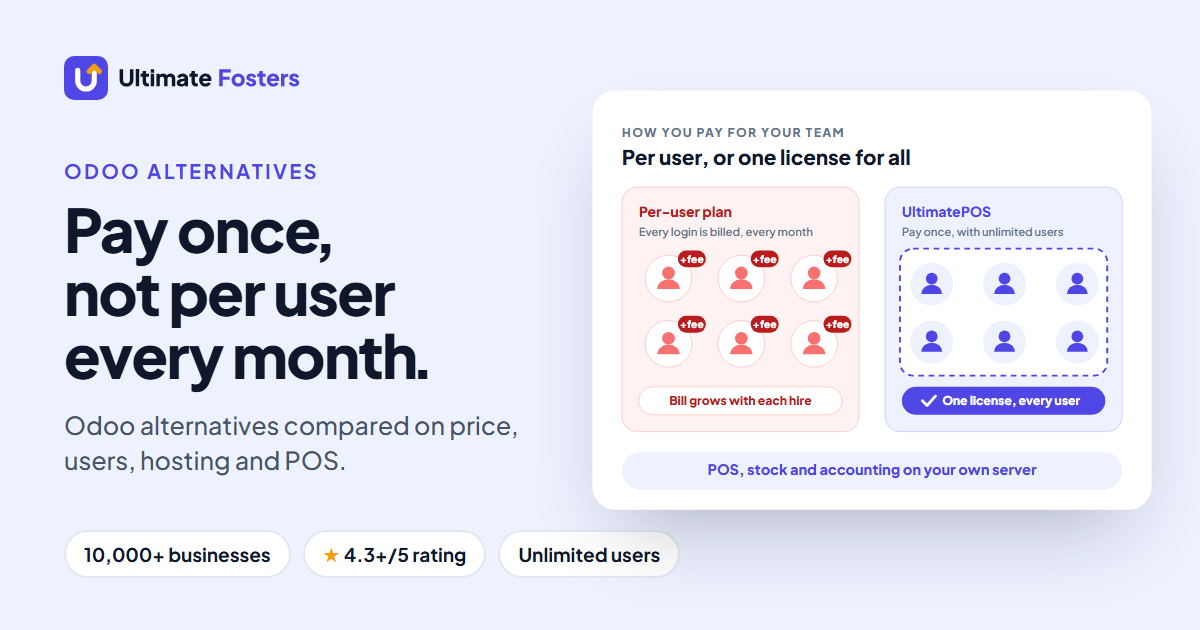
Short answer: Among Odoo alternatives, the best pick for small and mid-size shops, restaurants and wholesalers is UltimatePOS. You pay $79 once instead of a fee per user every month, and you get POS, stock, purchases and reports with unlimited users. You can also add accounting, HR or CRM as one-time modules, while your data stays on your own server. It is used by 10,000+ businesses and rated 4.3+/5 from 500+ ratings on CodeCanyon.
The other main Odoo alternatives are Zoho One, ERPNext, Microsoft Dynamics 365 Business Central, Oracle NetSuite, Acumatica, SAP Business One and Dolibarr. However, most of them charge per user or by yearly quote, while the open-source ones are free but need someone to set them up and keep them running.
Try UltimatePOS in the live demo (no sign-up) or see what the $79 license includes.
Compare all 8 · What Odoo costs · UltimatePOS vs Odoo · How to switch
Written by the Ultimate Fosters team, who have built and supported UltimatePOS for 10+ years. Updated November 2026, with every price checked on the vendor’s own site.
Odoo covers sales, stock and accounting in one system, but every employee with a login is a paying user, every month. So this guide compares 8 Odoo alternatives on how you pay, who sets it up, where your data lives and whether a point of sale is built in.
Why businesses look for Odoo alternatives
Odoo’s apps are good, so the reasons people leave are mostly about how it is sold. Based on Odoo’s own pricing page, four come up most:
- You pay per user, every month. Odoo counts anyone with access to the back end as a paying user, as well as employee records without a login. So the bill grows each time you hire.
- The useful extras sit on the top plan. For example, Odoo Studio, multi-company, the external API and hosting on your own server are all on the Custom plan, which costs about twice as much as Standard.
- Setup is not in the price. Implementation services, Odoo.sh hosting for custom code and upkeep of that code are also listed as extras. Small firms usually buy Odoo Success Packs, while larger ones hire a partner.
- Self-hosting has rules. The paid edition runs on your own server only on the Custom plan. In addition, on-premise users must stay on the latest stable version.
None of this makes Odoo a bad product. Rather, it means the cost of Odoo depends on your headcount, so a business with many staff and simple needs often pays for far more than it uses.
How much Odoo costs (US prices)
Here is Odoo’s US price list, taken from its pricing page in November 2026. Every paid price is per user, per month:
| Odoo plan | Billed yearly | Billed monthly | What you get |
|---|---|---|---|
| One App Free | $0 | $0 | One app for unlimited users, on Odoo Online only |
| Standard | $31.10 ($24.90 in year 1) | $38.90 ($31.10 in year 1) | All apps, on Odoo Online only |
| Custom | $61 ($49 in year 1) | $76.20 ($61.10 in year 1) | All apps, plus Odoo.sh or on-premise hosting, Studio, multi-company and external API |
US prices from odoo.com/pricing, November 2026. The first-year price is a discount for the users you order at the start. Since Odoo shows prices in local currency, yours may differ.
What 10 users cost on Odoo
For example, a business with 10 users on the Standard plan, billed yearly, pays $3,732 a year after the first-year discount ($2,988 in year 1). On Custom, the same 10 users cost $7,320 a year instead. Staff who only use the point of sale can sometimes be “light users” at $8.90, but only through a quote from an Odoo advisor.
By comparison, UltimatePOS with the Accounting and HR modules costs $227 once ($79 + $99 + $49), whether you have 3 users or 30. So the $79 license costs less than three months of one Odoo Standard user at the regular yearly rate. However, you do pay for your own server, so budget for low-cost cloud hosting or a computer in your shop.
Odoo alternatives compared
Here are the 8 Odoo alternatives that small businesses compare most, side by side. Again, all prices are US prices from each vendor’s own site:
| System | How you pay | Point of sale | Where it runs | Best fit |
|---|---|---|---|---|
| UltimatePOS | $79 once, unlimited users; modules from $49 once | Built in | Your own server or cloud server | Shops, restaurants and wholesalers that want to own their system |
| Zoho One | $37/employee a month (year 1, all employees) or $90/user | Separate app (Zoho POS) | Zoho’s cloud | Teams that want many cloud apps |
| ERPNext | Free to self-host; Frappe Cloud hosting per site | Built in | Your server or Frappe Cloud | Businesses with a developer or partner |
| Dynamics 365 Business Central | $80 or $110 per user a month, paid yearly | Not listed in the plans | Microsoft’s cloud | Companies already on Microsoft 365 |
| Oracle NetSuite | Annual license by platform, modules and users | Ask in your quote | Oracle’s cloud | Fast-growing firms with several entities |
| Acumatica | Priced by apps and usage, not user seats | Ask in your quote | Cloud, sold through partners | Mid-size distribution, manufacturing and construction |
| SAP Business One | Price on request | Ask in your quote | Cloud or on-premise | Growing SMBs with a partner |
| Dolibarr | Free and open source | Point of Sale module | Your own server | Very small teams that can self-host |
Checked in November 2026 on CodeCanyon, Zoho, ERPNext, Microsoft, NetSuite, Acumatica, SAP and Dolibarr. Where a vendor’s page names no point of sale, we say so; ask about one before you buy.
The best Odoo alternatives in detail
1. UltimatePOS: pay once and own your POS and stock system
Price: $79 once for the Regular license on CodeCanyon, with future updates and 6 months of support included
Users: Unlimited users, each with a role so that staff see only the screens they need
Core features: POS, stock in several locations, stock transfers, purchase orders, wholesale and retail price lists, expenses and profit and stock reports
Your data: Runs on your own server, with backups to the server, Dropbox or AWS S3
Best for: Shops, restaurants and wholesalers that want one system rather than a monthly bill per user
UltimatePOS is the system we have built and supported for 10+ years. It does the jobs most small businesses bought Odoo for, so you only add extras as one-time modules instead of per-user subscriptions.
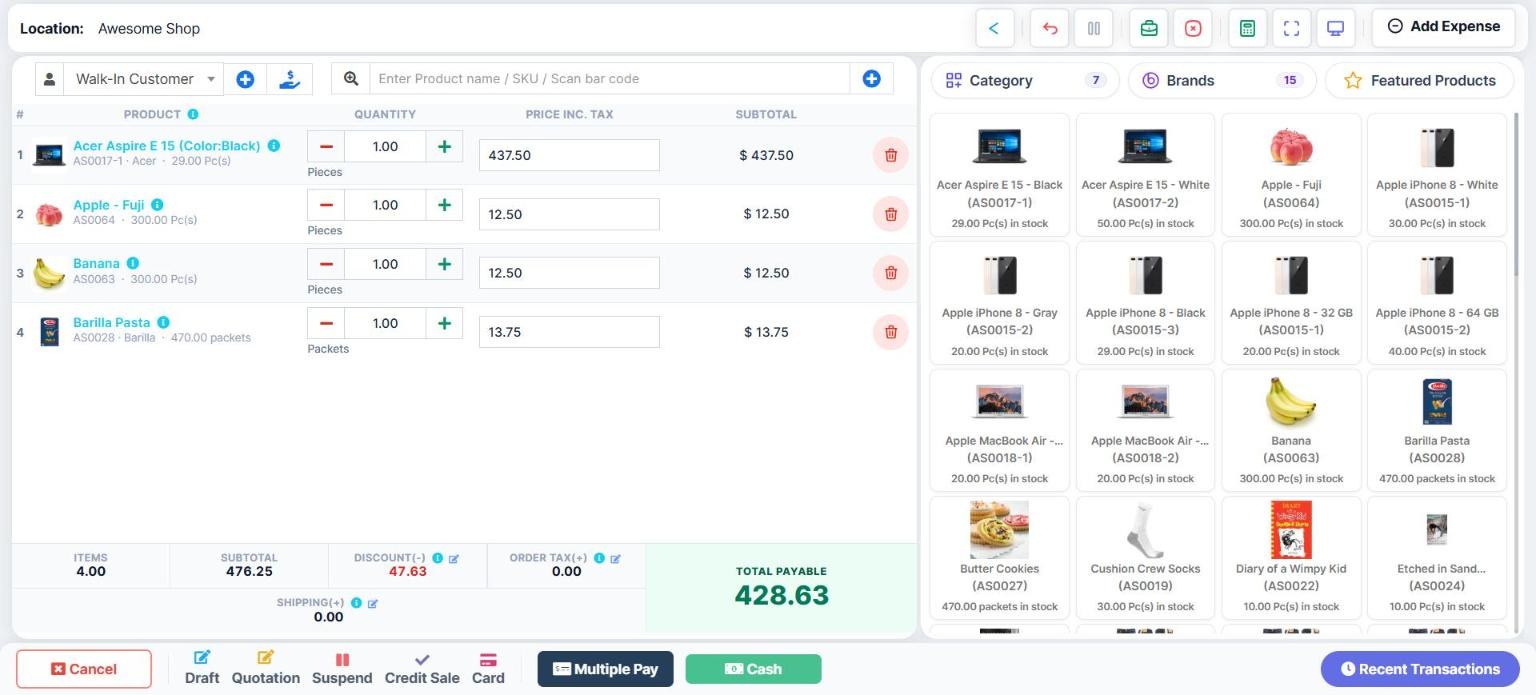
Which UltimatePOS module replaces each Odoo app
If you use these Odoo apps today, here is what you would use in UltimatePOS instead:
| The Odoo app you use | UltimatePOS answer | Price |
|---|---|---|
| Point of Sale, Inventory, Purchase, Sales | Included in UltimatePOS | $79 once |
| Accounting | Accounting & BookKeeping module: chart of accounts, journal entries, trial balance, balance sheet and ledger | From $99 once |
| Employees, Attendance, Time Off, Payroll | Essentials & HRM module: leave, clock-in, shifts, payroll from attendance and sales targets | $49 once |
| CRM | CRM module: leads, follow-ups, email and SMS campaigns, proposals and a customer login portal | From $69 once |
| Manufacturing | Manufacturing module: recipes, production, wastage and production cost | From $69 once |
| eCommerce | WooCommerce module: connects your WooCommerce store to UltimatePOS | From $49 once |
| External API (Odoo Custom plan only) | REST API module | From $59 once |
Module prices from our shop in November 2026. Each module is an add-on to UltimatePOS rather than a standalone app.
Is UltimatePOS right for you? Yes, if you sell, buy and keep stock in one or more shops, restaurants or warehouses and want that to run well without a partner project or a monthly bill per user.
It is not built for companies that need advanced manufacturing planning (work orders, MRP), accounting setups for many countries at once, or no-code changes to every screen.
“This is the best you can get without all the bloat and unnecessary subscriptions of larger enterprise systems.”
CodeCanyon buyer review of UltimatePOS
See UltimatePOS run a real sale
Open the live demo, ring up a sale, check the stock report and see the roles screen. No sign-up needed.
2. Zoho One
Price: $37 per employee a month in the first year if you license every employee, or $90 per user a month on flexible pricing
Point of sale: Zoho POS is a separate cloud app with its own plans
Watch out: The low all-employee price needs a license for every employee on your payroll, and it is also shown as a first-year price
Odoo vs Zoho: Both bill per person every month. However, Zoho runs in Zoho’s cloud, while Odoo can be self-hosted on its top plan
Compared with UltimatePOS: UltimatePOS has the point of sale built in and costs $79 once in total, with unlimited users, instead of a fee per employee each month
3. ERPNext
Price: Free and open source to self-host; Frappe Cloud charges per site, not per user
Point of sale: Built in
Watch out: Frappe does not provide implementation services itself, so certified partners do the setup and changes
Odoo vs ERPNext: ERPNext has no paid edition, so every feature is in the free download. Like Odoo, it is a large system, and Frappe points you to partners for setup
Compared with UltimatePOS: UltimatePOS is built around the shop counter, and you can set it up yourself or have us install it from $25, with 6 months of support included
4. Microsoft Dynamics 365 Business Central
Price: Essentials $80 and Premium $110 per user a month, paid yearly
How you buy: Through a Microsoft partner, who also handles setup
Watch out: The pricing page lists finance, inventory, purchasing and manufacturing, but no point of sale
Odoo vs Business Central: Business Central costs more per user than Odoo but fits companies already on Microsoft 365
Compared with UltimatePOS: The whole UltimatePOS license ($79) costs less than one month of a single Essentials user ($80), and it includes a point of sale
5. Oracle NetSuite
Price: An annual license fee made up of the core platform, optional modules and the number of users
Watch out: No list price, so you need a quote, and NetSuite adds a one-time implementation fee for the initial setup
Odoo vs NetSuite: NetSuite suits companies with several entities and bigger budgets, whereas Odoo is cheaper to start
Compared with UltimatePOS: UltimatePOS publishes its price ($79 once) and needs no implementation project, so you can try the demo today and buy it the same day
6. Acumatica
Price: Priced by the apps you use, your transaction volume and how you deploy it, not by user seats
Watch out: There is no public price, so you buy through an Acumatica partner
Odoo vs Acumatica: No per-user fee is a real plus over Odoo for big teams, but it is built for mid-size distributors and manufacturers
Compared with UltimatePOS: UltimatePOS also has no per-user fee, but its price is public and you buy it directly, with no partner in between
7. SAP Business One
Price: No price on SAP’s product page; you request pricing
Where it runs: Cloud or on-premise
Odoo vs SAP: SAP Business One is a more traditional ERP sold through partners, while Odoo is quicker to try and publishes its prices
Compared with UltimatePOS: UltimatePOS also runs on your own server, but you can see the price, open the live demo and buy it without waiting for a quote
8. Dolibarr
Price: Free and open source; you host it yourself or pay a hosting provider
Point of sale: A Point of Sale module you switch on with the other modules you need
Watch out: Because it is self-hosted, you install, update and support it yourself or through a partner
Odoo vs Dolibarr: Dolibarr is lighter and simpler than Odoo, with fewer apps
Compared with UltimatePOS: Both run on your own server, but UltimatePOS comes with 6 months of support, future updates and an installation service, so you are not on your own
Google’s AI answers also name Bitrix24, Sage Intacct, Cin7, Tryton and Flectra. Bitrix24 is a CRM and teamwork suite (tasks, video calls, a website builder) priced per plan with a user limit, Sage Intacct is finance software for growing companies, Cin7 is inventory software, and Tryton and Flectra are open-source ERPs for teams with developers, so they are left out of this small-business comparison.
UltimatePOS vs Odoo: side by side
If you are weighing Odoo against UltimatePOS, start with these differences. Of all the Odoo alternatives here, UltimatePOS differs most from Odoo in how you pay:
| UltimatePOS | Odoo | |
|---|---|---|
| Price | $79 once | $31.10–$61 per user a month (billed yearly) |
| Users | Unlimited | Each user is billed |
| 10 users for a year | No user fee after the one-time license | $3,732 on Standard, $7,320 on Custom |
| Point of sale | Built in | Point of Sale app (free only if it is your one free app) |
| Inventory and purchases | Built in | Inventory and Purchase apps |
| Accounting, HR, CRM | One-time modules from $49 | Included, but every user pays each month |
| Hosting on your own server | Yes, always | Custom plan only, or the Community edition |
| Source code | Included with the license | Community edition is open source; Enterprise is not |
| API | REST API module, from $59 once | Custom plan only |
| Setup help | Installation service from $25 | Success Packs or a partner, at extra cost |
| Updates | Future updates included | Included while you pay |
Odoo POS vs UltimatePOS for a shop
Odoo POS is one app inside Odoo, so a shop using it pays for each cashier too: as a full user, or as a light user at $8.90 through an Odoo advisor’s quote. In UltimatePOS, the point of sale is the core of the product: cashiers, managers and owners each get their own role at no extra cost, and every sale updates stock in the right location. For more detail, see how it works for a retail store, a restaurant or a wholesaler.
Leaving Odoo? Try the same daily jobs first
Open the UltimatePOS demo, sell at the till, raise a purchase order and check a report. Then keep it for $79 once.
Which Odoo alternative fits your business?
To choose between Odoo alternatives, start with the problem that made you look beyond Odoo. Then check how UltimatePOS handles it:
| Your situation | What matters most | With UltimatePOS |
|---|---|---|
| Retail shop or chain | A fast till, stock in each store and transfers | POS, multi-location stock and stock transfers are in the core product |
| Wholesaler or distributor | Price lists, credit and purchase orders | Wholesale price groups, customer credit limits and purchase orders are built in |
| Restaurant or café | Tables, kitchen orders and staff | Tables, service staff and a kitchen screen are included; see the restaurant guide |
| Small factory or food maker | Recipes and production cost | Add the Manufacturing module once |
| Growing team | No fee for each new hire | Unlimited users with their own roles |
| Tired of subscriptions | One price, data on your server | $79 once, with future updates included |
Not in one of these groups? Our industry guides also show how UltimatePOS fits pharmacies, grocery stores, repair shops and more.
How to switch from Odoo to UltimatePOS
Whichever of the Odoo alternatives you choose, moving off Odoo takes planning more than technical skill. Follow these steps:
- Check your Odoo subscription. Note the renewal date and how many users you are billed for, so you switch before the next charge.
- Export your lists. In Odoo, export products, customers and suppliers from each list view to a spreadsheet. Also keep a copy of your reports and invoices.
- Install UltimatePOS. Use our installation guide, or let our installation service do it from $25.
- Import your data. First, copy products into the template and import them from Excel, with opening stock. Then add your customers and suppliers.
- Set up locations and roles. Add each store or warehouse as a business location and give each user a role.
- Add modules if you need them. Install Accounting, HRM or CRM only when you used those apps in Odoo.
- Run both for a week. Enter the same sales in both systems, compare the totals, then stop renewing Odoo.
Ready to switch? Get UltimatePOS for $79 and set it up yourself, or add our installation service and we install it for you. Not sure yet? Try the live demo first.
Still comparing Odoo alternatives? In that case, our guides to inventory management software and retail management software cover more options.
Odoo alternatives: FAQs
What is the best alternative to Odoo?
For a shop, restaurant or wholesaler that wants POS, stock and accounting in one system, the best alternative to Odoo is UltimatePOS: $79 once, unlimited users and your data on your own server. The other main Odoo alternatives are Zoho One, ERPNext, Microsoft Dynamics 365 Business Central, Oracle NetSuite, Acumatica, SAP Business One and Dolibarr.
Who are Odoo’s main competitors?
Google’s AI answers and most comparison lists name ERPNext, Microsoft Dynamics 365 Business Central, Oracle NetSuite, SAP Business One, Acumatica and Zoho One. Most of these Odoo alternatives charge per user or by quote. UltimatePOS, however, works on a different model: you pay once for the license and then add only the modules you need.
What is better than Odoo?
For a small or mid-size business that mainly sells, buys and keeps stock, UltimatePOS is a better fit than Odoo. It covers POS, inventory, purchases and reports for $79 once with unlimited users, while Odoo charges every user every month for the same apps. It is built for businesses that sell, buy and keep stock, rather than for large manufacturers that need MRP.
Is Odoo an open-source system?
Partly. Odoo Community is free, open-source software (LGPL v3) that you install and run yourself. In contrast, the Standard and Custom plans are paid Odoo Enterprise subscriptions, priced per user per month, and Odoo Studio, multi-company and the external API are on the Custom plan.
Is Odoo 100% free?
No. Odoo’s One App Free plan gives you one app for unlimited users on Odoo’s cloud, and the Community edition is free if you host it yourself. Once you need a second app, such as Point of Sale next to Inventory, you move to a paid plan billed per user.
Is Odoo permanently free?
Only in two cases. The Community edition is free for good if you host it yourself, and Odoo says its One App Free plan stays free for unlimited users, forever, as long as you use one app. The paid apps come with a 15-day free trial, after which you pay per user. UltimatePOS costs $79 once, and the license is yours to keep.
How much does Odoo really cost each month?
On Odoo’s US pricing page in November 2026, Standard is $31.10 per user a month billed yearly ($24.90 in the first year), and Custom is $61 ($49 in the first year). Monthly billing also costs more: $38.90 and $76.20 after the first year. For 10 users on Standard, that is $3,732 a year, and implementation help and Odoo.sh hosting come on top.
What is the difference between Odoo Standard and Custom?
Both plans include all Odoo apps. However, Standard runs only on Odoo Online, Odoo’s own cloud. Custom adds hosting on Odoo.sh or your own server, Odoo Studio for no-code changes, multi-company and the external API, and costs about twice as much per user.
What is the disadvantage of using Odoo?
The main disadvantage for a small business is cost that grows with every user, because each employee with a login is a paying user. Implementation help, Odoo.sh hosting and upkeep of custom code are not in the plan price, and self-hosting the paid edition needs the Custom plan and the latest stable version.
Which is better, Odoo or Zoho?
Zoho One suits teams that want many cloud apps and nothing to host. It costs $37 per employee a month in the first year if you license every employee, or $90 per user. Its point of sale, Zoho POS, is also a separate app with its own plans. So if you want POS, stock and accounting on your own server for a one-time price, UltimatePOS fits better than either.
Which is better, Odoo or SAP?
SAP Business One is a partner-sold ERP for growing small and mid-size companies, and SAP does not list a price on its page. Odoo, by comparison, publishes per-user prices and is easier to start. For a store or wholesaler that wants to avoid both, UltimatePOS gives you POS, stock and purchasing for a one-time price.
Is Odoo as good as QuickBooks?
They do different jobs. QuickBooks Online is accounting software that tracks inventory only from its Plus plan ($115 a month for up to 5 users), while Odoo is a full suite with POS and inventory. UltimatePOS sits between them: a POS and inventory system with an optional Accounting module, paid once.
Which is better, ERPNext or Odoo?
ERPNext is fully open source with no paid edition, and you can host it free or pay Frappe Cloud per site rather than per user. Odoo has more polished apps but charges per user for its paid plans. Both usually need a partner to set up. UltimatePOS, by contrast, is built for shops and includes the full source code with the license, so you can host and change it yourself.
Odoo vs NetSuite: which should I choose?
NetSuite is sold on an annual license that depends on the core platform, modules and number of users, so it fits companies with bigger budgets and several entities. Odoo is cheaper to start, while a small shop or wholesaler that wants neither yearly fee can run UltimatePOS for a one-time price.
Is there an open-source alternative to Odoo?
Yes. ERPNext and Dolibarr are the best-known open-source Odoo alternatives, and both are free to self-host. UltimatePOS is not open source, but you get the full source code with the license, so you can host it and change it yourself. For more detail, our open source POS guide compares the free options.
Can I self-host Odoo?
Yes, in two ways. You can install the free Community edition on your own server, or run the paid Enterprise edition on-premise, which Odoo includes only in the Custom plan. In both cases, on-premise users must stay on the latest stable version.
Does UltimatePOS charge per user?
No. One license lets you create unlimited users with their own roles and permissions, across all your business locations. You pay $79 once for the Regular license, plus any modules you choose, so the price stays the same as your team grows.
Can I move my data from Odoo to UltimatePOS?
Yes, by spreadsheet. There is no direct Odoo import, but you can export products, customers and suppliers from Odoo’s list views and import the products into UltimatePOS from an Excel file. Opening stock and customers can be imported the same way.
Do I need technical skills to install UltimatePOS?
Only basic setup, because it runs on a web server, either a low-cost cloud server or a computer in your business. Our installation guide walks you through it. Otherwise, our installation service sets it up from $25.
“Good Product. It allows us to do business easily.”
CodeCanyon buyer review of UltimatePOS
Run your business without a per-user bill
UltimatePOS: $79 once, unlimited users, POS and stock built in, and accounting, HR or CRM as one-time modules. Updates and 6 months of support included.
About this guide
Written by the team at Ultimate Fosters, who build and support UltimatePOS, a POS and inventory system used by 10,000+ businesses for 10+ years. We are an Elite Author on CodeCanyon, with 12,000+ sales across our products. We read every price and plan rule for these Odoo alternatives on the vendor’s own website in November 2026, using each vendor’s US prices. Odoo and Zoho show prices by country, so we read their US pages as captured on 9–10 November 2026. Each UltimatePOS feature links to its documentation. Prices change, so check them before you buy.
Sources
- Odoo: pricing and plan FAQ
- Alternatives: Zoho One pricing, Zoho POS, ERPNext pricing FAQ, Frappe Cloud pricing, Business Central pricing, NetSuite ERP, Acumatica pricing, SAP Business One, Dolibarr, QuickBooks Online pricing
- UltimatePOS: CodeCanyon listing, Accounting module docs, HRM module docs, CRM module docs, Manufacturing module docs, product import
Related: open source POS system · inventory management software for small business · retail management software · retail POS system · wholesale inventory software · POS system cost
Leave A Comment