
Florist POS software
Florist POS System, Pay Once
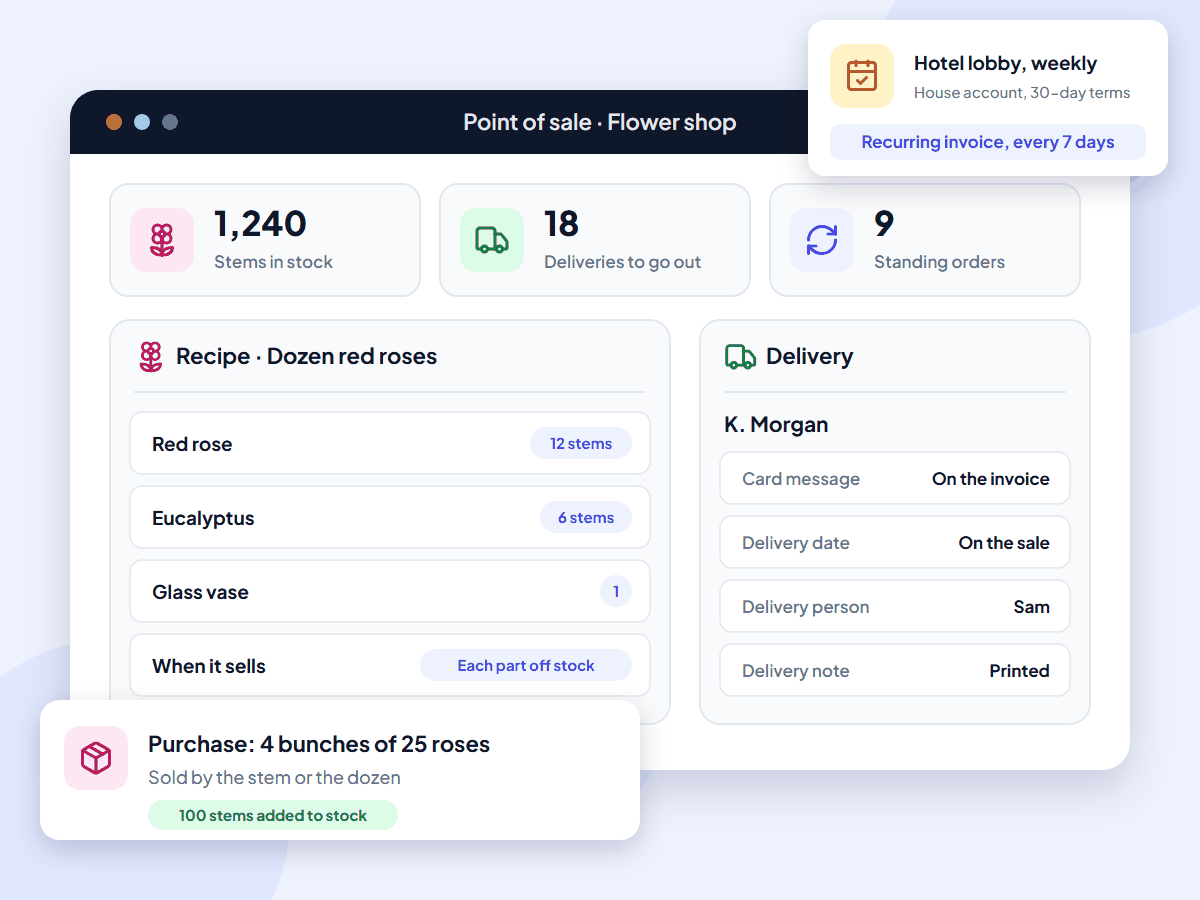
UltimatePOS is a florist POS system for walk-in and phone orders. It takes every stem in an arrangement off stock, keeps the card message and delivery details on the sale, and runs house accounts and standing orders. It costs $79 once and runs on your own computer or server. No monthly fee, and your customer list stays with you.
Opens a sample shop. No sign-up. Ring up a sale and look at stock, purchases and customer balances.
Used by 10,000+ businesses · 4.3+/5 from 500+ ratings on CodeCanyon · 10+ years of updates
What is a florist POS system?
A florist POS system is point-of-sale and inventory software built for flower shops. It rings up walk-in and phone orders, tracks the stems used in each arrangement, keeps delivery details and card messages on the sale, and runs house accounts and standing orders. UltimatePOS does all of this for a one-time price.
It is also called a floral POS, flower shop POS, florist software or flower shop software.
Monthly florist software fees add up
Most florist POS software is rented. FloristWare’s Basic plan is $149 a month, or $1,499 a year. QuickFlora’s website and POS bundle is $199 a month. Over three years, FloristWare Basic on yearly billing comes to $4,497.
UltimatePOS costs $79 once. You install it on a computer or server you control and keep using it. There is no fee per register, user or shop.
Features
Florist POS features
Everything below is part of UltimatePOS. There is no module to buy. Open a card to read its guide.
Sell plants, balloons, cards and gifts next to your flowers, print barcode labels for buckets and gift shelves. Set user roles so part-time staff only see what they need.
How a flower shop order works in UltimatePOS
- Take the orderRing up a walk-in or phone order and add the card message and delivery date.
- Build itThe arrangement's recipe takes each stem, green and vase off stock.
- Get paidTake the full amount, a deposit, or put it on the customer's house account.
- DeliverPick a delivery person and print the delivery note with the address.
- ReorderSee what is running low and send a purchase order to your wholesaler.
Worked examples
Two flower shop orders, with real numbers
One delivered arrangement built from a recipe, and one standing order on a house account, step by step.
A dozen red roses, delivered with a card
You buy 4 bunches of 25 red roses at $30.00 a bunch. A customer phones in a dozen red roses for $85.00, with $15.00 delivery and a card message.
| Dozen red roses (12 roses, 6 eucalyptus, 1 vase) | $85.00 |
| Delivery | $15.00 |
| Sale total before tax | $100.00 |
| Your stem and vase cost for the recipe | $21.40 |
- You record the purchase in bunches. UltimatePOS adds 100 stems to stock and works out the cost of one stem: $30.00 ÷ 25 = $1.20.
- You set up the dozen red roses once as a combo product: 12 roses, 6 stems of eucalyptus and a glass vase, at $85.00.
- You ring up the sale, add the $15.00 delivery charge and type the card message and delivery date in your two sale fields.
- When the sale is done, 12 roses, 6 eucalyptus and 1 vase come off stock. You have 88 roses left.
- You pick the delivery person and print the invoice with the card message, plus the delivery note for the driver.
Your stems and vase cost $21.40, so the arrangement leaves $63.60 before overheads. See our markup and margin guide to set your prices.
A weekly lobby arrangement on a house account
A local hotel orders a lobby arrangement every week for $120.00. It pays monthly, so you open a house account with a $2,000.00 credit limit and 30-day terms.
| Lobby arrangement, every 7 days | $120.00 |
| Invoices after 4 weeks | 4 |
| Owed on the account | $480.00 |
| Credit left before the limit | $1,520.00 |
- You add the hotel as a customer with a $2,000.00 credit limit and 30-day pay terms.
- You ring up the first arrangement on credit, tick Subscribe? and set it to repeat every 7 days.
- UltimatePOS creates the next invoice each week and sends a notification to you and the salesperson.
- After 4 weeks, the customer ledger shows $480.00 owed. A credit sale that would take the hotel over its limit is blocked.
- At month end the hotel pays all 4 invoices in one payment, and the balance goes back to zero.
See the recurring invoice guide and the customer guide. Recurring invoices need one cron job on your server, set once in your hosting panel.
Inventory
Flower shop inventory: stems, vases and supplies
UltimatePOS is your florist POS and your flower shop inventory system in one.
For more on stock control, read our inventory guide for small businesses.
Who it’s for
POS system for flower shops, studios and event florists
UltimatePOS is florist software for owners who want to buy their system once and stop paying every month.
For large event batches, the Manufacturing module adds recipes, production runs and cost. Garden centers and gift shops can use our retail POS system.
Why florists use UltimatePOS
10,000+
businesses use our software
10+
years of updates
2,000+
updates and features
How much does a florist POS system cost?
UltimatePOS costs $79 once. Updates are included, and so are 6 months of support, which you can extend. Most florist POS software charges every month or takes a cut of each card payment.
Software cost over three years, one shop
These figures cover software only. The monthly products include things UltimatePOS does not, such as cloud hosting, delivery routing and, on some plans, a florist website and wire-service links. Installed on a computer in your shop, UltimatePOS has no running cost. To use it from a second shop or your phone, put it on an online server. Our example server costs about $7.20 a month with backups (hosting options, full POS cost breakdown).
What UltimatePOS customers say
Reviews of UltimatePOS from buyers on CodeCanyon, across all types of business.
How to start using UltimatePOS in your flower shop
Florist POS questions
About this page
Written by the Ultimate Fosters team, who have built and supported UltimatePOS for 10+ years. Every feature is checked against our UltimatePOS documentation and release notes, and we recheck competitor prices on their own websites every quarter. See all industries we support.