
Gym management software

Gym Management Software You Pay for Once

Keep members, packages, dues and check-ins in one place, and sell supplements from the same system. UltimatePOS with the Gym module costs $178 once and runs on your own computer or server, so there is no monthly fee and your member data stays with you.

In the demo, click All In One and the gym dashboard opens. No sign-up.

Used by 10,000+ businesses  ·  4.2+/5 from 700+ ratings  ·  10+ years of updates
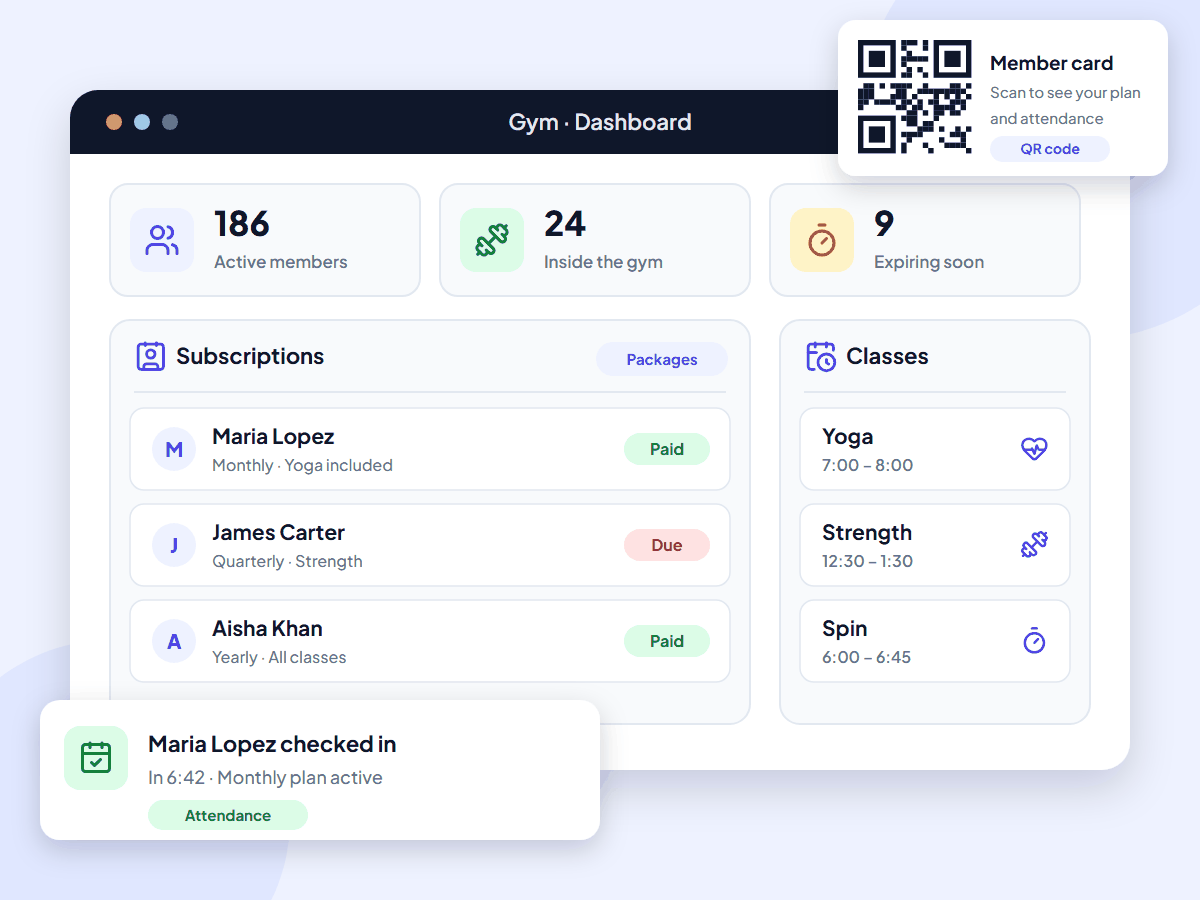
UltimatePOS gym management software dashboard with active members, members inside the gym, plans expiring soon, paid and due subscriptions, class times and a QR member card

What is gym management software?

Gym management software is the system a gym uses to keep member records, sell membership plans, track who has paid and who is due, and log check-ins. Most tools also handle classes and sales of drinks or supplements. UltimatePOS adds all of this to its POS with the Gym module, and you pay for it once.

It is also called a gym management system, gym software or gym billing software.

Monthly gym software fees add up

Most gym software is rented by the month. PushPress Pro costs $159 a month, which is $5,724 over three years. GymMaster prices each site by member count, so the bill goes up as your gym grows. Stop paying and you lose access.

With UltimatePOS, you buy the software and the Gym module once, install them on a computer or server you control, and keep using them. Updates are included.

With UltimatePOS you get:

  • A one-time price: $178 for the software and the Gym module
  • No fee per member, however many join
  • Member records on your own server
  • Your gym and your supplement shop in one system

Features

Gym management software features

The Gym module adds members, packages, subscriptions, attendance and member cards to UltimatePOS. Open a card to read its guide.

For a fee that repeats every month, set up recurring invoices for a member from the sales screen. UltimatePOS creates each invoice on schedule and can email it to the member.

How gym management works in UltimatePOS

  1. Set up packages and classesAdd your plans, from monthly to lifetime, with their prices and the classes each one includes.
  2. Add the memberEnter the member's details and photo, and their body measurements if you track progress.
  3. Start the subscriptionPick the package. The end date is filled in for you. Record the payment, or mark it as due.
  4. Print the member cardDownload the card with its QR code as a PDF, then print it or share the file with the member.
  5. Log visits and renewLog each check-in. The dashboard lists plans that are about to expire, so you can renew them in time.

Our step-by-step setup guide walks through every screen.

Why gym owners choose UltimatePOS

  • Pay once. One-time licences instead of a monthly plan, with updates included.
  • No fee per member. Add as many members as you like at the same price.
  • Your data stays with you. Member records and payments live on your own computer or server.
  • Gym and shop in one. Memberships and supplement sales share one customer record and one ledger.
  • Help when you need it. 6 months of support from our team and 270+ step-by-step guides.

10,000+

businesses use our software

10+

years of updates

2,000+

updates and features

How much does gym management software cost?

UltimatePOS with the Gym module costs $178 once. Updates are included, and so are 6 months of support, which you can extend. Most gym software charges every month instead, and some also take a share of each card payment.

Prices checked on each company’s own website in November 2026, in US dollars, excluding tax. UltimatePOS: Regular License on CodeCanyon. Gym module: 1-site licence in our shop.
Software What you pay How it is charged
UltimatePOS + Gym module $178 once ($79 UltimatePOS + $99 Gym module). Optional installation service: $25. One-time licences. No monthly fee and no fee per member.
PushPress Free plan at $0 with card fees of 4.99% + 30¢; Pro $159 a month; Max $229 a month Monthly plan. Card processing fees apply on every plan.
GymMaster $89 a month for up to 100 members, $129 for up to 400, $209 for up to 1,300, per site Monthly plan per site, priced by active members. 10% off if you pay yearly.

Software cost over three years, one gym

$178UltimatePOS + Gym module, paid once
$3,204GymMaster Foundation, $89 a month for 36 months (up to 100 members)
$5,724PushPress Pro, $159 a month for 36 months

Software only, before card fees and hardware. Installed on a computer at your gym, UltimatePOS has no running cost. To use it from anywhere, put it on an online server; our example server costs about $7.20 a month with backups (hosting options, full POS cost breakdown).

Who it’s for

Built for these fitness businesses

Independent gym

Members, plans, dues and check-ins without a monthly bill that grows with your members.

Fitness or yoga studio

Packages that include classes such as yoga or spin, each with its own times.

Gym with a shop

Sell supplements, drinks and kit at the counter from the same system as your memberships.

Several gyms or a software reseller

Give each gym its own account in one installation with the SaaS module.

Run a café or juice bar at your gym too? See our restaurant POS system page.

What UltimatePOS customers say

Reviews of UltimatePOS from buyers on CodeCanyon, across all types of business.

MMontashir

★★★★★

“This is the most complete application for pos. I am writing the review after using this for 2 years… Whatever you can think of under a pos for business, you will find a solution here.”

IiN4sser

★★★★★

“We’ve been using UltimatePOS for 2 years. UltimatePOS is a powerful tool that helps us to manage stock, sales, purchases & other business day-to-day activities.”

TTerranos74

★★★★★

“I’ve been using to manage my business for several years now. My support service already expired but I still can rely on the script due to the stability…”

How to start using UltimatePOS in your gym

1. Try the demo

Click All In One on the demo login page. No sign-up needed.

2. Buy UltimatePOS

Get the $79 Regular License. Future updates are included.

3. Add the Gym module

Get the Gym module for $99 (one gym) from our shop and add it to UltimatePOS.

4. Install

Install it on a computer at your gym or on a server, or let our team do it for $25.

Gym management software questions

It means the same as gym management software. Both describe one system for member records, membership plans, payments due and check-ins. UltimatePOS turns into a gym management system when you add the Gym module.

Look for member profiles, membership plans, payment tracking, check-in records, reports and a way to sell drinks or supplements. Some tools also add online class booking, automatic card billing, a member app and door access. UltimatePOS with the Gym module covers members, packages and classes, dues, attendance, QR member cards, health records and shop sales.

Most gym software charges every month. PushPress Pro costs $159 a month, and GymMaster costs $89 to $209 a month per site depending on member count. UltimatePOS with the Gym module costs $178 once, with no monthly fee. See the full POS cost breakdown.

No. UltimatePOS records each payment, whether cash, card or another method you add, and the card is taken on your own terminal. The subscriptions list shows who has paid, who is due and who is overdue. For a repeating fee, set up a recurring invoice and UltimatePOS creates it on schedule.

There is no separate member app. Each member gets a card with a QR code. Scanning it with a phone shows their plan, attendance and health record, with no login. Your staff use UltimatePOS in a web browser on a PC, tablet or phone.

UltimatePOS does not connect to door locks or turnstiles. Members show their QR card at the front desk, and your staff log the check-in and check-out time.

It is self-hosted. You install it on a computer at your gym or on a cloud server you rent, and your member data stays there. Our team can install it for you for $25.

Yes. It runs on one computer, there is no fee per member, and the price stays the same however many members you have. If you open more gyms later, the SaaS module can run them in one installation.

Yes. The POS screen sells products with a barcode scanner, keeps stock up to date and shows a low stock alert.

Yes. You add your own tax rates and tax groups, such as a state or city sales tax or VAT, and the tax shows on each invoice. There are also guides for GST billing and ZATCA e-invoicing.

Yes. With the SaaS & Superadmin module, each gym gets its own account inside one installation. You can also use it to offer gym software to other gym owners under your own brand.

A PC, laptop or tablet with a web browser. Member cards are PDFs you print on any printer. A thermal receipt printer and a barcode scanner help if you also run a shop counter.

It depends on where you install it. You can install UltimatePOS on a computer at your gym or on an online server. On an online server, staff need an internet connection to use it. Sending emails to members always needs a connection.

UltimatePOS is not free. It costs $178 once with the Gym module. You can try every gym screen for free in the live demo before you buy.

The licence includes 6 months of support from our team, which you can extend, plus 270+ step-by-step guides. The software keeps working after support ends. Use the backup feature to keep copies of your data.

Open the gym demo and click All In One on the login page. The gym dashboard opens with sample members, subscriptions and classes.

About this page

Written by the Ultimate Fosters team, who build the Gym module and have built and supported UltimatePOS for 10+ years. Every feature is checked against our Gym module documentation and the live demo, and we recheck competitor prices on their own websites every quarter. See all industries we support.

See the gym screens in the live demo

Open the demo and click All In One. The gym dashboard opens with members, subscriptions and classes. No installation or sign-up.