
Wholesale inventory software

Wholesale Inventory Software, Pay Once

This wholesale inventory software keeps your trade price lists, customer credit limits, sales orders and the stock in every warehouse in one system. UltimatePOS costs $79 once and runs on your own computer or server, so there is no monthly fee and your price and customer data stays with you.

Opens a sample shop. No sign-up. Try sales orders, purchase orders, stock transfers and customer credit limits.

Used by 10,000+ businesses  ·  4.3+/5 from 500+ ratings on CodeCanyon  ·  10+ years of updates
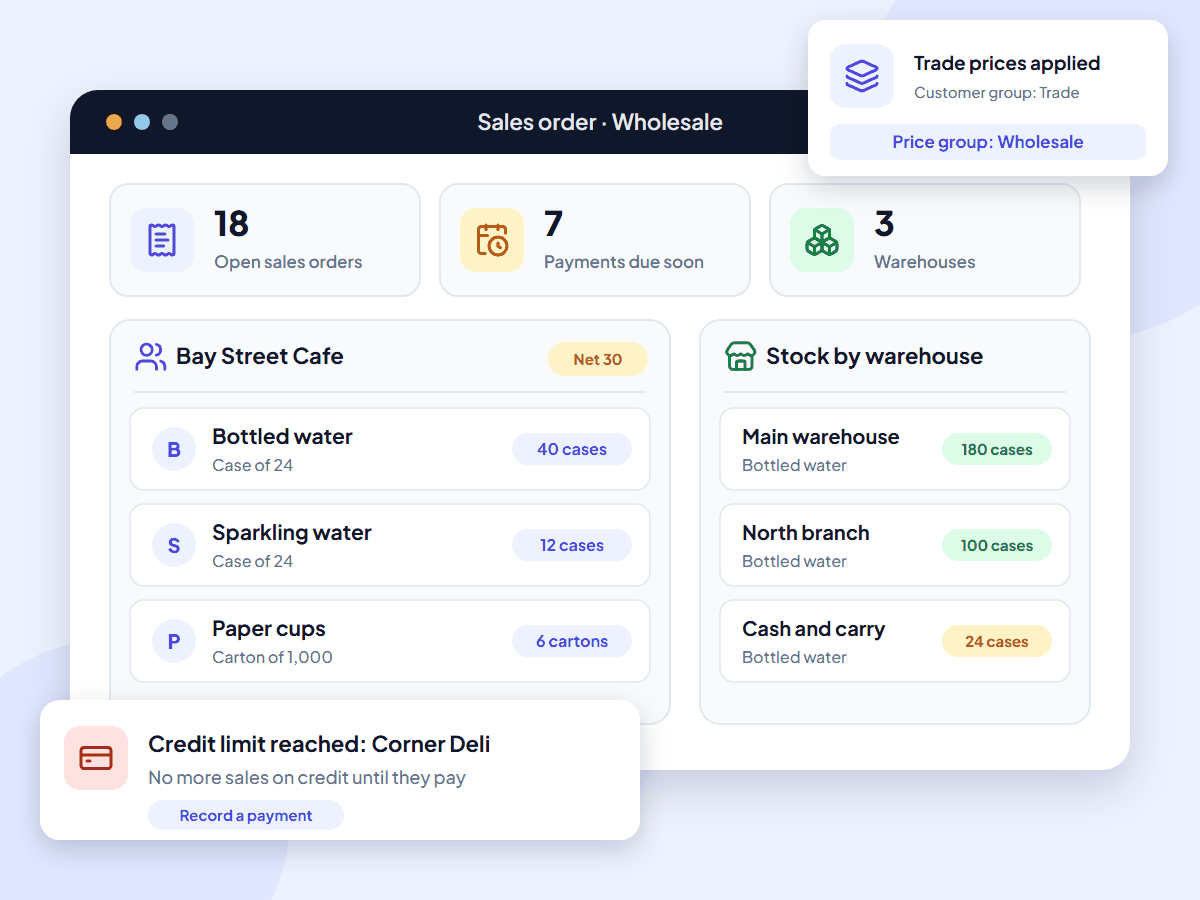
UltimatePOS wholesale inventory software: a trade sales order on net 30 terms, stock in three warehouses and a credit limit alert

What is wholesale inventory software?

Wholesale inventory software is the stock and order system a wholesaler or distributor runs on. It keeps a separate price list for each type of buyer, tracks stock in every warehouse, turns quotes and sales orders into invoices, and records what each customer owes. UltimatePOS does all of this for a one-time price.

It is also called wholesale software, software for wholesalers or inventory software for distributors.

Monthly inventory software gets expensive as you grow

Most wholesale inventory software is rented by the month, and the price goes up when you add a warehouse or a user. inFlow Inventory costs $299 a month, billed yearly, on the plan with 5 locations, plus a $499 onboarding fee. Unleashed needs its $399 a month Core plan for more than one warehouse, and SOS Inventory adds wholesale price levels from $144.95 a month.

With UltimatePOS you buy the software once, install it on a computer or server you control, and keep using it. There is no fee per user, per warehouse or per order, and updates are included.

With UltimatePOS you get:

  • A one-time price of $79, with updates included
  • No monthly plan or contract
  • No extra fee for more warehouses or users
  • Prices, customers and stock on your own server

Features

Wholesale inventory software features

Everything below is part of UltimatePOS. No add-on module is needed. Open a card to read its guide.

Import your products from a spreadsheet. Role permissions decide who can see costs, change prices or sell on credit, and invoice layouts let you print your own invoice design.

How a wholesale order works in UltimatePOS

  1. QuoteSend a quote or proforma invoice at the customer's trade prices.
  2. Sales orderTurn the accepted quote into a sales order. Stock is not taken yet.
  3. InvoiceTurn the order into a sale on credit. The due date comes from the customer's terms.
  4. DeliverPrint a delivery note. Stock goes down in the warehouse you sold from.
  5. Get paidRecord the payment when it arrives. The customer's balance updates.

Worked examples

Credit limits and warehouse stock, with real numbers

Two jobs every wholesaler does each week, step by step.

A 40-case order on 30-day terms

Bay Street Cafe is in your Trade customer group, which uses your Wholesale price list. Bottled water sells for $1.25 a bottle retail and $0.95 a bottle wholesale, and you sell it in cases of 24.

40 cases of bottled water at $22.80 a case$912.00
Already owed by Bay Street Cafe$650.00
Owed after this order (limit $2,000)$1,562.00
  1. The sales order fills in $22.80 a case because the customer is in the Trade group.
  2. The new balance stays under the $2,000 credit limit, so the sale on credit goes through.
  3. The 30-day terms set the due date, and the dashboard lists the invoice once it is due within 7 days.

Another customer, Corner Deli, owes $1,320 on a $1,500 limit. A $360 order would take them to $1,680, so UltimatePOS stops the sale on credit. Once they pay $200, they owe $1,120 and the same order fits. See the price list guide and the credit limit guide.

Restocking a branch from the main warehouse

  1. First, you send your supplier a purchase order for 300 cases of bottled water. It shows as Ordered, and stock does not change.
  2. Next, the delivery brings 280 cases. You receive them into the main warehouse. The order shows as Partial and main warehouse stock goes up by 280.
  3. Then you transfer 100 cases to your north branch. The main warehouse now holds 180 cases and the branch holds 100.
  4. Finally, when the last 20 cases arrive, you receive them against the same order and it shows as Completed.

The same steps work for any number of warehouses. See the purchase order guide and the stock transfer guide.

Who it’s for

Software for wholesalers and distributors

UltimatePOS suits small and mid-size wholesalers that sell to trade customers on account and want to own their system.

Food and drink distributors

Cases and single units, lot numbers and expiry dates, and trade prices for cafes, shops and restaurants.

Cash-and-carry wholesalers

A fast counter for walk-in trade buyers, plus credit accounts and sales orders for regular customers.

Distributors with a few warehouses

Two to five warehouses or branches, with stock transfers and a price list for each location.

Wholesale and retail in one business

Trade customers on account and walk-in shoppers at the till, from one stock list.

Make your own products too? See our manufacturing inventory software. Distribute medicines? See our pharmacy software page. Run a shop? See our retail POS system and grocery store POS system pages.

Why wholesalers choose UltimatePOS

  • Pay once. A one-time licence instead of a monthly plan, with updates included.
  • Grow without a bigger bill. Add warehouses, users and customers without moving to a higher plan.
  • Your data stays with you. Price lists, customer balances and sales live on your own computer or server.
  • Know your profit per case. The profit report shows profit by product, customer or location, and you can check your markup and margin.
  • Help when you need it. 6 months of support from our team and 270+ step-by-step guides.

10,000+

businesses use our software

10+

years of updates

2,000+

updates and features

How much does wholesale inventory software cost?

UltimatePOS costs $79 once. Updates are included, and so are 6 months of support, which you can extend. Most wholesale inventory software charges every month, and the price rises with warehouses and users.

Prices checked on each company’s own website in November 2026, in US dollars, excluding tax and short-term offers. UltimatePOS: Regular License on CodeCanyon.
Software What you pay How it is charged
UltimatePOS $79 once. Optional installation service: $25. One-time licence. No fee per user, warehouse or order.
inFlow Inventory Lite $99, Core $299, Pro $499, Max $699 a month, billed yearly. Onboarding: $499, required on most plans. Yearly plan. Lite has 1 location; Core has 5. The B2B portal is an add-on.
Unleashed Lite $99, Core $399, Pro $729 a month. Monthly. Several warehouses on Core and Pro. Extra users from $69 a month; B2B store from $129 a month.
SOS Inventory Companion $74.95, Plus $144.95, Pro $199.95 a month. Monthly or yearly. Price levels and contract pricing start on Plus. Built to work with QuickBooks Online.

Software cost over three years, several warehouses

$79UltimatePOS, paid once
$5,218SOS Inventory Plus, $144.95 a month for 36 months
$11,263inFlow Inventory Core, $299 a month for 36 months plus $499 onboarding

These figures cover software only, and the other products include things UltimatePOS does not, such as hosting and, on some plans, an online ordering portal. Installed on a computer in your office, UltimatePOS has no running cost. To use it from several warehouses, put it on an online server. Our example server costs about $7.20 a month with backups (hosting options, full POS cost breakdown).

What UltimatePOS customers say

Reviews of UltimatePOS from buyers on CodeCanyon, across all types of business.

MMontashir

★★★★★

“This is the most complete application for pos. I am writing the review after using this for 2 years… Whatever you can think of under a pos for business, you will find a solution here.”

IiN4sser

★★★★★

“We’ve been using UltimatePOS for 2 years. UltimatePOS is a powerful tool that helps us to manage stock, sales, purchases & other business day-to-day activities.”

TTerranos74

★★★★★

“I’ve been using to manage my business for several years now. My support service already expired but I still can rely on the script due to the stability…”

How to start using UltimatePOS for wholesale

1. Try the demo

Open a sample shop with products, orders and reports. No sign-up needed.

2. Buy UltimatePOS

Get the $79 Regular License. Future updates are included.

3. Install

Install it on a computer in your office or on a server, or let our team do it for $25.

4. Set up wholesale

Add your price lists and customer groups, set credit limits and terms, then import your products.

Wholesale inventory software questions

Most wholesalers use inventory software to track stock, price lists, purchase orders and sales orders, plus accounting software for invoices and payments. Larger distributors often run an ERP such as NetSuite, SAP Business One or Acumatica. Smaller ones use monthly tools like inFlow, Unleashed, Zoho Inventory or SOS Inventory. Some run a free, self-hosted system such as Odoo Community or ERPNext (open source options compared), and others buy one once, such as UltimatePOS.

The best wholesale inventory software keeps a separate price list for trade customers, sets credit limits and payment terms, handles sales orders and purchase orders, and tracks stock in each warehouse. UltimatePOS does all of these for $79 once. If you also need an online ordering portal for your customers or EDI with large retailers, choose a system that has them.

A small or mid-size wholesale business needs trade prices, customer credit, sales orders and stock in one place, at a cost that does not grow with every user or warehouse. UltimatePOS costs $79 once and runs in a web browser, so staff can use it on a computer or tablet. Monthly tools such as inFlow and Unleashed start at $99 a month.

For a small or mid-size distributor, look for price lists per customer group, credit limits, net terms, sales and purchase orders, stock transfers between warehouses, and sales rep commission. UltimatePOS covers all of these. Large distributors that need route planning, warehouse picking or EDI usually choose an ERP.

Distribution inventory management means tracking the stock you buy from suppliers and sell to other businesses across one or more warehouses. It covers purchase orders, receiving, stock levels in each location, transfers, sales orders and what each customer owes.

Monthly tools cost about $75 to $730. inFlow Inventory runs from $99 to $699 a month billed yearly, Unleashed from $99 to $729 a month, and SOS Inventory from $74.95 to $199.95 a month. UltimatePOS costs $79 once. See the full POS cost breakdown.

Yes. You pay $79 once, and the licence includes future updates and 6 months of support that you can extend. Hosting is extra. On a computer in your office there is nothing more to pay; on an online server, our example costs about $7.20 a month. Installation by our team is an optional $25.

Some tools have a free plan with limits on orders, users or locations, such as Zoho Inventory. UltimatePOS isn’t free. It costs $79 once, with no limit on orders, users or warehouses, and you can try it in the live demo before you buy.

Yes. Add a selling price group such as Wholesale, set a fixed price or a percentage of the retail price, and link it to a customer group. Customers in that group get the wholesale price; walk-in buyers pay retail.

Set a credit limit and a pay term, such as 30 days, on each customer. Each sale on credit then gets a due date from the terms, and the dashboard lists invoices due in the next 7 days. If a sale would take a customer past their credit limit, UltimatePOS stops the sale on credit.

Yes. Set up a case as a multiple of the single unit, such as 1 case = 24 bottles. Buy and sell in either unit; stock is kept in single units, so counts stay right.

Yes. Add each warehouse or branch as a business location, move stock between them with stock transfers, and see the stock in each one. You can also note a rack, row and position for each product.

No. UltimatePOS sets prices by customer group, location or staff role, and runs discounts by brand, category or date. It does not change the price automatically when a customer buys more units.

A B2B wholesale platform is an online store where trade customers log in, see their own prices and place orders. UltimatePOS does not include one. Customers can send orders by phone, email or message, and you enter them as sales orders. If you sell online, the WooCommerce module syncs products and orders with a WooCommerce store.

Not automatically. Set an alert level on each product and the dashboard lists items that fall below it. A purchase requisition gathers those items so you can turn them into purchase orders for your suppliers.

Yes. Plug in a barcode scanner to scan UPC and EAN codes at the counter, and print barcode labels for your products on label sheets or a roll printer.

No. UltimatePOS does not exchange EDI documents with large retailers. If your buyers require EDI, you need a system that supports it.

Yes. Add each rep as a user or a commission agent with a commission rate. Choose whether commission is worked out on the invoice total or on payments received, and see each rep’s sales in the Sales Representative Report.

UltimatePOS records sales, purchases, payments, expenses and what each customer and supplier owes. For a full general ledger, add the Accounting module.

UltimatePOS is inventory, sales and purchasing software with optional modules for accounting, HR and manufacturing. It is lighter than NetSuite or SAP and costs far less, so it suits small and mid-size wholesalers more than large distributors.

Yes. Turn on GST, add HSN codes and print GST invoices for your trade customers. For a shop, see our guide to retail billing software in India.

It needs a connection to wherever you install it. On a computer in your office, staff there use your own network. To reach it from several warehouses or on the road, put it on an online server.

Open the live demo. It logs you in to a sample shop with products, sales orders, purchase orders and reports. No sign-up is needed.

About this page

Written by the Ultimate Fosters team, who have built and supported UltimatePOS for 10+ years. Every feature is checked against our UltimatePOS documentation and the live demo, and we recheck competitor prices on their own websites every quarter. See all industries we support.

Try UltimatePOS in the live demo

Create a sales order, receive a purchase order and check a customer’s balance in a sample shop. No installation or sign-up.