By the Ultimate Fosters team, makers of UltimatePOS point of sale and billing software for 10+ years.
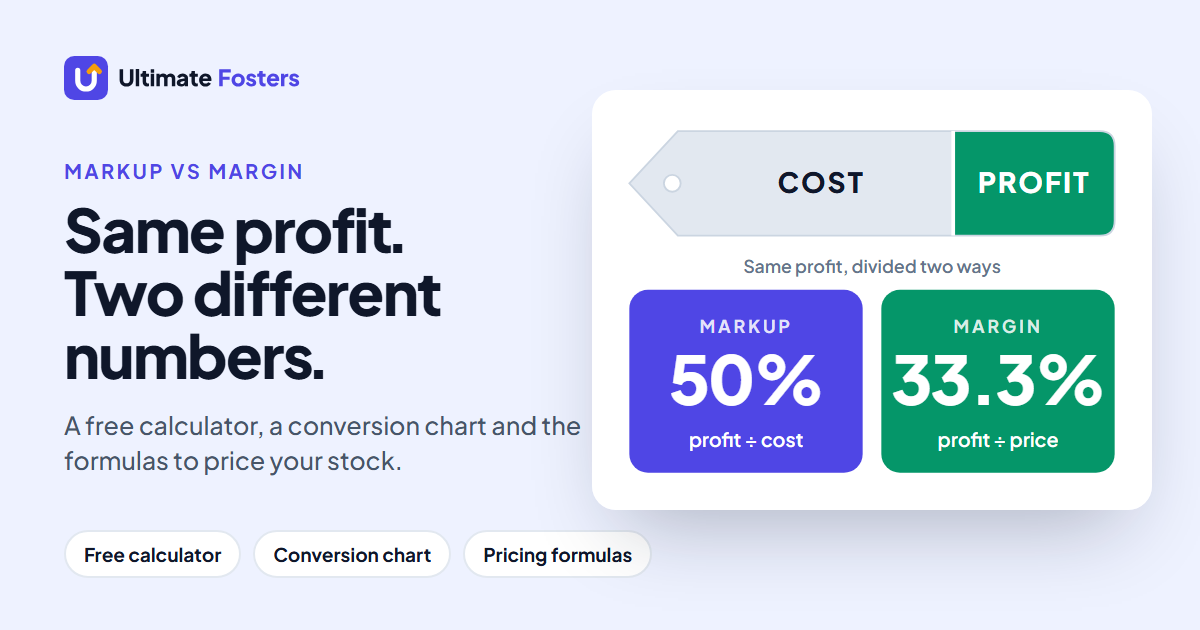
The difference between markup and margin is what you divide your profit by. Markup is profit as a percentage of the cost. Margin is profit as a percentage of the selling price. Buy an item for $70 and sell it for $100: the $30 profit is a 42.9% markup but a 30% margin. Markup is always the bigger number.
| Markup | Margin | |
|---|---|---|
| Formula | (Price − Cost) ÷ Cost | (Price − Cost) ÷ Price |
| Based on | What you paid | What the customer paid |
| Best for | Setting prices | Checking profit |
| $70 cost, $100 price | 42.9% | 30% |
Use the calculator · Markup to margin chart · What discounts cost you
Say you want to keep 30% of every sale, so you add 30% to your cost. An item that costs $70 goes on the shelf at $91. Your profit, $21, is only 23% of $91. You priced for a 30% margin and got 23%. On $100,000 of sales, that’s about $6,900 less gross profit than you planned.
This guide shows both formulas, a calculator, a full conversion chart, what discounts and sales tax do to your numbers, and how to set prices in a POS. It’s written for shop owners, so the examples are retail. If you’re choosing software for your store, see our retail POS system guide too.
Markup vs margin calculator
Enter your cost and one other number. The calculator gives you the selling price, profit, markup and margin together, so you can see both percentages side by side.
Pick what you know. Results update as you type.
In UltimatePOS, you would enter 42.86 in the “x Margin(%)” field (it works as a markup). Try it in the live demo.
What is markup?
Markup is the amount you add to your cost to get your selling price, shown as a percentage of the cost. It answers the question “how much am I adding on top of what I paid?”
How to calculate markup
Markup % = (Selling price − Cost) ÷ Cost × 100
Selling price = Cost × (1 + Markup %)
Example: you buy a phone case for $8 and sell it for $12.
- Profit: $12 − $8 = $4
- Divide by cost: $4 ÷ $8 = 0.5
- Times 100: 50% markup
To go the other way, from cost and markup to price: a $8 cost with a 50% markup is $8 × 1.5 = $12. A 20% markup on a $100 item is $100 × 1.2 = $120.
“Cost” should be your full cost to get the item on the shelf: the supplier’s price plus freight, import duty and packaging. Leave those out and your markup looks bigger than it is.
What is margin?
Margin (gross margin) is your profit as a percentage of the selling price. It answers “out of every dollar a customer pays me, how much do I keep after paying for the item?”
How to calculate margin percentage
Margin % = (Selling price − Cost) ÷ Selling price × 100
Selling price = Cost ÷ (1 − Margin %)
Same phone case: $4 profit ÷ $12 price = 0.333, so a 33.3% margin. The case has a 50% markup and a 33.3% margin at the same time. Both are correct; they measure the same $4 against different numbers.
Gross profit, gross margin and net margin
- Gross profit is money: sales minus the cost of the goods you sold. $4 on the phone case.
- Gross margin is that gross profit as a percentage of sales. 33.3% on the phone case.
- Net margin is what’s left after every other cost too: rent, wages, card fees, software. It’s always lower than gross margin.
When people say “margin” while pricing products, they almost always mean gross margin. That’s the one used in this guide.
Markup vs margin: the key differences
Markup and margin use the same two numbers, cost and price, and the same profit. The only difference is what you divide by, and that decides what each one is good for.
| Markup | Margin | |
|---|---|---|
| Profit divided by | Cost | Selling price |
| Answers | “How much do I add to cost?” | “How much of each sale do I keep?” |
| Which is higher | Always higher | Always lower |
| Can it go above 100%? | Yes (selling at 2.5 times cost is a 150% markup) | No, a margin is always below 100% |
| Most used for | Setting prices from cost | Profit reports, comparing products, talking to your accountant |
| Example: $50 cost, $75 price | 50% | 33.3% |
When to use which: use markup when you price new stock, because you start from what you paid. Use margin when you look back at how the shop did, because it’s based on sales, like your profit and loss report.
Is a 30% markup the same as a 30% margin?
No. A 30% markup gives you a 23.1% margin. On a $10 item, a 30% markup means a $13 price and $3 profit. $3 is 30% of the $10 cost, but only 23.1% of the $13 price.
The two get mixed up because both are percentages of the same profit, so a markup looks like a margin until you do the math. The gap grows as the numbers get bigger:
| Markup | Real margin | Margin you might expect | Shortfall |
|---|---|---|---|
| 10% | 9.1% | 10% | 0.9 points |
| 30% | 23.1% | 30% | 6.9 points |
| 50% | 33.3% | 50% | 16.7 points |
| 100% | 50% | 100% | 50 points |
If you want a 30% margin, you need a 42.9% markup. The chart below gives every common pair.
Markup to margin conversion chart
Find your markup in the left column to see the margin it gives. The multiplier tells you what to multiply your cost by, and the last column shows the price for an item that costs $10.
| Markup | Margin | Multiply cost by | Price if cost is $10 |
|---|---|---|---|
| 5% | 4.8% | × 1.05 | $10.50 |
| 10% | 9.1% | × 1.1 | $11.00 |
| 15% | 13% | × 1.15 | $11.50 |
| 20% | 16.7% | × 1.2 | $12.00 |
| 25% | 20% | × 1.25 | $12.50 |
| 30% | 23.1% | × 1.3 | $13.00 |
| 33.3% | 25% | × 1.3333 | $13.33 |
| 40% | 28.6% | × 1.4 | $14.00 |
| 50% | 33.3% | × 1.5 | $15.00 |
| 60% | 37.5% | × 1.6 | $16.00 |
| 66.7% | 40% | × 1.6667 | $16.67 |
| 75% | 42.9% | × 1.75 | $17.50 |
| 100% | 50% | × 2 | $20.00 |
| 150% | 60% | × 2.5 | $25.00 |
| 200% | 66.7% | × 3 | $30.00 |
| 300% | 75% | × 4 | $40.00 |
Markup to margin chart. 33.33% and 66.67% markups give exact 25% and 40% margins.
Margin to markup chart
Start here if you know the margin you want. Divide your cost by the number in the third column to get the price.
| Margin you want | Markup needed | Divide cost by | Price if cost is $10 |
|---|---|---|---|
| 10% | 11.1% | ÷ 0.90 | $11.11 |
| 15% | 17.6% | ÷ 0.85 | $11.76 |
| 20% | 25% | ÷ 0.80 | $12.50 |
| 25% | 33.3% | ÷ 0.75 | $13.33 |
| 30% | 42.9% | ÷ 0.70 | $14.29 |
| 35% | 53.8% | ÷ 0.65 | $15.38 |
| 40% | 66.7% | ÷ 0.60 | $16.67 |
| 45% | 81.8% | ÷ 0.55 | $18.18 |
| 50% | 100% | ÷ 0.50 | $20.00 |
| 55% | 122.2% | ÷ 0.45 | $22.22 |
| 60% | 150% | ÷ 0.40 | $25.00 |
| 70% | 233.3% | ÷ 0.30 | $33.33 |
Margin to markup chart. A margin can never reach 100%.
Conversion formulas
Margin % = Markup % ÷ (100 + Markup %) × 100
Markup % = Margin % ÷ (100 − Margin %) × 100
Example: a 60% markup gives 60 ÷ 160 = 37.5% margin. A 25% margin needs 25 ÷ 75 = 33.3% markup.
How to set a selling price from a target margin
Most shop owners know the margin they need to cover rent and wages, then work back to a price. This is called margin pricing (or margin-based pricing):
Selling price = Cost ÷ (1 − target margin)
Example: an item costs $60 and you want a 40% margin. $60 ÷ 0.60 = $100. Check: $40 profit ÷ $100 = 40%.
The common mistake is to add 40% to the cost instead: $60 × 1.4 = $84. That price gives $24 profit, which is a 28.6% margin, and you lose $16 on every unit compared with the price you meant to charge.
Keystone pricing (the “double the cost” rule)
Keystone pricing means selling at twice your cost. It’s a 100% markup and a 50% margin. Some shops use it as a quick starting point. They then lower prices on items that sell slowly or that shoppers compare across stores, and raise them where there’s little competition.
What is a good markup or margin?
For most retail shops, a gross margin between about 22% and 35% is in the normal range, which is a markup of roughly 28% to 55%. That’s the spread of average gross margins for US-listed retailers in NYU Stern’s data below. The right number for you depends on what you sell, how fast it sells and what your other costs are.
| Industry (US-listed companies) | Average gross margin | Same as a markup of | Average net margin |
|---|---|---|---|
| Retail (general merchandise) | 33.18% | 49.7% | 5.61% |
| Retail (specialty stores) | 35.30% | 54.6% | 5.19% |
| Retail (building supply) | 34.22% | 52% | 7.84% |
| Retail (grocery and food) | 26.31% | 35.7% | 1.32% |
| Retail (automotive) | 21.96% | 28.1% | 3.36% |
| Restaurants | 32.24% | 47.6% | 9.37% |
Source: NYU Stern, Margins by Sector (US), data as of January 2026. Markup column calculated from the gross margin.
Three things to keep in mind when you compare:
- These are large public companies. A small shop buys in smaller amounts and may pay more for stock, so its margins can differ.
- They are averages across everything a company sells. In your shop, some items will carry a small markup and others a large one.
- Gross margin is not take-home profit. Look at the gap between the gross and net columns: most of the gross margin goes on running the business.
So a question like “is 30% margin too high?” depends on which margin. A 30% gross margin is normal for general retail. A 30% net margin would be far above what these retailers earn. Your software is one of those running costs; our POS system cost guide breaks it down.
What discounts do to your margin
Every dollar of discount comes out of your profit, so a small discount can wipe out most of what you make on an item. Take an item that costs $60 with a 50% markup, so it sells for $90 and makes $30 profit:
| Discount | Price | Profit per item | Margin | Items needed |
|---|---|---|---|---|
| No discount | $90.00 | $30.00 | 33.3% | 1 |
| 10% off | $81.00 | $21.00 | 25.9% | 1.4 |
| 20% off | $72.00 | $12.00 | 16.7% | 2.5 |
| 25% off | $67.50 | $7.50 | 11.1% | 4 |
| 30% off | $63.00 | $3.00 | 4.8% | 10 |
Cost $60 per item, normal price $90 (a 50% markup). Items needed: how many you must sell to make the same profit as one full-price sale.
At 20% off, you have to sell 2.5 items to make what one item made at full price. At 30% off, you need 10. Before running a sale, check the margin at the sale price, not the discount on the label.
Markup with sales tax, VAT or GST
Always work out markup and margin on prices before tax. The tax you collect isn’t yours; you pass it on to the tax office.
Example: an item costs you $20 before tax. You add a 50% markup, so your price is $30. With 10% sales tax, VAT or GST, the customer pays $33. If you used the $33 to work out your markup, you’d think it was 65%, but $3 of that is tax.
- Cost: if you can claim back the tax you paid on stock (as VAT- and GST-registered businesses usually can), use the cost before tax.
- Shelf prices that include tax: in many countries, such as the UK, Australia, the UAE and India, prices shown to shoppers include VAT or GST. Take the tax out first, then check your margin.
- Sales tax added at the register: common in the US. Your shelf price is already the pre-tax price.
Markup and margin formulas in Excel or Google Sheets
Put the cost in column A and the selling price in column B, starting on row 2. Then use these formulas and format the result cells as percentages:
| To find | Formula |
|---|---|
| Markup | =(B2-A2)/A2 |
| Margin | =(B2-A2)/B2 |
| Price from a markup in C2 (e.g. 50%) | =A2*(1+C2) |
| Price from a margin in C2 (e.g. 40%) | =A2/(1-C2) |
| Markup to margin (markup in C2) | =C2/(1+C2) |
| Margin to markup (margin in C2) | =C2/(1-C2) |
A spreadsheet works for a few dozen products. Once supplier prices change every month, keeping hundreds of rows in sync gets slow, and one wrong cell changes the price at the register. See how a POS handles it.
How to set prices in your POS
A POS that stores your cost for every product can set the selling price for you and show the profit on every sale. Check one thing first. Many POS and accounting tools call the percentage they add to cost “margin”, even though the math is a markup. Test it with one product. If a cost of 100 with “50” gives a price of 150, the field is a markup.
Here is how it works in UltimatePOS, the self-hosted POS and inventory software we make:
- Price from cost. When you add a product, you enter the purchase price and the “x Margin(%)” field fills in the selling price. The field adds a percentage of the cost: cost 100 with 25 gives 125. So it works as a markup. For a 40% margin, enter 66.67. Use the chart above or the calculator for any other margin.
- A default for every product. Set a “Default profit percent” in Business Settings and new products start with it.
- Change many prices at once. The Update Price tool exports your product prices to a spreadsheet, including selling price groups for wholesale and retail customers. Edit them and import the file back.
- See your real margin. The Profit / Loss report shows profit by product, category, brand, location, invoice, customer and day, and counts purchase shipping and extra purchase costs.
- Cost what you make. If you produce your own goods, the Manufacturing module works out the cost of each batch from its materials. See our manufacturing inventory software page.

Try the pricing in the live demo
Open the UltimatePOS demo, add a product and watch the selling price follow the cost. No sign-up. Used by 10,000+ businesses and rated 4.2+/5 from 700+ ratings on CodeCanyon.
Markup and margin questions
Is a 30% markup the same as a 30% margin?
No. A 30% markup gives a 23.1% margin. Example: an item that costs $10 with a 30% markup sells for $13. The $3 profit is 30% of the cost but only 23.1% of the price. To get a real 30% margin you need a 42.9% markup.
What is a 20% markup on $100, and how do you add it?
Multiply the cost by 1.20. A 20% markup on a $100 cost gives a selling price of $120 and $20 profit. That’s a 16.7% margin.
What does a 5% markup mean?
It means the selling price is 5% above cost: cost × 1.05. On a $100 item you charge $105. Your margin is only 4.8%, which is thin for most shops once rent and wages are paid.
Is a 100% markup the same as a 50% margin?
Yes. A 100% markup doubles the cost: buy at $25, sell at $50. The $25 profit is 100% of the cost and 50% of the price. Doubling the cost is called keystone pricing.
What margin is a 33% markup?
About 24.8% (33 ÷ 133). A markup of 33.33%, a third of the cost, gives exactly a 25% margin.
How do I convert a 25% margin to markup?
Use markup = margin ÷ (100 − margin). For a 25% margin: 25 ÷ 75 = 33.3%. So an item that costs $30 needs a 33.3% markup, a $40 price, to give a 25% margin.
What is a 30% margin on $100?
It depends on which $100. If $100 is your selling price, a 30% margin is $30 profit and the item cost you $70. If $100 is your cost, a 30% margin needs a price of $142.86 ($100 ÷ 0.70), which is a 42.9% markup.
How much markup do I need for a 40% margin?
66.7%. Multiply the cost by 1.667, or divide it by 0.60. An item that costs $60 needs a $100 price for a 40% margin.
Is a 30% profit margin too high?
Not as a gross margin. US-listed general retailers averaged a 33.18% gross margin in NYU Stern’s January 2026 data. As a net margin, after rent, wages and other costs, 30% would be far above the retail groups in that data, whose average net margins ranged from 1.32% to 7.84%.
Why use margin vs markup?
Use both, for different jobs. Markup is easier for setting prices from cost. Margin is better for judging profit, comparing products and talking to your accountant or bank, because it’s based on sales.
Is a 30% markup good?
For most shops it’s on the thin side. A 30% markup is a 23.1% gross margin, while US-listed retailers averaged gross margins of about 22% to 35% in NYU Stern’s January 2026 data. It can work for fast-selling, price-compared items such as groceries; slower or specialty items usually need more.
Do I calculate markup before or after sales tax?
Before. Sales tax, VAT and GST belong to the tax office, not to you. Work out your markup on the price before tax, then add the tax on top.
Is markup always higher than margin?
Yes, whenever you make a profit. Both use the same profit, but markup divides it by the cost, which is the smaller number.
What is the difference between gross profit and gross margin?
Gross profit is an amount of money: sales minus the cost of the goods sold. Gross margin is that amount as a percentage of sales. $30 gross profit on $100 of sales is a 30% gross margin.
Why does my POS call markup “margin”?
Many POS and accounting tools use the word margin for the percentage they add to cost. If the price is worked out as cost plus a percentage of cost, that percentage is a markup. In UltimatePOS, the “x Margin(%)” field works this way, so enter the markup from the chart in this guide.
Price from cost, see profit on every sale
UltimatePOS sets selling prices from your cost, updates them in bulk and reports profit by product and day. Pay once, keep your data on your own server, and get 6 months of support.
About the authors
Written by the team at Ultimate Fosters, who build and support UltimatePOS, a POS and inventory system used by 10,000+ businesses for 10+ years. Every number in the tables and examples is calculated by formula, not typed by hand. The UltimatePOS steps were tested in the live demo. Industry figures link to the original data. This is general information, not financial or tax advice.
Sources
- NYU Stern School of Business (Aswath Damodaran), Margins by Sector (US), data as of January 2026: pages.stern.nyu.edu
- UltimatePOS live demo: Add Product price fields, Business Settings, Update Price and Profit / Loss report: ultimatefosters.com/ultimatepos-demo
Related: retail POS system · how much a POS system costs · retail billing software compared · invoice vs receipt · proforma invoice · what is a purchase order