
Manufacturing inventory software

Manufacturing Inventory Software, Pay Once

Track raw materials, production runs and finished stock in one place, and sell what you make from the same system. UltimatePOS with the Manufacturing module costs $148 once and runs on your own computer or server, so there is no monthly fee and your data stays with you.

Sample data included. Choose Manufacturing in the menu.

Used by 10,000+ businesses  ·  4.2+/5 from 700+ ratings  ·  10+ years of updates
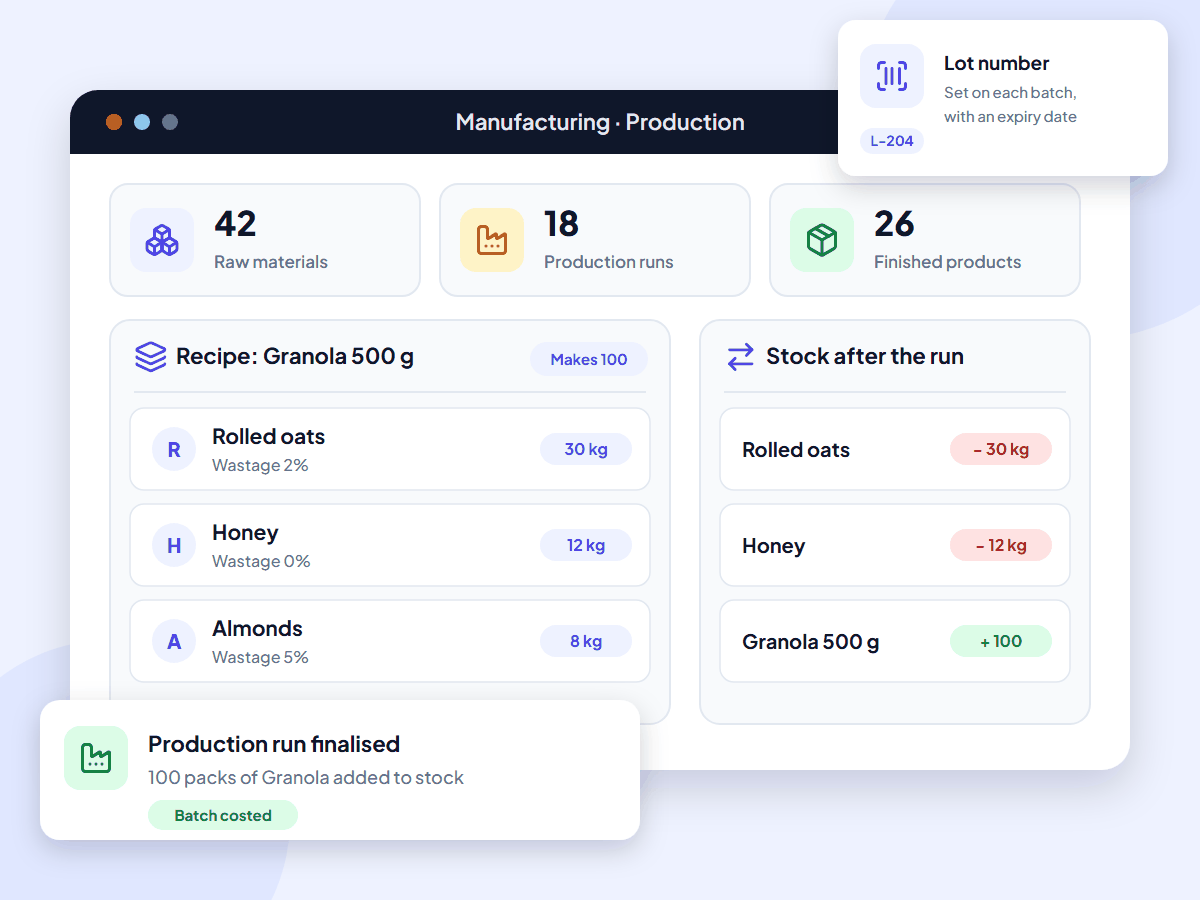
UltimatePOS manufacturing inventory software showing a recipe with raw material quantities and wastage, a finalised production run, the stock change for each item and a lot number

What is manufacturing inventory software?

Manufacturing inventory software keeps count of your raw materials and finished goods, and records what each production run uses and makes. That keeps your stock levels and product costs accurate. UltimatePOS adds this to its inventory and sales system with the Manufacturing module, and you pay for it once.

It is also called manufacturing inventory management software, a manufacturing inventory tracking system or manufacturing stock control software.

Monthly software fees add up

Most inventory software for manufacturers is rented by the month. inFlow Manufacturing starts at $169 a month, billed yearly, which is $6,084 over three years. SOS Inventory starts at $74.95 a month and charges $30 a month for each extra user. Stop paying and you lose access.

With UltimatePOS, you buy the software and the Manufacturing module once, install them on a computer or server you control, and keep using them. Updates are included.

With UltimatePOS you get:

  • A one-time price: $148 for the software and the Manufacturing module
  • No monthly plan to renew
  • Recipes, stock and costs on your own server
  • Making and selling in one system

Features

Manufacturing inventory software features

The Manufacturing module adds recipes, production runs, wastage and batch costing to UltimatePOS. Open a card to read its guide.

Role permissions decide who can view or add recipes and production runs, and a setting stops staff changing ingredient quantities during a run. For retail and wholesale prices, use selling price groups. The manufacturing report shows total production, production cost and units sold for any dates.

How manufacturing works in UltimatePOS

  1. Add materials and productsAdd your raw materials and finished products. Mark the materials you never sell on their own as not for sale.
  2. Save the recipeList the materials for one batch, with quantities, wastage and the number of units the batch makes.
  3. Buy your materialsRecord each purchase from a supplier, so stock and material costs are up to date.
  4. Run productionEnter the quantity to make and finalise the run. Raw materials go down and finished stock goes up in one step.
  5. Sell and check profitSell the product at the counter or by invoice. Profit is worked out from the manufacturing cost.

The Manufacturing module guide shows every screen, with a worked example.

Who it’s for

Manufacturing software for small business

UltimatePOS suits small manufacturers that make products in batches and sell them. One system covers buying materials, making the product, stock and sales.

Food and drink producers

Recipes with wastage, lot numbers and expiry dates for bakeries, sauces, snacks and drinks.

Cosmetics, soap and candle makers

Batch recipes and costs for products made from oils, waxes and fragrances.

Workshops and assemblers

A parts list for each product you build, from furniture to gift sets, with the cost of every unit.

Packers and repackagers

Buy in bulk, repack into retail sizes and keep both stock counts right.

Run a kitchen with tables or delivery? See our restaurant POS system page. Sell from a shop as well? See our retail POS system page.

Why small manufacturers choose UltimatePOS

  • Pay once. One-time licences instead of a monthly plan, with updates included.
  • Your data stays with you. Recipes, costs and stock records live on your own computer or server.
  • Make and sell in one system. Purchases, production, stock and sales use the same product list.
  • Know what each batch costs. Price from the real cost, then check your markup and margin.
  • Help when you need it. 6 months of support from our team and 270+ step-by-step guides.

10,000+

businesses use our software

10+

years of updates

2,000+

updates and features

How much does manufacturing inventory software cost?

UltimatePOS with the Manufacturing module costs $148 once. Updates are included, and so are 6 months of support, which you can extend. Most manufacturing inventory software charges every month instead, often with a fee for each extra user.

Prices checked on each company’s own website in November 2026, in US dollars, excluding tax. UltimatePOS: Regular License on CodeCanyon. Manufacturing module: 1-site licence in our shop.
Software What you pay How it is charged
UltimatePOS + Manufacturing module $148 once ($79 UltimatePOS + $69 Manufacturing module). Optional installation service: $25. One-time licences. No monthly fee.
inFlow Manufacturing Starts at $169 a month Monthly plan, billed yearly.
SOS Inventory Companion $74.95 a month, Plus $144.95, Pro $199.95. Each extra user: $30 a month. Monthly plan. Lot tracking starts on Plus; job costing is on Pro.
Katana Free plan at $0 for up to 30 products (SKUs). The Advantage plan is priced on request. Free plan, or a yearly contract with custom pricing.

Software cost over three years

$148UltimatePOS + Manufacturing module, paid once
$2,698SOS Inventory Companion, $74.95 a month for 36 months
$6,084inFlow Manufacturing, $169 a month for 36 months

Software only, on each product’s lowest paid plan. Installed on a computer at your workshop, UltimatePOS has no running cost. To use it from anywhere, put it on an online server; our example server costs about $7.20 a month with backups (hosting options, full POS cost breakdown).

What UltimatePOS customers say

Reviews of UltimatePOS from buyers on CodeCanyon, across all types of business.

MMontashir

★★★★★

“This is the most complete application for pos. I am writing the review after using this for 2 years… Whatever you can think of under a pos for business, you will find a solution here.”

IiN4sser

★★★★★

“We’ve been using UltimatePOS for 2 years. UltimatePOS is a powerful tool that helps us to manage stock, sales, purchases & other business day-to-day activities.”

TTerranos74

★★★★★

“I’ve been using to manage my business for several years now. My support service already expired but I still can rely on the script due to the stability…”

How to start using UltimatePOS for manufacturing

1. Try the demo

It opens with sample recipes and production runs. No sign-up needed.

2. Buy UltimatePOS

Get the $79 Regular License. Future updates are included.

3. Add the module

Get the Manufacturing module for $69 (one site) from our shop and add it to UltimatePOS.

4. Install

Install it on a computer at your workshop or on a server, or let our team do it for $25.

Manufacturing inventory software questions

Manufacturers hold three types of inventory: raw materials, work in progress and finished goods. UltimatePOS keeps a stock count for raw materials and for finished goods. A production run you have not finalised stays open, and stock changes only when you finalise it.

It depends on how you make your products. If you make batches from a recipe and sell them yourself, you need recipes, stock, batch costs and sales in one place. UltimatePOS with the Manufacturing module covers that. If you need automatic material planning or a production schedule across machines, look at a tool built around planning, such as MRPeasy or Katana.

Look for software that covers recipes or bills of materials, raw material and finished stock, batch cost and sales, without a monthly bill. UltimatePOS with the Manufacturing module covers these as a one-time purchase of $148, with no monthly cloud fees.

Large manufacturers run ERP systems that tie production to finance and purchasing. Mid-sized firms often add planning software for materials and schedules. Small manufacturers mostly need inventory software with recipes and production runs, which is where UltimatePOS fits.

Most of it is charged monthly. inFlow Manufacturing starts at $169 a month billed yearly, and SOS Inventory costs $74.95 to $199.95 a month plus $30 for each extra user. UltimatePOS with the Manufacturing module costs $148 once, with no monthly fee. See the full POS cost breakdown.

Yes. You pay $79 for UltimatePOS and $69 for the Manufacturing module, once. Both licences include future updates, and you get 6 months of support that you can extend. The price does not include hosting. On a computer at your workshop there is none to pay; on an online server our example costs about $7.20 a month. Installation by our team is an optional $25.

Some tools have a free plan with limits. Katana is free for up to 30 products, for example. UltimatePOS is not free. It costs $148 once with the Manufacturing module, and you can try every screen for free in the live demo before you buy.

Yes. In UltimatePOS a bill of materials is called a recipe. It lists the raw materials for a product, the quantity of each, the wastage and the number of units the batch makes. Quantities use the units you set up, such as grams or kilograms. You can copy a recipe and change it for a similar product.

When you finalise a production run. The raw materials leave stock and the finished product is added in the same step. Selling the finished product later only reduces the finished stock.

No. UltimatePOS records recipes, production runs, stock and costs. It does not forecast material needs or schedule machines and staff. A low stock alert tells you when a raw material falls below the level you set.

Yes. Turn on lot numbers and expiry dates, then enter them when you buy raw materials and when you produce a batch. At sale you pick the lot, and the lot number can print on the invoice.

Yes. Recipes allow for trimming and cleaning waste, production runs record units lost to quality, and lot numbers and expiry dates follow each batch. Bakeries, sauce makers and drink producers use the same steps.

Yes. Add the bulk item and each pack size as products, then save a recipe for each pack that uses the bulk item as its material. A production run moves stock from bulk to packs. The module guide has a worked example with cooking oil.

Yes. Print barcode labels for the products you make, then scan them at the counter with a barcode scanner.

UltimatePOS has built-in reports for profit and loss, purchases, sales and stock, plus the manufacturing report. For full bookkeeping, add the optional Accounting and Bookkeeping module.

It is self-hosted. You install it on a computer at your workshop or on a cloud server you rent, and your data stays there. Our team can install it for you for $25.

Yes. Add each workshop, warehouse or shop as a business location. Each production run uses and adds stock at the location you pick, and a stock transfer moves goods between locations.

Yes. You add your own tax rates and tax groups, such as a state or city sales tax or VAT, and the tax shows on each invoice. There are also guides for GST billing and ZATCA e-invoicing.

The licence includes 6 months of support from our team, which you can extend, plus 270+ step-by-step guides. The software keeps working after support ends. Use the backup feature to keep copies of your data.

Open the manufacturing demo. It logs you in to a sample business. Choose Manufacturing in the menu to open the recipe, production and report screens. No sign-up is needed.

About this page

Written by the Ultimate Fosters team, who build the Manufacturing module and have built and supported UltimatePOS for 10+ years. Every feature is checked against our Manufacturing module documentation and the live demo, and we recheck competitor prices on their own websites every quarter. See all industries we support.

See recipes and production runs in the live demo

The demo opens a sample manufacturer with recipes and production runs already set up. No installation or sign-up.