
Tire shop software

Tire Shop Software and POS, Pay Once

UltimatePOS is tire shop software for new and used tire dealers. Find any tire by size and see where it is stored. Add mounting and balancing to the sale, book the bay, assign the technician and bill fleet customers on account. It costs $79 once and runs on your own computer or server. No monthly fee.

Opens a sample shop. No sign-up. Try a sale, a quotation and a purchase order.

Used by 10,000+ businesses  ·  4.3+/5 from 500+ ratings on CodeCanyon  ·  10+ years of updates
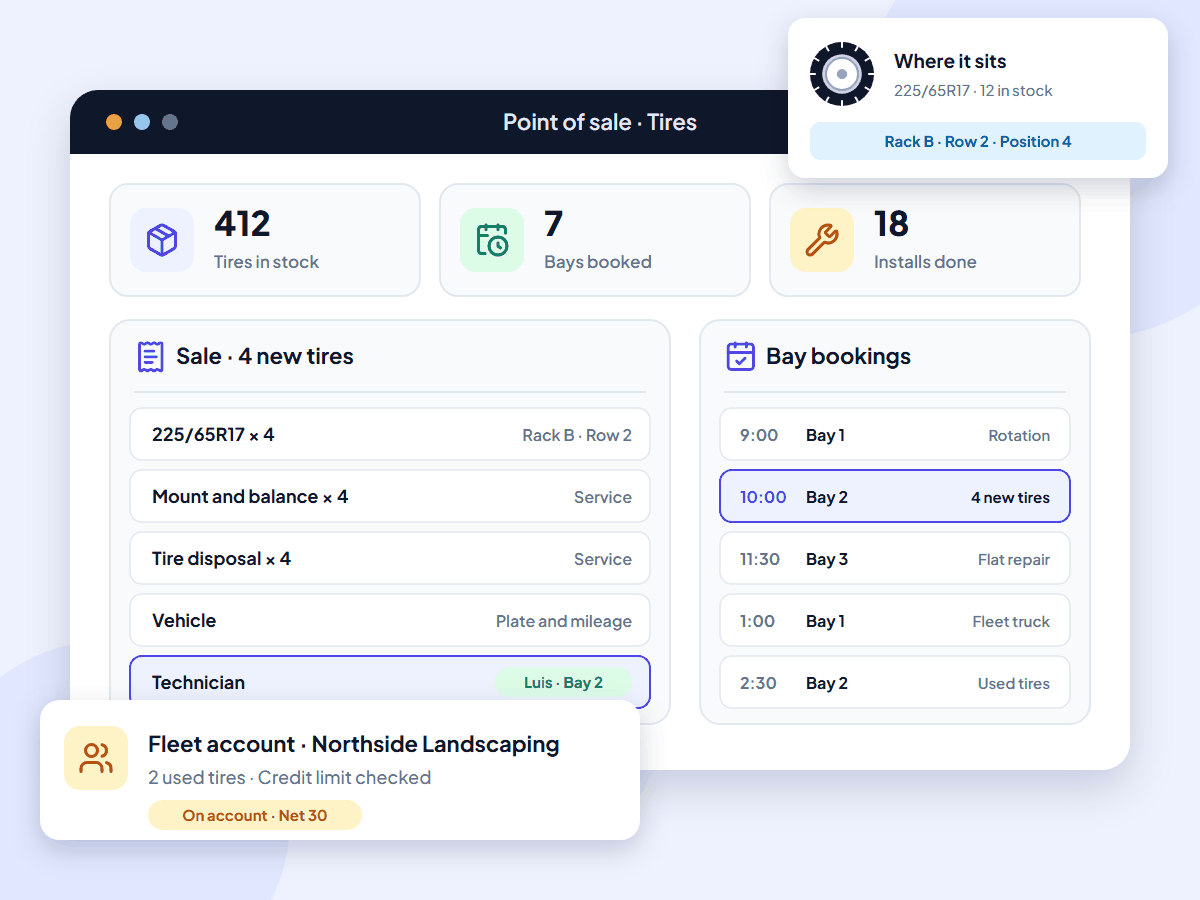
UltimatePOS tire shop software: a sale for four 225/65R17 tires with mount and balance, the rack position of the tire, a technician in Bay 2, the day's bay bookings and a fleet account on net 30

What is tire shop software?

Tire shop software is a point of sale and inventory system for selling and fitting tires. It tracks tires by size and where each one is stored, adds mounting and balancing to the sale, books bays, assigns technicians and bills fleet accounts. UltimatePOS does all of this for $79 once.

You may also hear it called a tire shop POS system, tire shop management software, tire management software or tire inventory software.

Monthly tire software adds up

Tekmetric’s Start plan is $199 a month, and its Tire Suite adds $39 a month per shop. Used Tire Shop starts at $33 a month. Over three years, that is $8,568 or $1,188 for one shop, and the bill keeps coming.

UltimatePOS costs $79 once. You install it on a computer or server you control and keep using it. There is no fee per technician, bay or store.

With UltimatePOS you get:

  • A one-time price of $79, updates included
  • No monthly plan or contract
  • No limit on technicians, bays or stores
  • Customer and fleet records on your own server

Features

Tire shop POS system features

Every feature below comes with UltimatePOS for $79 once. You don’t need an add-on module for tires. Open a card to read its guide.

Sell wheels, valve stems and TPMS sensors as ordinary products. Take cash, card and other payment methods, and see what each size and brand earns in the profit reports.

How a tire sale runs in UltimatePOS, from quote to invoice

  1. QuoteFind the size, see what is in stock and where it sits, and print a quote.
  2. BookBook the customer into a bay with a start time and a technician.
  3. FitAdd the tires, mounting, balancing and disposal to the sale.
  4. InvoiceAdd the plate and mileage, take payment or put it on account.
  5. RestockA low stock alert tells you when to send a purchase order.

Worked examples

Two tire jobs, with real numbers

One retail customer at the counter and one fleet truck on account.

Four new tires, booked into a bay

A customer needs four new tires on an SUV. You quote, book the bay and fit them the same morning.

225/65R17 tire × 4 at $142.00$568.00
Mount and balance × 4 at $20.00$80.00
Tire disposal × 4 at $4.00$16.00
Invoice total, before tax$664.00
  1. You search for 225/65R17. Twelve are in stock at Rack B, Row 2, Position 4.
  2. You print a quote. The customer agrees, and you book Bay 2 at 10:00 with Luis.
  3. Luis pulls the tires from Rack B. You add the four tires, four mount and balance services and four disposal fees, with Luis as the technician on each line.
  4. You type the plate and mileage into the invoice fields.
  5. The customer pays. Four tires leave stock, and the sale shows in Luis's service staff report.

The tires cost you $98.00 each, so the job made $272.00 before wages and rent. Read our markup and margin guide to set your tire prices.

Two used tires for a fleet truck, on account

A landscaping company runs its trucks on your account. One truck needs two used tires.

Used 245/75R16 tire × 2 at $65.00$130.00
Mount and balance × 2 at $20.00$40.00
Charged to the account$170.00
  1. Northside Landscaping is set up as a customer with a $2,500.00 credit limit and 30-day pay terms.
  2. You find two used 245/75R16 tires. Each used tire is listed with its tread depth in a custom field.
  3. You add the tires and the fitting to the sale and put it on account instead of taking payment.
  4. The account already owed $640.00, so the new balance is $810.00, well under the limit.
  5. At month end, the ledger shows each invoice for the account and its due date.

See the pay term guide and the customer ledger guide.

Tires and parts

Tire inventory software for new and used tires

Your counter, your bays and your stock room use the same stock, so the count is right after every sale.

Tire shop jobHow UltimatePOS handles it
New tires in many sizesThe size in each tire's name or SKU, with its own cost, price and stock. Sizes of one model can be variations. Guide
Used tiresList each used tire or set with its size, and record tread depth in a custom field you name. Guide
Where each tire is storedRack, row and position on each product. Guide
Mounting, balancing and disposalAdd-ons on the tire line, or service items with stock switched off. Guide
Wheels, valve stems and TPMS sensorsOrdinary products with stock, barcodes and labels. Guide
Running low on a sizeA low stock alert, then a purchase order to your supplier. Guide
Tires at a second storeEach store is a location with its own stock. Transfers move tires between them. Guide
Which sizes and brands make moneyProfit reports by product, brand, category and date. Guide

New to barcodes? Read our barcode inventory guide.

Who it’s for

Software for new tire dealers, used tire shops and fleets

UltimatePOS suits independent tire shops, from one bay to a few stores, that sell and fit tires and want to buy their software once.

New tire dealers

Many sizes and brands, fitting add-ons and quotes at the counter.

Used tire shops

One-off tires with tread depth, rack spots and quick cash sales.

Fleet and commercial tire sellers

Trucks and company cars on account, with credit limits and net terms.

Tire and wheel stores

Tires, wheels and parts across one or more stores, with transfers.

Fix phones and laptops? See our repair shop software. Sell parts and tools too? See our hardware store POS.

Why tire shops use UltimatePOS

  • Pay once. A one-time license instead of a monthly plan, with updates included.
  • Your customer data stays with you. Customer, vehicle and fleet records sit on your own computer or server, not on a vendor’s cloud.
  • Add every technician. No fee per user. Give each person a role that shows only what they need.
  • Keep your own card processor. Take cards on the terminal you already have and record each payment in UltimatePOS.
  • Help when you need it. 6 months of support from our team and 270+ step-by-step guides.

10,000+

businesses use our software

10+

years of updates

2,000+

updates and features

How much does tire shop software cost?

UltimatePOS costs $79 once. Updates are included, and so are 6 months of support, which you can extend. Most tire shop software charges every month, per shop or by the number of users.

Prices checked on each company’s own website in November 2026, in US dollars, excluding tax, hardware and card fees. UltimatePOS: Regular License on CodeCanyon.
Software What you pay How it is charged
UltimatePOS $79 once for every feature on this page. Optional installation service: $25. One-time license. Runs in a web browser. No fee per technician, bay or store.
Tekmetric Start plan $199 a month ($179 billed yearly), plus Tire Suite at $39 a month per shop. Monthly plan per shop.
Used Tire Shop From $33 a month. No setup fee or contract. Monthly plan.
MT-POS for Tire Shops $49 a month for 1 user, $59 for up to 4 users, $69 for up to 8 users. Monthly plan per store.
TreadPOS Software $0. Card and ACH payments must run through its partner PaidYET, at 5¢ each. Free software, tied payments.

Software cost over three years, one shop

$79UltimatePOS, paid once
$8,568Tekmetric Start + Tire Suite, $238 a month for 36 months
$1,188Used Tire Shop, $33 a month for 36 months

These figures cover software only. Several monthly products include things UltimatePOS does not, such as VIN and fitment lookup, DOT registration, distributor ordering, vehicle inspections, online booking and built-in card payments. Installed on a computer in your shop, UltimatePOS has no running cost. To use it from a second store or your phone, put it on an online server. Our example server costs about $7.20 a month with backups (hosting options, full POS cost breakdown).

What UltimatePOS customers say

Reviews from buyers on CodeCanyon, where UltimatePOS has a 4.3+/5 rating from 500+ ratings.

MMontashir

★★★★★

“This is the most complete application for pos. I am writing the review after using this for 2 years… Whatever you can think of under a pos for business, you will find a solution here.”

IiN4sser

★★★★★

“We’ve been using UltimatePOS for 2 years. UltimatePOS is a powerful tool that helps us to manage stock, sales, purchases & other business day-to-day activities.”

TTerranos74

★★★★★

“I’ve been using to manage my business for several years now. My support service already expired but I still can rely on the script due to the stability…”

How to start using UltimatePOS in your tire shop

1. Try the demo

Open a sample shop, ring up a sale and make a quote. No sign-up needed.

2. Buy UltimatePOS

Get the $79 Regular License. Updates are included.

3. Install it

Install it on a computer in your shop or an online server, or let our team do it for $25.

4. Add your tires

Set up sizes, racks and fitting add-ons, then import your tire list from a spreadsheet.

Tire shop software questions

The best tire shop software tracks tires by size and rack spot, adds mounting and balancing to the sale, books bays, assigns technicians and runs fleet accounts. UltimatePOS does all of this for $79 once. It has no VIN fitment lookup or DOT registration, so check whether your shop needs those.

It is the system a tire shop runs on: tire stock, quotes, bay bookings, technicians, invoices and customer accounts. Most products also sell at a counter. UltimatePOS keeps the counter, the stock and the bays in one system.

Tire stock by size and brand, new and used tires, rack locations, fitting fees on each tire, quotes, bay bookings, technician tracking, customer accounts with credit limits, barcode scanning, purchase orders and sales reports. UltimatePOS has all of these.

Tekmetric’s Start plan is $199 a month plus $39 a month for Tire Suite. Used Tire Shop starts at $33 a month, and MT-POS for tire shops costs $49 to $69 a month. UltimatePOS costs $79 once.

TreadPOS offers its software for $0, but card and ACH payments must run through its partner at 5¢ each, and your data lives on its cloud. UltimatePOS is a paid license, $79 once, that you run on your own computer or server. See our cheapest POS system guide.

Over a few years, a one-time license usually costs least. UltimatePOS is $79 once, while monthly tire software starts at about $33 a month, or $1,188 over three years. Hardware and card fees come on top for any system.

Yes. List each used tire or matched set with its size, record the tread depth in a custom field you name, and note the rack spot. Scan or search for it at the counter and sell it like any other item.

Put the size in each tire’s name or SKU, such as Defender LTX 225/65R17, so staff can search by size at the counter. You can also add one tire model as a variable product with its sizes as variations, each with its own stock, cost and price.

Your staff can. Bookings let you pick the customer, the bay (set up as a table), the technician and the start and end time, and send the customer a notification. Customers can’t book online themselves.

No. UltimatePOS has no VIN, plate or fitment lookup, does not send DOT registrations and has no distributor catalog. Staff search your stock by size, record each tire’s DOT code in a custom field on the invoice, and send suppliers a purchase order.

No. UltimatePOS has no QuickBooks sync. It keeps its own sales, purchase and profit reports, and you can export them to Excel for your accountant.

It records card, cash and other payment methods, but it does not connect to a card terminal. Take the payment on your own terminal and record it as Card.

For simple jobs such as oil changes, brakes or alignments, yes: add them as service items. It has no labor guides, vehicle inspections or repair orders, so a full repair shop may need a dedicated system.

Yes. You pay $79 once. The license includes future updates and 6 months of support that you can extend. Hosting is extra. On a computer in your shop there is nothing more to pay, and our example online server costs about $7.20 a month.

About this page

Written by the Ultimate Fosters team, who have built and supported UltimatePOS for 10+ years. Every feature is checked against our UltimatePOS documentation, and the page says plainly what UltimatePOS does not do. We recheck competitor prices on their own websites every quarter. See all industries we support.

Try UltimatePOS in the live demo

Ring up a sale, make a quote and send a purchase order. No installation or sign-up.