
Jewelry POS and inventory software

Jewelry POS and Inventory Software, Pay Once

UltimatePOS is jewelry POS and inventory software that keeps a record for every piece, tracks repairs, takes deposits and prints your tags. It costs $79 once, plus $36 for repair tickets, and runs on your own computer or server. No monthly fee, and your customer list stays with you.

Opens a sample shop. No sign-up. Ring up a sale and take a part payment. Repair tickets are in the Advance Repair Module demo.

Used by 10,000+ businesses  ·  4.3+/5 from 500+ ratings on CodeCanyon  ·  10+ years of updates
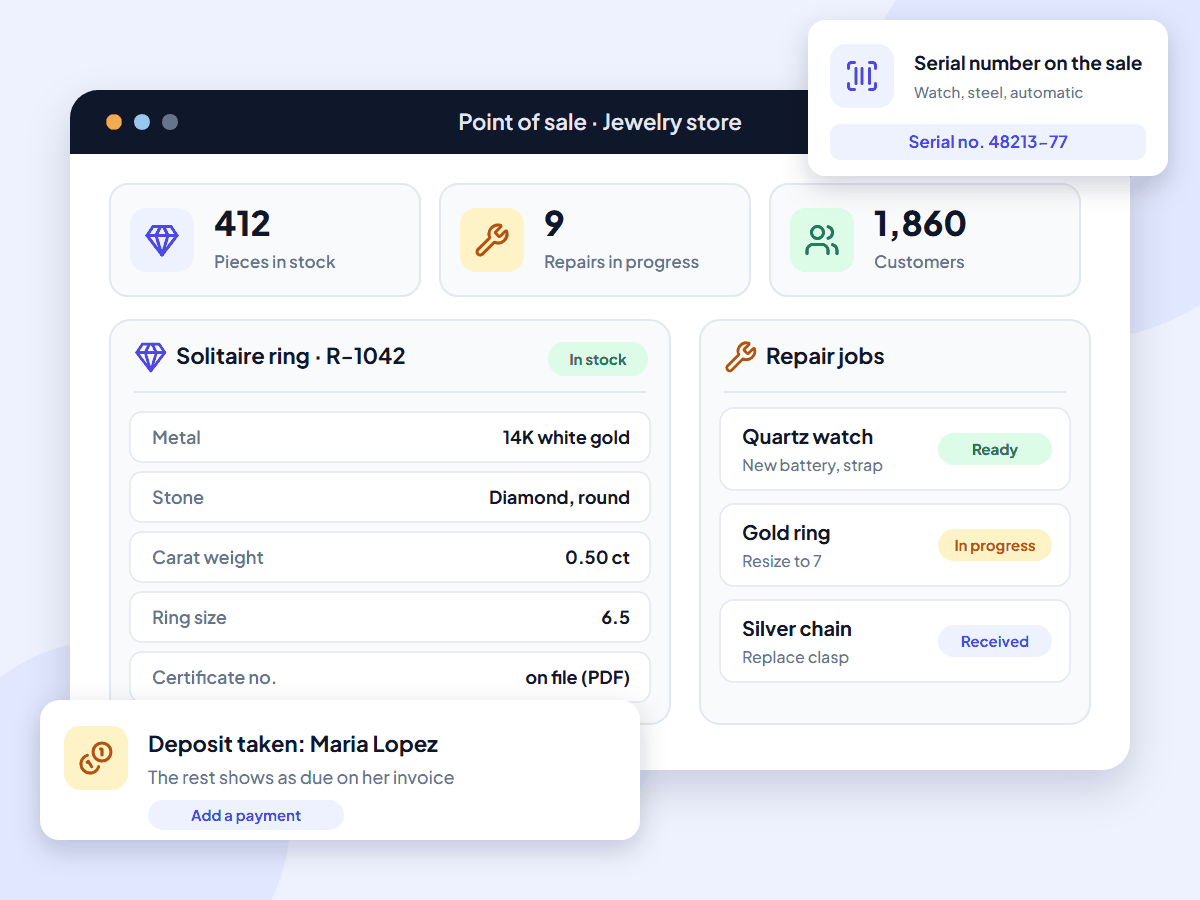
UltimatePOS jewelry POS software: a ring record with metal, stone and carat weight, repair jobs by status, and a deposit on a sale

What is a jewelry POS system?

A jewelry POS system is point-of-sale and inventory software built around how a jewelry store sells. It keeps a record for each piece with its metal, stones and certificate, rings up sales, takes deposits, tracks repairs from drop-off to pickup and prints small barcode tags. UltimatePOS does all of this for a one-time price.

It is also called jewelry point of sale, jewelry store POS, jeweler software or jewelry inventory software (jewellery in the UK, Australia and India).

Monthly jewelry software adds up

Most jewelry POS systems are rented by the month. wJewel starts at $159 a month billed yearly. Jewel360’s entry plan is $199 a month billed yearly, plus a $750 setup fee, and Pavilion runs from $299 a month for one user to $999 for ten. The lowest of these comes to $1,908 a year.

With UltimatePOS you buy the software once, install it on a computer or server you control, and keep using it. There is no fee per user, per store or per sale.

With UltimatePOS you get:

  • A one-time price of $79, with updates included
  • Repair tickets for $36 more, also paid once
  • No monthly plan or contract
  • Stock, sales and customers on your own server

Features

Jewelry POS features

Everything below is part of UltimatePOS, except repair tickets, which need the Repair module ($36 once). Open a card to read its guide.

Import your pieces from a spreadsheet and update prices in bulk from Excel when metal costs change. The optional CRM module adds follow-up reminders and email or SMS campaigns.

How a sale and a repair work in UltimatePOS

  1. TagAdd the piece with its details and print a barcode tag.
  2. SellScan the tag at the counter. Add a serial number or warranty if it has one.
  3. Get paidTake the full price, or a deposit with the rest left due.
  4. RepairOpen a repair ticket when a customer drops off a piece.
  5. Follow upSee what each customer bought and save dates such as birthdays.

Worked examples

A deposit and a watch repair, with real numbers

Two everyday jobs at a jewelry counter, step by step.

A $2,400 ring paid in three parts

Maria wants a 14K white gold solitaire ring, stock number R-1042, priced at $2,400 before tax. She pays a $600 deposit today and the rest over a month.

Ring R-1042$2,400.00
Deposit today−$600.00
Left due on the invoice$1,800.00
  1. You ring up the sale with Maria as the customer and enter $600 as the payment. The invoice shows $1,800 due.
  2. Two weeks later she pays $900. You add it to the same invoice, and $900 is left.
  3. She pays the last $900 and the invoice shows as paid. The ring stays in your safe until then.

To keep the ring aside until she has paid in full, take the $600 as an advance payment on Maria's account. Then suspend the sale under her name, so the ring comes out of available stock. When she pays the rest, open the suspended sale and finish it: $600 with the Advance payment method and $1,800 in cash or card. See the advance payment guide.

A watch repair from drop-off to pickup

  1. A customer brings in a quartz watch that has stopped and a worn strap. You open a repair ticket with the brand, the serial number and a checklist: scratched glass, strap worn.
  2. You add the parts and work: a new battery for $20 and a leather strap for $45, so the job is $65. You set a due date and choose the jeweler doing it.
  3. You print a label for the ticket and attach it to the watch. The status moves from Received to In progress.
  4. When you set the status to Ready, the customer gets an SMS or email if you have set up a message for that status. They can also check the job by its number.
  5. At pickup, you turn the ticket into an invoice for $65 and take payment.

The same steps work for ring sizing, chain repairs and stone setting. See the Repair module guide.

Who it’s for

Software for jewelry stores and watch shops

UltimatePOS is a jewelry store POS system for independent jewelers that want to own their system and stop paying every month.

Independent jewelry stores

One store selling fine jewelry, with deposits, special orders and repairs at the counter.

Watch shops and repairers

Serial numbers on every sale, warranties, and repair tickets for batteries, straps and servicing.

Small jewelry chains

Two or more stores sharing one stock list, with transfers and permissions for each location.

Fashion jewelry and gift shops

Lots of lower-priced items with variations, fast barcode checkout and gift receipts.

Make your own pieces? See our manufacturing inventory software. Sell to other stores? See our wholesale inventory software. Run a different kind of shop? See our retail POS system.

Why jewelers choose UltimatePOS

  • Pay once. A one-time licence instead of a monthly plan, with updates included.
  • Your data stays with you. Stock, sales and your customer list live on your own computer or server.
  • Grow without a bigger bill. Add staff and stores without moving to a higher plan.
  • Know your profit per piece. The profit report shows profit by product, category or brand, and you can check your markup and margin.
  • Help when you need it. 6 months of support from our team and 270+ step-by-step guides.

10,000+

businesses use our software

10+

years of updates

2,000+

updates and features

How much does jewelry POS software cost?

UltimatePOS costs $79 once, or $115 with repair tickets. Updates are included, and so are 6 months of support, which you can extend. Most jewelry POS software charges every month.

Prices checked on each company’s own website in November 2026, in US dollars, excluding tax and short-term offers. UltimatePOS: Regular License on CodeCanyon; Repair module on our shop.
Software What you pay How it is charged
UltimatePOS $79 once. Repair module: $36 once. Optional installation service: $25. One-time licence. No fee per user, store or sale.
wJewel From $159 a month billed yearly, or $179 month to month. Monthly or yearly plan. No setup fee. Hardware is priced separately.
Jewel360 From $199 a month billed yearly, plus a $750 setup fee. Yearly plan. Higher plans are shown after you fill in a form.
Pavilion Basic $299 (1 user), Starter $449 (3 users), Standard $699 (6 users), Enterprise $999 (10 users) a month. Monthly plan. Extra stores cost more each month; texting is $99 a month.

Software cost over three years

$115UltimatePOS with the Repair module, paid once
$5,724wJewel, $159 a month for 36 months
$10,764Pavilion Basic, 1 user, $299 a month for 36 months

These figures cover software only. The other products include things UltimatePOS does not, such as cloud hosting, card processing and, on some plans, gold-price pricing, appraisals and consignment. Installed on a computer in your store, UltimatePOS has no running cost. To use it from more than one store, put it on an online server. Our example server costs about $7.20 a month with backups (hosting options, full POS cost breakdown).

What UltimatePOS customers say

Reviews of UltimatePOS from buyers on CodeCanyon, across all types of business.

MMontashir

★★★★★

“This is the most complete application for pos. I am writing the review after using this for 2 years… Whatever you can think of under a pos for business, you will find a solution here.”

IiN4sser

★★★★★

“We’ve been using UltimatePOS for 2 years. UltimatePOS is a powerful tool that helps us to manage stock, sales, purchases & other business day-to-day activities.”

TTerranos74

★★★★★

“I’ve been using to manage my business for several years now. My support service already expired but I still can rely on the script due to the stability…”

How to start using UltimatePOS in your jewelry store

1. Try the demo

Open a sample shop with products, sales and reports. No sign-up needed.

2. Buy UltimatePOS

Get the $79 Regular License. Future updates are included.

3. Add repair tickets

Add the Repair module for $36 once if you take in repairs.

4. Set up your store

Install it or let our team do it for $25, name your custom fields, set your tag size and import your pieces.

Jewelry POS questions

The best jewelry POS keeps a record for each piece, tracks repairs, takes deposits, prints small tags and limits what staff can change. UltimatePOS does these for $79 once, plus $36 for repair tickets. If you need pricing by the daily gold price, appraisals, consignment or certificate lookups, choose a jeweler-only system such as wJewel or Pavilion.

Many jewelers use a jeweler-only system such as The Edge, wJewel, Jewel360, Pavilion, Luxe or Crystal, most of them paid monthly. Others use a general POS such as Lightspeed or Clover with separate accounting software. Some set up a free self-hosted system such as ERPNext or Odoo Community (open source options compared), and some buy a system once, such as UltimatePOS.

A small jewelry business needs one record per piece, barcode tags, stock in each store and sales that update stock. It also needs a cost that does not grow every month. UltimatePOS covers these for $79 once and runs in a web browser, so staff can use it on a computer or tablet.

Give every piece its own stock number and barcode tag, and record its details, such as metal, stone and weight, in that record. Scan the tag when you sell it, so stock updates at once. When you count your display cases, fix any difference with a stock adjustment, and use stock transfers when a piece moves to another store.

Yes, a spreadsheet works for a handful of pieces. It does not know when something sells, so counts drift and two staff can sell the same piece. When you outgrow it, import your spreadsheet into UltimatePOS and sell from the same list.

Some inventory apps have free plans with limits, and open source systems such as ERPNext and Odoo Community are free to download but need setup for jewelry. UltimatePOS isn’t free. It costs $79 once, with no limit on pieces, users or stores, and you can try it in the live demo before you buy.

Jeweler-only systems cost about $159 to $999 a month. wJewel starts at $159 a month billed yearly, Jewel360 at $199 a month billed yearly plus a $750 setup fee, and Pavilion runs from $299 to $999 a month. UltimatePOS costs $79 once, or $115 with repair tickets. See the full POS cost breakdown.

Yes. You pay $79 once, and $36 once more for the Repair module if you need it. The licence includes future updates and 6 months of support that you can extend. Hosting is extra: on a computer in your store there is nothing more to pay, and our example online server costs about $7.20 a month. Installation by our team is an optional $25.

Yes. Name up to 20 custom fields for products, such as Metal, Karat, Stone, Carat weight and Certificate no. A field can be text, a date or a dropdown list. You can search by these fields on the sales screen and attach a certificate file to the piece.

Yes. Turn on serial numbers for the product, type the watch’s number when you sell it, and add a warranty. Repair tickets also record the serial number of each watch you service.

With the Repair module, you open a ticket for each job with the item, serial number, checklist, problem, due date and the person doing the work. You add parts and labour, print a label for the item and move it through your own statuses. Each status can send the customer an SMS or email, and at pickup the ticket becomes an invoice.

Yes, in two ways. Sell the piece now with a part payment, and the rest stays on the invoice as due. Or hold it. Take the deposit as an advance payment on the customer’s account and suspend the sale under their name. The piece then comes out of available stock. At pickup, finish the sale and pay the deposit part with the Advance payment method.

No. There is no metal-price feed, so prices do not change by weight on their own. When metal prices move, update prices in bulk from an Excel sheet.

No. Consigned and memo pieces can’t be kept apart from your own stock, and there is no report of what you owe a consignor. If you sell a lot on memo, choose a jeweler-only system.

No. There is no scrap gold buying or trade-in screen, and no appraisal documents.

Yes. Add your label size in inches, on sheets or a roll, then print barcode tags for your pieces. A barcode printer and a barcode scanner work with it at the counter.

If your store runs on WooCommerce, yes. The WooCommerce module syncs products and orders. UltimatePOS does not sync with Shopify.

It records card, cash and other payment methods, but it does not connect to a card terminal. Take the payment on your own terminal and record it as Card.

For making pieces, the Manufacturing module turns metal, stones and findings into a finished piece. It tracks waste and shows the cost of each run. See our manufacturing inventory software page. For drawing designs, jewelers use CAD software.

Yes. Export your pieces from your old system to a spreadsheet and import them into UltimatePOS. To keep your existing tags, enter each tag’s barcode number as the piece’s SKU, and the barcode scanner finds it at the counter as before.

Yes. Add each store as a business location, move pieces between them with stock transfers, and choose which stores each user can see.

It needs a connection to wherever you install it. On a computer in your store, staff there use your own network. To reach it from home or from a second store, put it on an online server.

Open the live demo and choose a sample shop with products, sales and reports. To try repair tickets, choose “Advance Repair Module”. No sign-up is needed.

About this page

Written by the Ultimate Fosters team, who have built and supported UltimatePOS for 10+ years. Every feature is checked against our UltimatePOS documentation and release notes, and we recheck competitor prices on their own websites every quarter. See all industries we support.

Try UltimatePOS in the live demo

Ring up a sale, take a part payment and look at the stock reports in a sample shop. No installation or sign-up.