
Hardware store POS software

Hardware Store POS System, Pay Once

UltimatePOS is a hardware store POS system that sells chain by the foot and screws by the box or the piece, keeps contractor accounts on credit and shows you what to reorder. It costs $79 once and runs on your own computer or server. No monthly fee, and your customer list stays with you.

Opens a sample shop. No sign-up. Ring up a sale and look at stock, purchases and customer balances.

Used by 10,000+ businesses  ·  4.3+/5 from 500+ ratings on CodeCanyon  ·  10+ years of updates
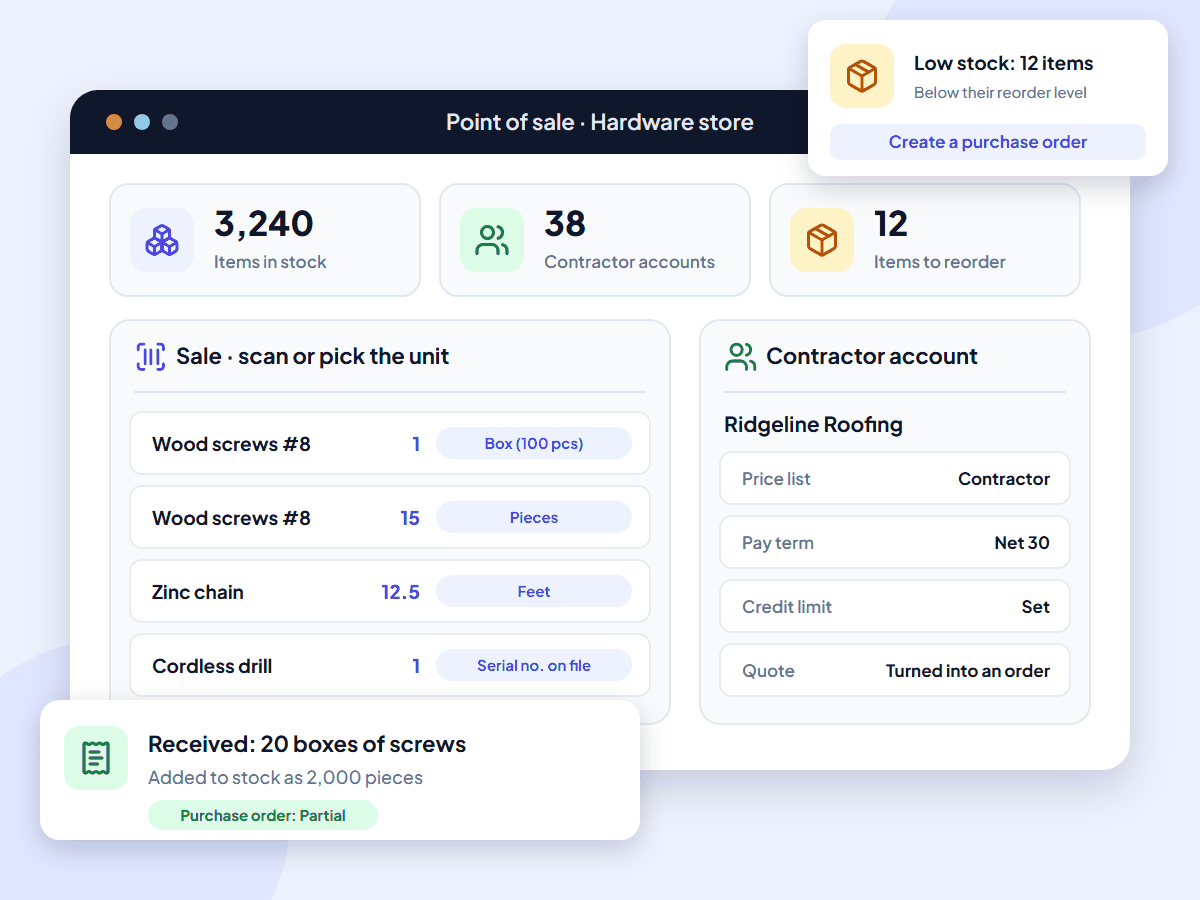
UltimatePOS hardware store POS: a sale with a box of screws, single screws and 12.5 feet of chain, a contractor account and a low-stock reorder

What is a hardware store POS system?

A hardware store POS system is point-of-sale and inventory software built for how a hardware store sells. It scans thousands of small parts, sells by the foot, pound, box or piece, keeps contractor accounts with credit limits and orders stock from suppliers. UltimatePOS does all of this for a one-time price.

It is also called hardware store point of sale, hardware store POS software or hardware store software.

Monthly POS fees add up

Most hardware store POS software is rented by the month. KORONA’s Retail plan is $79 a month for each register. Lightspeed Retail starts at $89 a month billed yearly, and Celerant’s hardware and paint POS starts at $125 a month. Even the lowest of these comes to $948 a year for one register.

UltimatePOS costs $79 once. You install it on a computer or server you control and keep using it. There is no fee per register, user or store.

With UltimatePOS you get:

  • A one-time price of $79, with updates included
  • No monthly plan or contract
  • As many registers, staff and stores as you need
  • Stock, sales and customers on your own server

Features

Hardware store POS features

Everything below is part of UltimatePOS. There is no module to buy. Open a card to read its guide.

Import your items from a spreadsheet and update prices in bulk from Excel when supplier costs change. Run seasonal discounts on a brand or category with start and end dates.

How a hardware store sale works in UltimatePOS

  1. Add itemsSet each item's unit (piece, foot or box) and print its barcode label.
  2. Receive stockReceive a purchase order. UltimatePOS adds boxes to stock as pieces.
  3. SellScan items at the counter and pick the unit: a full box, single pieces or a length.
  4. Charge to accountPut a contractor's sale on account at their trade price.
  5. ReorderTurn low-stock items into a purchase order for your supplier.

Worked examples

Two sales at a hardware counter, with real numbers

One sale in boxes, pieces and feet, and one contractor sale on account, step by step.

A box of screws, 15 single screws and 12.5 ft of chain

#8 wood screws sell for $0.12 each and come in boxes of 100. Zinc chain is $1.80 a foot. One customer buys a full box, 15 loose screws and 12.5 ft of chain.

Wood screws, 1 box of 100$12.00
Wood screws, 15 pieces$1.80
Zinc chain, 12.5 ft at $1.80 a foot$22.50
Total before tax$36.30
  1. You set up the screws with Pieces as the unit and add Box as 100 pieces. The chain's unit is Feet, set to allow decimals.
  2. You receive 20 boxes on a purchase order. Stock shows 2,000 pieces.
  3. At the counter you scan the screws twice. On one line you pick Box, and the price changes to $12.00. On the other you type 15.
  4. You scan the chain and type 12.5. The line shows $22.50.
  5. After the sale, screw stock shows 1,885 pieces.

We checked the box and decimal steps in the live demo. See the product units guide.

A contractor buys on account

Ridgeline Roofing is in your Contractors group, which uses a price list set to 10% below retail. Its credit limit is $5,000, its pay term is net 30, and it already owes $3,400.

Job materials at retail price$1,250.00
Contractor price list, 10% off−$125.00
This sale, on account$1,125.00
  1. You send a quote for the job. The prices come from the contractor price list.
  2. When Ridgeline accepts, you turn the quote into a sales order. UltimatePOS does not take the items out of stock yet.
  3. When the crew picks up, you turn the order into a sale on account. Its balance goes from $3,400 to $4,525, under the $5,000 limit. UltimatePOS blocks a credit sale that would take it over the limit.
  4. UltimatePOS sets the due date from net 30, and your dashboard lists payments due in the next 7 days.
  5. At month end it pays $4,525 in one payment across all open invoices. Print its ledger as a statement.

See the pay term guide and the customer ledger guide.

Who it’s for

Software for hardware stores and supply counters

UltimatePOS is hardware store software for store owners who want to buy their system once and stop paying every month.

Independent hardware stores

One store with thousands of small parts, walk-in customers and a few regular contractors.

Paint and hardware stores

Paint, tools and supplies, with sizes and colors set up as variations of one item.

Farm, feed and garden supply

Feed by the bag, seed and fertilizer by the pound, and busy seasons with dated discounts.

Small chains and trade counters

Two or more stores sharing one stock list, and a counter for contractors who buy on account.

Sell mostly to other businesses? See our wholesale inventory software. Sell groceries by weight? See our grocery store POS system. Run a different kind of shop? See our retail POS system.

Why hardware stores use UltimatePOS

  • Pay once. A one-time licence instead of a monthly plan, with updates included.
  • Your data stays with you. Stock, sales and your contractor accounts live on your own computer or server.
  • Grow without a bigger bill. Add registers, staff and stores without moving to a higher plan.
  • Know your profit per item. The profit report shows profit by product, category or brand, and you can check your markup and margin.
  • Help when you need it. 6 months of support from our team and 270+ step-by-step guides.

10,000+

businesses use our software

10+

years of updates

2,000+

updates and features

How much does a hardware store POS system cost?

UltimatePOS costs $79 once. Updates are included, and so are 6 months of support, which you can extend. Most hardware store POS software charges every month.

Prices checked on each company’s own website in November 2026, in US dollars, excluding tax, hardware and card fees. UltimatePOS: Regular License on CodeCanyon. RMH, The General Store and Paladin show no prices on their hardware store pages.
Software What you pay How it is charged
UltimatePOS $79 once. Optional installation service: $25. One-time licence. No fee per register, user or store.
KORONA POS Retail plan $79 a month per register. Core is $59, without inventory counts or supplier ordering. Monthly plan, cancel any time. No setup fee.
Lightspeed Retail Basic $89 a month billed yearly, or $109 paid monthly, per location. Monthly or yearly plan.
Celerant Cumulus Retail from $125 a month for its hardware and paint POS. Monthly plan. The larger Stratus system is priced on request.

Software cost over three years, one register

$79UltimatePOS, paid once
$2,844KORONA Retail, $79 a month for 36 months
$3,204Lightspeed Retail Basic, $89 a month for 36 months

These figures cover software only. The monthly products include things UltimatePOS does not, such as cloud hosting, card processing and, on some plans, supplier catalog links and inventory counts. Installed on a computer in your store, UltimatePOS has no running cost. To use it from more than one store, put it on an online server. Our example server costs about $7.20 a month with backups (hosting options, full POS cost breakdown).

What UltimatePOS customers say

Reviews of UltimatePOS from buyers on CodeCanyon, across all types of business.

MMontashir

★★★★★

“This is the most complete application for pos. I am writing the review after using this for 2 years… Whatever you can think of under a pos for business, you will find a solution here.”

IiN4sser

★★★★★

“We’ve been using UltimatePOS for 2 years. UltimatePOS is a powerful tool that helps us to manage stock, sales, purchases & other business day-to-day activities.”

TTerranos74

★★★★★

“I’ve been using to manage my business for several years now. My support service already expired but I still can rely on the script due to the stability…”

How to start using UltimatePOS in your hardware store

1. Try the demo

Open a sample shop with products, sales and reports. No sign-up needed.

2. Buy UltimatePOS

Get the $79 Regular License. Future updates are included.

3. Install it

Install it on a computer in your store or an online server, or let our team do it for $25.

4. Add your items

Set your units, import your items from a spreadsheet and print shelf labels.

Hardware store POS questions

The best hardware store POS sells by the foot, box or piece, keeps contractor accounts, creates purchase orders and prints shelf labels. UltimatePOS does these for $79 once. Some stores buy through a co-op such as Do it Best, True Value or Ace and want its catalog and ordering built in. For that, look at a system that connects to the co-op, such as Celerant, Epicor Eagle or Paladin.

Many hardware stores use a hardware-focused system such as Epicor Eagle, Paladin, Celerant, ECI RockSolid MAX, RMH or The General Store. Others use a general retail POS such as Lightspeed, KORONA, Square or Clover, most of them paid monthly. Some set up a free self-hosted system such as ERPNext or Odoo Community (open source options compared), and some buy a system once, such as UltimatePOS.

Monthly hardware store POS software starts at about $79 to $125 a month for one register. KORONA Retail is $79 a month per register, Lightspeed Retail Basic $89 a month billed yearly and Celerant from $125 a month. UltimatePOS costs $79 once. See the full POS cost breakdown.

Some POS apps are free for basic sales, but hardware store jobs cost extra. Square needs its Plus plan, $49 a month per location, for purchase orders and label printing. Loyverse needs its Advanced Inventory add-on, $25 a month per store, for purchase orders. UltimatePOS costs $79 once, with purchase orders, labels and contractor accounts included (free inventory plans compared).

Yes. Create a unit such as Feet, Pounds or Gallons and set it to allow decimals. Then type a quantity such as 12.5 on the sale, and UltimatePOS works out the line price from the price per unit. For items weighed on a scale, see how our grocery store POS reads scale barcode labels.

Yes. Add Box as a unit of 100 pieces, or any number you choose. You receive boxes on the purchase order and stock is kept in pieces. At the counter, pick Box or Pieces on the sale line, and the price changes to match.

Yes. Put contractors in a customer group and give the group its own price list, such as 10% below retail. Each contractor can have a credit limit and pay terms, and their sales go on account.

Yes. Set a credit limit and a pay term such as net 30 for each contractor. UltimatePOS blocks a credit sale that would go over the limit. At month end, print the customer’s ledger as a statement and take one payment against all their open invoices.

Yes. Turn on serial numbers for the item, type the number when you sell it, and add a warranty.

Not on its own. You set a reorder level on each item, and low-stock items show on your dashboard. A purchase requisition turns them into a purchase order, which you check and send to your supplier.

No. There is no built-in link to co-op or distributor catalogs. You can import items and update prices from a spreadsheet your supplier sends.

Not automatically. There is no price break by quantity. Give contractors their own price list, or add a discount to the line at the counter.

Yes. Set up a discount on a brand or category with a start date and an end date, such as 15% off garden tools in spring.

No. It does not connect to a tinting machine. You can sell paint by size and color as variations of one item.

Give every item a unit and a barcode label, receive stock on purchase orders and sell by scanning, so stock updates with each sale. When you count your shelves, record missing or damaged items with a stock adjustment. Read more in our small business inventory guide.

Yes, for a small number of items. A spreadsheet does not change when something sells, so counts drift, and boxes versus single pieces are easy to get wrong. When you outgrow it, import your spreadsheet into UltimatePOS.

Yes. Export your items from your old system to a spreadsheet and import them into UltimatePOS. Enter each item’s barcode number as its SKU, and the barcode scanner finds it at the counter as before.

Yes. Add your label size, on sheets or a roll, then print barcode labels for your items. A barcode printer and a barcode scanner work with it at the counter.

Yes. Turn on rack, row and position in Business Settings, on the Product tab, and record them for each item.

It records card, cash and other payment methods, but it does not connect to a card terminal. Take the payment on your own terminal and record it as Card.

It needs a connection to wherever you install it. On a computer in your store, staff there use your own network. To reach it from home or from a second store, put it on an online server.

Yes. Add each store as a business location, move items between them with stock transfers, and choose which stores each user can see.

Yes. You pay $79 once. The licence includes future updates and 6 months of support that you can extend. Hosting is extra. On a computer in your store there is nothing more to pay, and our example online server costs about $7.20 a month. Installation by our team is an optional $25.

Open the live demo and choose a sample shop with products, sales and reports. No sign-up is needed.

About this page

Written by the Ultimate Fosters team, who have built and supported UltimatePOS for 10+ years. Every feature is checked against our UltimatePOS documentation, release notes and the live demo, and we recheck competitor prices on their own websites every quarter. See all industries we support.

Try UltimatePOS in the live demo

Ring up a sale, look at stock and purchases, and check customer balances in a sample shop. No installation or sign-up.