
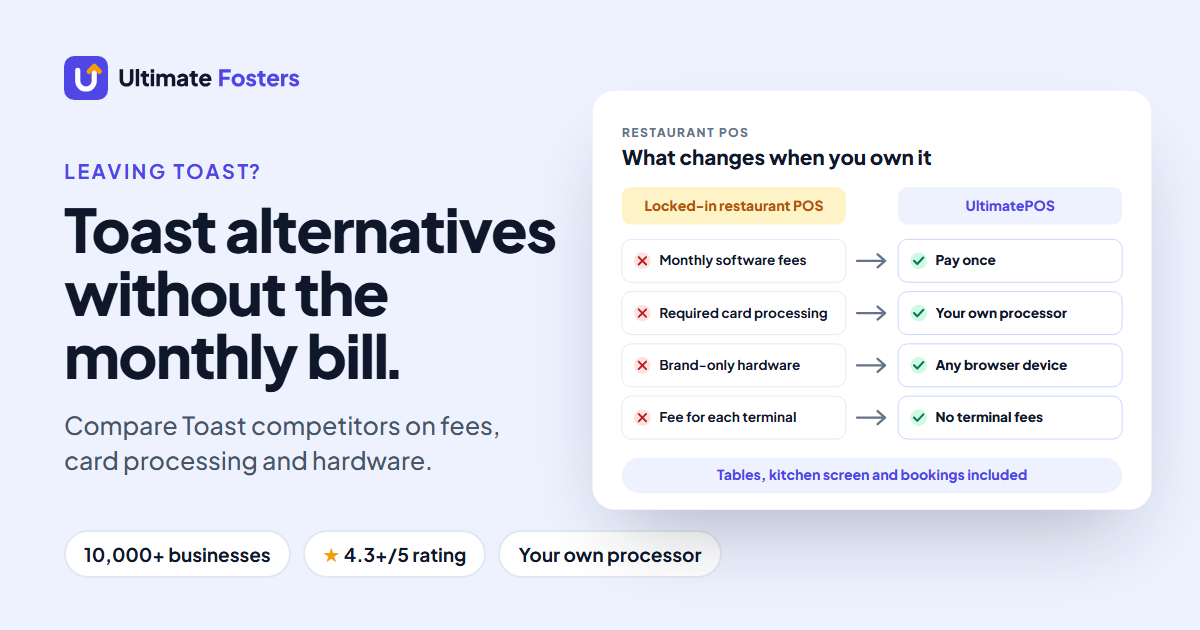
Short answer: Among Toast competitors, the best pick for small and mid-size restaurants is UltimatePOS. You pay $79 once, not every month, and get tables, add-ons, bookings and a kitchen screen. You keep any card processor you like, run it on any device with a browser, and your data stays on your own server. Used by 10,000+ businesses and rated 4.3+/5 from 500+ ratings on CodeCanyon.
The main Toast competitors are UltimatePOS, Square for Restaurants, Clover, SpotOn, TouchBistro, Lightspeed Restaurant and Loyverse. UltimatePOS is the only one you pay for once. The others, like Toast, bill you every month or through their own card processing, and the cost grows with every extra you add.
Try UltimatePOS in the live demo (no sign-up) or see what the $79 license includes.
Compare all 7 · UltimatePOS vs Toast · Toast pricing and fees · How to switch
Written by the Ultimate Fosters team, who have built and supported UltimatePOS for 10+ years. Updated November 2026, with every price checked on the vendor’s own site.
Most restaurants start looking at Toast competitors for the same reason: the Toast bill never stops growing. Every card payment has to go through Toast, the hardware only works with Toast, and most tools you add next cost extra every month.
So this guide compares 7 Toast POS alternatives on the things that decide your real cost: software fees, card processing, hardware and lock-in. UltimatePOS comes first because it is the only one here you pay for once, at $79, while you keep your own card processor and hardware. You can test a full restaurant order in the live demo while you read.
Why restaurant owners look at Toast competitors
When owners leave Toast, they usually point to how it is sold. Four reasons come up most:
- You can’t choose your card processor. Toast’s billing FAQ is clear: “You must use Toast’s processing services.” So you can’t shop around for a lower card rate while you stay on Toast.
- The hardware only works with Toast. Toast’s pricing FAQ says its services may only be used on approved Toast hardware. So your tablets and old terminals won’t do.
- The monthly bill keeps growing. Each terminal after the first costs extra, and online ordering, payroll, loyalty and inventory tools also live in higher plans or paid add-ons.
- The terms are in the quote. Toast’s pricing page shows no contract length, so the term, renewal and any early-cancellation fee are only in your agreement.
The same points also show up in Toast POS reviews in restaurant forums and Facebook groups: card fees owners can’t negotiate, hardware they can’t reuse and contract terms they missed. So when you compare Toast competitors, check processing, hardware and terms, not only the monthly price.
Toast POS pricing and fees: what you really pay
Toast POS fees start with the plan you pick, and Toast publishes three restaurant plans as well as a new-restaurant offer. Here is what each one includes, based on Toast’s pricing page in November 2026:
| Toast plan | Software price | What to know |
|---|---|---|
| Starter Kit | From $0 a month | Pay-as-you-go plan, so the hardware kit has no upfront cost. Aimed at single-location restaurants with 1–2 terminals, but only for new customers |
| Point of Sale | From $69 a month | Monthly software subscription with your choice of Toast hardware as well as flat-rate processing |
| Build Your Own | Quoted | Also adds online ordering, payroll, inventory, scheduling, loyalty and gift cards |
| POS + Payroll (new restaurant offer) | $69 a month + $9 per employee | Also adds payroll and scheduling to the POS |
Checked in November 2026 on Toast’s pricing page. Toast notes that the price includes the first terminal and that each extra device costs more.
On top of the software price, a Toast restaurant pays for:
- Card processing on every sale, at a rate Toast quotes for your business. You can’t move it to another processor.
- Hardware, bought, financed or leased from Toast, because other devices aren’t supported.
- Extra terminals and add-ons, since “additional add-ons available, fees may apply” appears on every plan.
In contrast, UltimatePOS costs $79 once, which is close to a single month of Toast’s $69 Point of Sale plan. After that, there is no monthly software fee, while the card terminal and processor are your choice. For a full breakdown of POS hardware and card fees, see our POS system cost guide.
7 Toast competitors compared
Next, compare the main Toast POS competitors on the four things that decide your real cost. All prices are US prices, taken from each vendor’s own site so you can check them:
| System | Software price | Card processing | Hardware | Lock-in to watch |
|---|---|---|---|---|
| UltimatePOS | $79 once | Any processor or terminal you choose | Any device with a web browser | None, because you own the license and your data |
| Toast | $0 (Starter Kit) or from $69/mo | Toast only, quoted rate | Approved Toast hardware only | Terms are set when you get a quote |
| Square for Restaurants | $0, $49 or $149/mo per location | Square only, 2.4% + 15¢ to 2.6% + 15¢ in person | Square devices or an iPad with a Square reader | Monthly fee per location, and the KDS app also costs per device |
| Clover (full service) | $1,799 + $89.95/mo, or $179/mo for 36 months | Clover’s rate, 2.3% + 10¢ on Restaurant Growth | Clover devices | 36-month subscriptions are non-cancelable |
| SpotOn | $0 All-In or $55/mo per station | 2.79% + 20¢ (All-In) or 2.45% + 15¢ | Included (All-In) or $750 per station | All-In has a 2-year minimum term |
| TouchBistro | From $69/mo, or $119/mo with hardware | Several processors supported | Extra on the base plan; included in the bundle | KDS, inventory, online ordering and loyalty also cost extra |
| Lightspeed Restaurant | Starter, Essential, Premium and Enterprise plans | Lightspeed payments by default on Starter | Not listed on the pricing page | KDS $30 per screen a month |
| Loyverse | Free POS; add-ons $25/mo per store | Loyverse Payments, 2.49% + 15¢ credit | iPad or Android tablet | Staff and advanced stock tools $25/mo each per store |
Checked in November 2026 on Toast, Square, Clover, SpotOn, TouchBistro, Lightspeed, Loyverse and CodeCanyon. Vendors change prices, so check before you buy.
Other Toast competitors you may see
Google’s AI answers also name Shift4 (SkyTab) and NCR Voyix (Aloha) as Toast competitors. Both mostly serve larger and multi-unit operators, so they are left out of this small-restaurant comparison.
The best Toast competitors for restaurants
1. UltimatePOS: pay once and keep your own card processor
Price: $79 once for the Regular license on CodeCanyon, with future updates as well as 6 months of support
Restaurant tools: Tables, service staff, add-ons (modifiers) and bookings, as well as a built-in kitchen screen
Card payments: Any terminal or processor you choose, so you can shop for the lowest card rate. UltimatePOS records each payment
Hardware: Any computer, tablet or phone with a web browser, so you only add a standard thermal receipt printer
Best for: Restaurants, cafés and bars that want to stop paying monthly software fees and also own their data

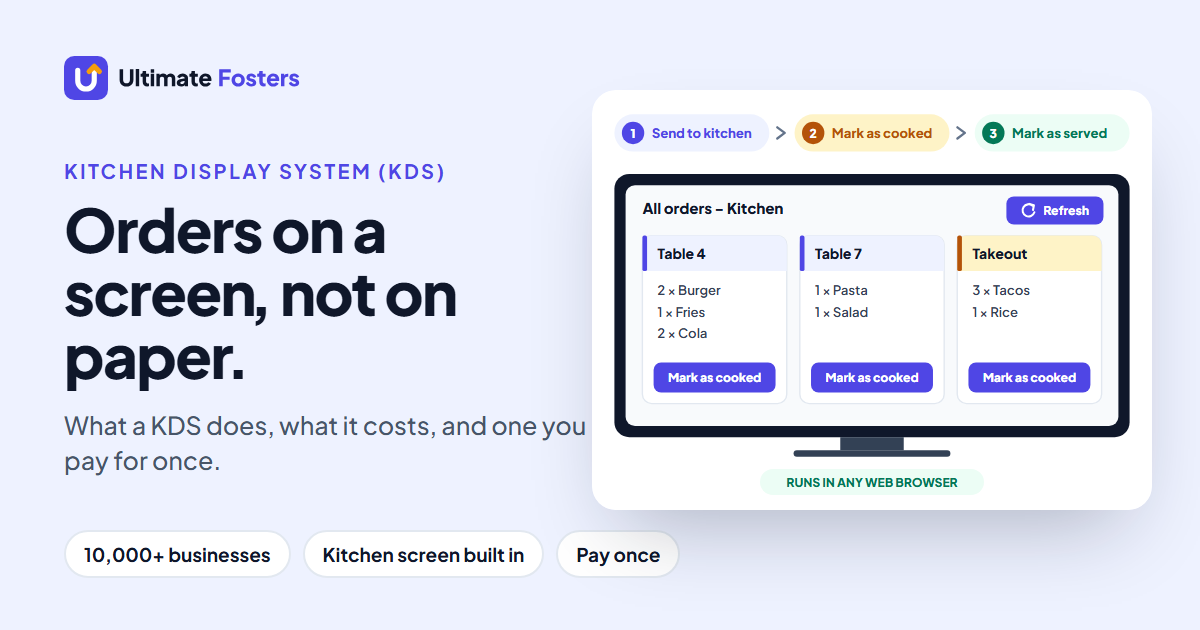
UltimatePOS is the restaurant POS we have built and supported for 10+ years. Here is how a dine-in order runs on it:
- First, the server picks the table, adds the dishes and any add-ons, such as extra cheese, on the POS screen.
- Then the order goes to the kitchen screen, and a ticket can also print on your receipt printer.
- When the dish is ready, the cook clicks Mark as Cooked, and the server sees it on the Orders screen and clicks Mark as Served.
- Finally, you take payment on your own card terminal, and you can split one bill across several payment methods.
What else UltimatePOS covers
It also covers the back office that Toast keeps in higher plans:
- Dine-in, takeout and delivery prices. Set types of service, such as dine-in and takeout, each with its own price list and packing charge.
- Stock and suppliers. Track stock, get low-stock alerts and also raise purchase orders in the core product.
- Loyalty. Give customers reward points on their purchases, also in the core product.
- Staff control. Give each role only the screens it needs in role management, and also link servers to orders with a service staff PIN.
- More than one location. Each business location has its own tables and stock, while one license covers them all.
- Your data, your server. It runs on your own server, with backups to the server or AWS S3, so nobody can lock you out of your records.
Built to stay yours: UltimatePOS records every payment from the card terminal you choose, so you can shop for the lowest card rate instead of taking a bundled one. For online ordering or payroll, keep the tools you already like. Either way, there is no monthly POS bill and no processing lock-in.
“This is the best you can get without all the bloat and unnecessary subscriptions of larger enterprise systems.”
CodeCanyon buyer review of UltimatePOS
See a restaurant order in the live demo
Pick a table, add dishes and then send the order to the kitchen screen. No sign-up needed.
2. Square for Restaurants
Price: $0 (Free), $49 (Plus) or $149 (Premium) a month per location
Card fees: 2.6% + 15¢ in person on Free, 2.5% + 15¢ on Plus, 2.4% + 15¢ on Premium
Watch out: The free plan has no kitchen display app, so a kitchen screen means a paid plan. The KDS app is $30 a month per device on Plus, so Plus with two kitchen screens is $109 a month for one location
Toast vs Square: Square is simpler to start and publishes its card rates, while Toast quotes them. Still, both tie you to their own processing
Our full guide to Square alternatives covers Square’s fees in detail.
3. Clover
Price: Full-service Starter: $1,799 for the hardware plus $89.95 a month, or $179 a month for 36 months
Card fees: 2.3% + 10¢ on the Restaurant Growth plan
Watch out: The 36-month subscription is non-cancelable, so leaving early means paying it off. If you buy the hardware instead, the monthly software fee still applies
Toast vs Clover: Clover lets you buy the hardware outright, but you still pay monthly software and Clover’s card rate
Every Clover price and term is in our Clover fees guide.
4. SpotOn
Price: All-In plan $0 a month per station with hardware included, or POS Essentials $55 a month per station
Card fees: 2.79% + 20¢ in person on All-In, 2.45% + 15¢ on Essentials
Watch out: All-In has processing minimums as well as a 2-year minimum term. On Essentials, however, a Station 15 terminal is $750 each, plus setup costs
Toast vs SpotOn: Both offer a $0 start in exchange for their own processing, but SpotOn publishes its rates while Toast quotes them
5. TouchBistro
Price: Point of Sale from $69 a month, or the Essentials bundle with hardware and payments from $119 a month
Card fees: TouchBistro says it works with a wide range of payment processors, so your rate depends on the processor you pick
Watch out: A kitchen display, inventory, online ordering, loyalty and reservations also cost extra
Toast vs TouchBistro: TouchBistro lets you pick a processor, but every add-on raises the monthly bill
6. Lightspeed Restaurant
Plans: Starter, Essential, Premium and Enterprise, all monthly subscriptions
Card fees: Lightspeed’s integrated payments are the default on Starter, while higher plans get custom rates
Watch out: The kitchen display system is an extra $30 a month per screen on every plan
Toast vs Lightspeed: Lightspeed is still a monthly subscription, and every kitchen screen adds $30 a month on top
7. Loyverse
Price: Free POS with a free kitchen display; Employee management and Advanced inventory are $25 a month each per store
Card fees: Loyverse Payments: 1.99% + 15¢ on debit and 2.49% + 15¢ on credit cards in person
Watch out: Staff tools and advanced stock control cost $25 a month each, so the cost grows with every store
Toast vs Loyverse: Loyverse is cheap to start, but staff and stock tools cost extra per store, so check its table service tools before you switch
UltimatePOS vs Toast: side by side
Of all the Toast competitors, this is the comparison that matters most if you are thinking of leaving Toast:
| UltimatePOS | Toast | |
|---|---|---|
| Software price | $79 once | $0 (Starter Kit) or from $69 a month |
| Ongoing software fee | None, you own the license | Paid every month, through the plan fee or Toast processing |
| Card processing | Any processor or terminal you choose | Toast processing only |
| Hardware | Any computer, tablet or phone with a browser | Approved Toast hardware only |
| Extra terminals | No fee per terminal or user | Each device after the first costs extra |
| Tables, add-ons and service staff | Included | Included |
| Kitchen screen | Included, no fee per screen | Toast KDS on Toast hardware |
| Stock and purchase orders | Included | Automated inventory in Build Your Own |
| Reward points / loyalty | Included | Loyalty in higher plans or as an add-on |
| Online ordering and payroll | Use any tool you like, with no lock-in | In higher plans or paid add-ons, billed monthly |
| Where your data lives | On your own server | In Toast’s cloud |
| Updates and support | Future updates and 6 months of support included | Toast Care, tied to the monthly subscription |
Toast charges every month, keeps you on its card processing and limits you to its hardware. UltimatePOS gives you the restaurant core for $79 once, and the processor and hardware stay your choice. You can also see the restaurant screens in the live demo.
Leaving Toast? Try the same restaurant flow first
Open the UltimatePOS demo, seat a table, send an order to the kitchen screen and then close the bill. Then keep it for $79 once.
Toast vs Square vs Clover
Square and Clover are the Toast competitors most restaurant owners compare first. All three bundle card processing with the POS, so the real difference is in the plans:
| Toast | Square | Clover (full service) | |
|---|---|---|---|
| Entry price | $0 Starter Kit or $69/mo | $0/mo per location | $1,799 + $89.95/mo |
| Card rate | Quoted per business | 2.6% + 15¢ (Free plan) | 2.3% + 10¢ (Restaurant Growth) |
| Hardware | Approved Toast hardware only | Square devices or an iPad with a Square reader | Clover devices |
| Biggest catch | Toast processing required | Paid plan needed for a kitchen screen | Software fee even after you buy the hardware |
If you want out of this monthly model altogether, UltimatePOS is $79 once, with a kitchen screen included and any processor you like.
Which Toast alternative fits your restaurant?
To choose between Toast competitors, start with your service style, then your biggest problem with Toast. Here is how UltimatePOS handles each case:
| Your situation | What matters most | With UltimatePOS |
|---|---|---|
| Full-service restaurant | Tables, servers, add-ons and a kitchen screen | All included: pick the table and server, add modifiers, then send to the kitchen screen |
| Quick service and takeout | Fast counter orders and separate takeout prices | Sell without a table, and set dine-in, takeout and delivery as types of service with their own prices |
| Café or bar | Speed at the counter, drinks kept off the kitchen screen | Leave the send-to-kitchen box unticked on drink-only orders, so they skip the kitchen |
| Tired of card fees | Freedom to choose a cheaper processor | Use any terminal or processor, because UltimatePOS only records the payment |
| Tired of monthly software fees | One price, no subscription | $79 once, with future updates included |
| Several locations | Separate tables and stock for each site | Each location has its own tables and stock, while one license covers all of them |
Need online ordering or payroll too? Run them as separate tools alongside UltimatePOS, so you still pay no monthly fee for the POS itself. For everything else, our restaurant POS guide shows how UltimatePOS works for each type of restaurant.
How to switch from Toast to UltimatePOS
Switching POS takes planning, but not much time. Follow these steps:
- Check your Toast agreement. Find the end date, the renewal rule and any early-cancellation fee before you set a switch date.
- Save your data. Download the sales reports and customer lists you want to keep while your Toast account is still open.
- Set up card payments. Get a terminal from your bank or any processor you like. Toast devices are built for Toast, so plan on new hardware.
- Install UltimatePOS. Use our installation guide, or let our installation service do it for $25.
- Add your menu. Put your items and prices into a spreadsheet and import them, then add modifiers such as sizes and extras.
- Set up the restaurant side. Turn on tables, service staff and the kitchen in the restaurant settings, then connect your receipt printer.
- Train the team on a quiet day. Run test orders from table to kitchen to payment before your first busy shift.
Ready to switch? Get UltimatePOS for $79 and set it up yourself, or add our installation service for $25 and we install it for you. Not sure yet? Try the live demo first.
If you are still comparing Toast competitors, our guides to the cheapest POS systems and open source POS systems cover more choices.
Toast competitors: FAQs
What are some alternatives to Toast POS?
The main Toast POS alternatives are UltimatePOS, Square for Restaurants, Clover, SpotOn, TouchBistro, Lightspeed Restaurant and Loyverse. UltimatePOS is the one you pay for once ($79), with tables, add-ons, bookings and a kitchen screen included and any card processor you like. The others instead charge monthly, bundle their own card processing or both.
Who is Toast’s biggest competitor?
Square is the Toast competitor most owners compare first, followed by Clover. But both work like Toast: monthly fees and their own card processing. For owners who want out of that model, the strongest alternative is UltimatePOS: $79 once, any card processor and no lock-in.
What POS system is better than Toast?
UltimatePOS, if what you dislike about Toast is the monthly bill, the required Toast processing or the Toast-only hardware. It fixes all three: $79 once, any card processor and any computer or tablet with a web browser. Online ordering and payroll are not built in, so you keep the tools you prefer alongside it.
What is the best restaurant POS software?
The best restaurant POS software covers your service style without a bill that grows every month. For a small or mid-size restaurant that wants tables, add-ons, a kitchen screen and bookings without a subscription, UltimatePOS at $79 once is our pick. Our restaurant POS guide shows how each feature works.
Why is Toast POS so expensive?
Toast’s software starts at $69 a month on the Point of Sale plan, and the extras add up. Every card payment goes through Toast’s own processing, and you also need approved Toast hardware. Each terminal after the first also costs extra. Online ordering, payroll, loyalty and inventory tools sit in higher plans or paid add-ons. Those costs repeat every month for as long as you use Toast.
How much does Toast POS cost per month?
Based on Toast’s pricing page in November 2026, the Starter Kit starts at $0 a month on a pay-as-you-go plan for 1–2 terminals. The Point of Sale plan starts at $69 a month, and Build Your Own is quoted. Card processing, extra terminals and add-ons are on top, while Toast quotes the processing rate for each business.
Is Toast POS free?
Not really, because the Starter Kit is a pay-as-you-go plan. It starts at $0 a month, but you still pay Toast’s card processing on every sale, and the price covers the first terminal only. It is also aimed at single-location restaurants with 1–2 terminals.
Does Toast POS have a contract?
Toast does not list a contract length on its pricing page. The term, renewal and any early-cancellation fee are set in your quote and agreement, so ask for them in writing before you sign. Hardware financing and leases can also add their own terms.
Can I use a different payment processor with Toast?
No. In fact, Toast’s own billing FAQ answers this question with “No. You must use Toast’s processing services.” UltimatePOS, however, works the other way round: it records the payment, and the card goes through any terminal or processor you choose.
Can I use my own hardware with Toast?
No, because Toast’s pricing FAQ says its services may only be used on approved Toast hardware. UltimatePOS runs in a web browser, so you can use the computers and tablets you already have, plus a standard thermal receipt printer.
Is Toast a good POS system?
Toast has solid restaurant features, but it comes with high ongoing cost and lock-in: monthly software fees, required Toast processing and Toast-only hardware. UltimatePOS covers the restaurant core for $79 once, with any processor and any browser device, so you get the tools without the lock-in.
Toast vs Square: which is better for a restaurant?
Square is cheaper to start, with a $0 plan and published card rates from 2.4% + 15¢ to 2.6% + 15¢. Toast quotes its processing rate and requires its own hardware. Both still charge monthly for their better plans and lock you into their processing. UltimatePOS skips both: $79 once, with any processor.
Toast vs Clover: which is better?
Clover lets you buy the hardware, but its restaurant plans still carry a monthly software fee. For example, the full-service Starter kit is $1,799 plus $89.95 a month, or $179 a month on a 36-month subscription that is non-cancelable. Toast, meanwhile, quotes processing and requires Toast hardware. Our Clover fees guide has every Clover price, while UltimatePOS avoids both monthly bills for $79 once.
Toast vs SpotOn: which is cheaper?
SpotOn has a $0 All-In plan with hardware included, but it has a 2-year minimum term, processing minimums and a higher card rate (2.79% + 20¢). Its POS Essentials plan is $55 a month per station. Toast starts at $0 or $69 a month. Both keep charging every month, while UltimatePOS is $79 once.
What’s the best and cheapest POS system?
For a restaurant that wants to stop paying every month, UltimatePOS at $79 once is the cheapest full restaurant POS we know of. Free plans such as Square Free and Loyverse cost nothing up front, but they charge monthly for extras: Square for a kitchen screen, Loyverse for staff and advanced stock tools. Our cheapest POS guide compares them in detail.
Is there a restaurant POS with no monthly fee?
Yes, UltimatePOS is a restaurant POS you pay for once: $79 for the Regular license, with tables, add-ons, bookings and a kitchen screen included and no monthly software fee. You run it on your own server or a low-cost cloud server, and you also keep your own card terminal.
Can I move my menu from Toast to UltimatePOS?
Yes, by spreadsheet. There is no direct Toast import, but UltimatePOS can import products from an Excel file. Then copy your menu items and prices into the template and import them in one go. Add-ons and tables are then set up in the settings.
Does UltimatePOS take card payments?
No, UltimatePOS only records the payment, while the card goes through a terminal from your bank or any processor you choose. You can also set up your own payment methods and split one bill across several of them.
Does UltimatePOS work on a tablet like the Toast handheld?
Yes. UltimatePOS runs in a web browser, so servers can take orders on any tablet or phone that can reach your UltimatePOS server, with no special handheld to buy. Card payments go through your own terminal, so you keep your own card rate.
Does UltimatePOS have a kitchen display system?
Yes. When an order is sent from the POS, it appears on the built-in kitchen screen; cooks mark it as cooked, and servers mark it as served. It is included in the $79 license with no fee per screen. Our kitchen display system guide shows the full flow.
Do I need technical skills to install UltimatePOS?
Only basic setup. It runs on a web server, either a low-cost cloud server or a computer in your restaurant. Our installation guide walks you through it, or our installation service sets it up for $25, so you never touch the server.
“Good Product. It allows us to do business easily.”
CodeCanyon buyer review of UltimatePOS
Run your restaurant without a monthly POS bill
UltimatePOS: $79 once, tables, kitchen screen and bookings included, any card processor and your data on your own server. Updates and 6 months of support included.
About this guide
Written by the team at Ultimate Fosters, who build and support UltimatePOS, a POS and inventory system used by 10,000+ businesses for 10+ years. We read every price and term for these Toast competitors on the vendor’s own website in November 2026 and quoted Toast’s own pricing page and support FAQ for its rules. We tested the tables, kitchen and orders screens in the UltimatePOS live demo, and each feature links to its documentation. Prices change, so check them before you buy.
Sources
- Toast: pricing and plans, credit card processing and billing FAQ
- Competitor pricing: Square for Restaurants, Clover restaurant pricing, SpotOn, TouchBistro, Lightspeed Restaurant, Loyverse
- UltimatePOS: CodeCanyon listing, tables, service staff, bookings, modifiers and kitchen docs, types of service, product import
Related: restaurant POS system · kitchen display system · Square alternatives · Clover fees · cheapest POS system · POS system cost
Leave A Comment