
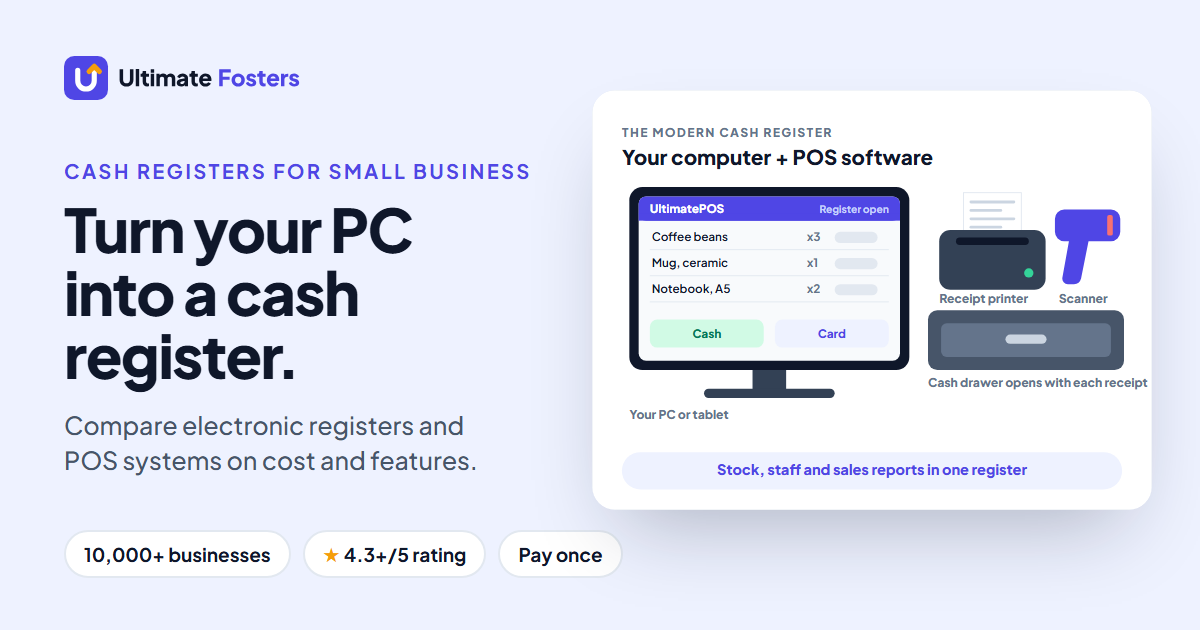
Short answer: Among cash registers for small business, the best pick for most shops is UltimatePOS, a POS system that runs on a computer you already own. It costs $79 once, with no monthly fee, and adds stock tracking, staff logins and daily reports to your till. Then add a receipt printer, cash drawer and barcode scanner, and the whole setup came to $428.97 at November 2026 prices. Used by 10,000+ businesses and rated 4.3+/5 from 500+ ratings on CodeCanyon.
A basic electronic cash register costs $249.99 to $499.99, but it only rings up sales. Counter POS registers cost more: Square Register is $899 and Clover Station Duo is $1,899, and both add monthly plans and card fees.
Try the UltimatePOS register in the live demo (no sign-up) or see what the $79 license includes.
Prices compared · Register vs POS · Best picks · Set up a POS register
Written by the Ultimate Fosters team, who have built and supported UltimatePOS for 10+ years. Updated November 2026, with every price checked on the seller’s own site.
Buying a cash register used to mean picking a machine with a drawer and a printer. Now, however, small shops choose between three options, so this guide compares them on real prices and features. Because we build UltimatePOS, the pay-once option, we also show where a plain register is enough.
Types of cash registers for small business
A cash register is a machine or system that records each sale, adds up the total and tax, prints a receipt and holds the cash in a locking drawer. Small business cash registers come in three types, which differ in what they track, how you pay for them and who controls your sales data:
- Electronic cash register (ECR). A countertop cash register machine with a keypad, a receipt printer and a cash drawer. It rings up sales, adds tax and prints a daily total. It is cheap and simple, but most models track sales by department, not by product.
- All-in-one POS register. A touch screen cash register sold by a payment company, such as Square Register or Clover Station Duo. It tracks products and stock as well. However, card payments must go through that company, and more features need a monthly plan.
- POS software on your own computer. Software such as UltimatePOS runs on a PC, Mac or tablet you already own. Then you add a receipt printer, cash drawer and scanner, and you choose your own card terminal.
Modern cash registers are usually called POS systems, and both of the last two types fit that name. A POS register keeps the cash drawer but adds your product list, stock levels, staff logins and sales reports.
How much does a cash register cost?
A cash register costs $249.99 to $499.99 for an electronic model. UltimatePOS with new hardware on a computer you own comes to about $428.97, and a counter POS register such as Square Register or Clover Station Duo costs $899 to $1,899 before monthly fees. Here is what cash registers for small business cost in November 2026, with each price read on the seller’s own site:
| Option | Up-front price | Monthly cost | Card payments |
|---|---|---|---|
| UltimatePOS on your own computer | $79 software, once, plus a receipt printer ($99.99), cash drawer ($189.99) and USB scanner ($59.99) = $428.97 | No software fee | Your own card terminal and processor |
| Electronic cash register | $249.99 (Nadex Coins CR180) to $499.99 (Nadex Coins CR600); Royal 6000ML $399.99 | None | Usually a separate card terminal |
| Square Register | $899 (or Square Terminal $299) | $0, $49 or $149 per location | Square only, 2.6% + 15¢ in person on the free plan |
| Clover Station Duo | $1,899 or $180 a month for 36 months (Clover Compact $349) | Clover software plan on top | Clover’s processing |
Prices read in November 2026 on Office Depot, Square hardware, Square pricing and the Clover shop. The UltimatePOS hardware examples are an Adesso NuPrint 210 printer, an Adesso 16-inch POS cash drawer and a Unitech MS250 scanner from Office Depot. Also, taxes and shipping are extra.
Two costs that are easy to miss
First, Square and Clover charge a card fee on every sale for as long as you use them, and their paid plans are billed per location. Second, a plain register has no monthly cost but also no stock or staff tracking, so you may outgrow it as your shop grows. In addition, our guide to POS system cost breaks down every fee, and the cheapest POS system guide compares totals over time.
Electronic cash registers vs POS systems for small business
An electronic cash register records the sale. In contrast, a POS system records the sale and runs the shop behind it. Here is what each type of cash register for small business does at the counter:
| UltimatePOS on your computer | Electronic cash register | Square or Clover POS register | |
|---|---|---|---|
| Ring up sales and print receipts | Yes | Yes | Yes |
| Product list with stock levels | Yes, updated with every sale | Usually not (sales by department) | Yes |
| Low-stock alerts and purchase orders | Yes, included | No | Some features need a paid plan |
| Staff logins and roles | Yes, with a Cashier role that only sees the POS screen | Basic clerk numbers | Yes |
| Barcode scanning and labels | Yes, USB scanners and label printing | Some models | Yes |
| Daily cash count | Open and close register, Register Report | Z report | Yes |
| Several shops | All locations in one system, no extra fee | One machine per counter | Billed per location |
| Card payments | Your own terminal and processor, recorded in the sale | Separate terminal | Their processing only |
| Where your sales data lives | On your own computer or server | In the machine | On the company’s servers |
| Monthly software fee | None, pay once | None | Square $0 to $149 per location; Clover plan on top |
An electronic register can be enough if you sell a few items for cash. Once you track stock, have staff on the till or plan a second shop, you need a POS system, because those are jobs a register can’t do.
Best cash registers for small business
Here are the best cash registers for small business, by the kind of shop that fits each one best:
1. UltimatePOS: best for most small shops
Price: $79 once, no monthly software fee; updates and 6 months of support included
Runs on: The browser of a PC, Mac or tablet you already own; install it on a computer in your shop or on your own web hosting
Best for: Shops with stock to track, staff on the till, or more than one location
Cash register tools: Open and close the register with a cash count, register details during the day and a Register Report
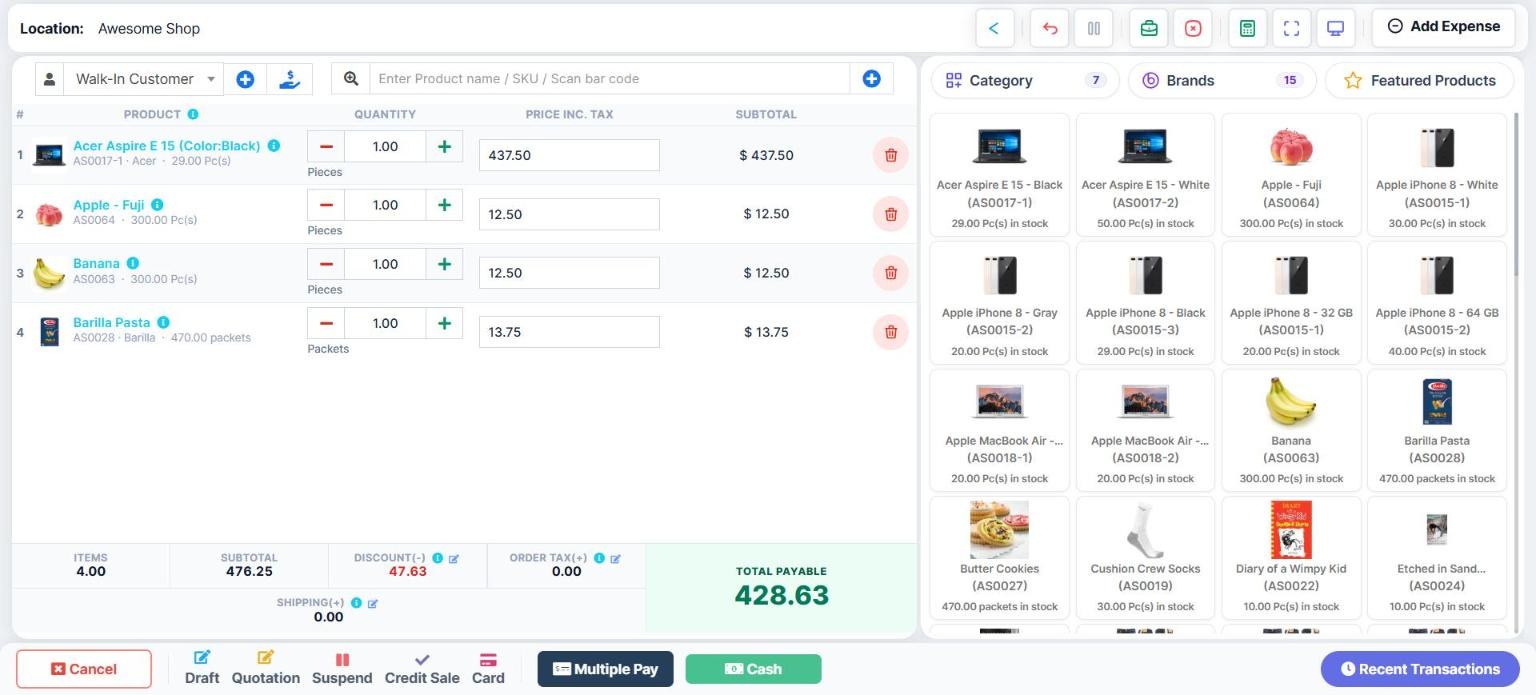
UltimatePOS turns the computer at your counter into a full POS cash register. Each sale lowers stock, prints a receipt and opens the cash drawer.
What you get with UltimatePOS for $79
- A real cash register routine: open the register with a cash count, check register details during the day, close it with cash, card slips and cheques, and review every shift in the Register Report.
- Stock that keeps itself up to date: every sale lowers stock, and low-stock alerts and purchase orders tell you what to reorder.
- Barcodes and labels: scan with a USB barcode scanner and print your own barcode labels.
- Staff logins: each cashier gets a login, and the Cashier role only opens the POS screen.
- Customers and reports: customer accounts, sales and profit reports, all in one place.
- Every location included: run several shops in one system for the same one-time price.
Why owners pick it: you pay once and keep the setup. Card payments run on the terminal and processor you choose, so you can shop for the lowest card rate. Also, your sales data stays on your own computer or server, not on a vendor’s account you rent.
“This is the best you can get without all the bloat and unnecessary subscriptions of larger enterprise systems.”
CodeCanyon buyer review of UltimatePOS
See the register screen before you buy
Open the UltimatePOS demo, ring up a sale and check the register details. No sign-up needed. The license is $79 once.
2. Electronic cash register: basic, cash-only selling
Price: $249.99 to $499.99 at Office Depot (November 2026)
Fits: A market stall or kiosk with a short price list and mostly cash sales
Watch out: Sales by department only, no stock counts, few reports beyond the daily Z report, and one machine per counter
For example, popular models include the Royal 6000ML and the Nadex Coins CR180. They are fine for simple selling, but the day you need to know what sold and what to reorder, you will be copying totals into a spreadsheet.
3. Square Register: card processing bundled in
Price: $899 for Square Register; $299 for Square Terminal; plans at $0, $49 or $149 a month per location
Fits: Card-heavy shops that want one company for hardware, software and payments
Watch out: Every card payment goes through Square (2.6% + 15¢ in person on the free plan), and staff and loyalty tools sit on paid plans
For more detail, our guide to Square alternatives covers Square’s plans and fees.
4. Clover Station Duo: a two-screen counter on Clover
Price: $1,899, or $180 a month for 36 months; Clover Compact $349
Fits: Shops that want a two-screen counter POS with Clover’s payment service
Watch out: A Clover software plan and Clover card fees come on top of the device price
You can also find every Clover plan and fee in our Clover fees guide.
How to turn a PC or tablet into a POS cash register
Turning the computer at your counter into a POS cash register takes six steps with UltimatePOS:
- Install UltimatePOS. Buy the $79 license and install it on a computer in your shop or on your web hosting. Prefer not to? Then our installation service sets it up from $25.
- Add your products. Next, type them in or import them from an Excel file, with prices, barcodes and opening stock.
- Plug in a USB barcode scanner. No setup is needed, so put the cursor in the product field and scan (barcode scanner guide).
- Connect a thermal receipt printer. Browser-based thermal printers are the easiest to set up, because they print straight from the browser (receipt printer guide).
- Connect the cash drawer to the printer. Plug the drawer’s RJ12 cable into the printer and turn on the cash drawer option in the printer’s settings, so the drawer opens with every receipt (cash drawer guide).
- Add your cashiers. Finally, give each one a login with the Cashier role, which only opens the POS screen.
Hardware you need for a POS cash register
Apart from the computer you already have, a POS cash register needs three add-ons and your card terminal. Together, they give you a cash register with a scanner, receipt printer and cash drawer, plus stock tracking and reports:
| Hardware | What it does | Example price (November 2026) |
|---|---|---|
| Computer or tablet | Runs UltimatePOS in a web browser | The one you already own |
| Thermal receipt printer | Prints receipts and opens the drawer | $99.99 (Adesso NuPrint 210) |
| POS cash drawer | Holds cash; opens with each receipt | $189.99 (Adesso 16-inch) |
| USB barcode scanner | Adds products to the sale in one scan | $59.99 (Unitech MS250) |
| Card terminal | Takes card payments from the processor you choose | Set by your processor |
Pick a receipt printer with a cash drawer port (RJ11/RJ12) if you want the drawer to open by itself. Examples are from Office Depot, but any compatible model works.
Selling from more than one counter? In that case, each counter opens UltimatePOS in its own browser and shares the same products and stock. You can also print receipts from a phone or tablet over Bluetooth. If most of your items have barcodes, our barcode inventory system guide covers labels and scanners in more detail.
Want to see the till first? Ring up a test sale and open the register details in the live demo. When you are ready, get UltimatePOS for $79, and add our installation service if you would rather not set up the server yourself.
How to use a cash register: open, sell and close
Whatever register you use, the daily routine is the same: start with a counted float, ring up sales, then count the drawer at closing. Here is how each step works in UltimatePOS:
- Open the register. First, at the start of the shift, the cashier enters the cash in hand, which is the float of small bills and coins for change.
- Ring up sales. Next, scan or search each item, pick the payment method (cash, card or another type you set up) and print the receipt. Then the drawer opens for the change.
- Check during the day. Meanwhile, the Register details button shows cash in hand, payments by method and refunds so far.
- Close the register. Finally, at the end of the shift, the cashier counts and enters the total cash, card slips and cheques. Then compare the cash count with the cash total in Register details.
- Review the Register Report. After that, the owner sees every register session in Reports, so a short drawer can be traced to a shift (cash register guide).
Example: You open with a $150 float. Then, during the day, you take $640 in cash sales and give one $20 refund in cash. So at closing, the drawer should hold $150 + $640 − $20 = $770. If you count $760, the drawer is $10 short, and the Register Report lists that shift’s totals so you know which session to check.
Which of these cash registers fits your small business?
Choosing between cash registers for small business starts with the kind of shop you run. Here is how UltimatePOS works as the cash register in each case:
| Your shop | What matters most | How UltimatePOS handles it |
|---|---|---|
| Small counter, mostly cash | Fast checkout, a counted drawer | Scan or tap items, print the receipt, drawer opens; open and close the register each shift |
| Retail shop with stock to reorder | Stock levels, low-stock alerts, purchase orders | Every sale updates stock; alerts and purchase orders are included |
| Staff working the till | Separate logins, cash counted per shift | Cashier role per person; each register session in the Register Report |
| Two or more locations | One system without per-location fees | All locations in one system for the same one-time price |
| Pop-up or market stall | Light hardware | Open it in a tablet browser and print over Bluetooth; take cards on your own reader |
| Card-heavy shop | Low card fees | Use any card processor and terminal, and record each card payment in the sale |
If you run a retail shop, our retail POS system page shows how UltimatePOS handles variants, barcodes and multiple stores. If you also want to compare inventory tools, see our guide to inventory management software for small business.
Cash registers for small business: FAQs
What is the best cash register for a small business?
The best cash register for small business is usually POS software on a computer you already own. UltimatePOS costs $79 once and adds stock tracking, staff logins and sales reports to the till. For example, with a receipt printer, cash drawer and scanner, the full setup came to $428.97 at November 2026 prices. A basic electronic register only makes sense for a cash-only stall that never needs stock counts.
How much does a cash register cost?
Electronic cash registers cost $249.99 to $499.99 at Office Depot (November 2026). By contrast, counter POS registers cost more: Square Register is $899 and Clover Station Duo is $1,899, plus monthly plans and card fees. UltimatePOS is $79 once and runs on your own computer, so you only add a printer, drawer and scanner.
What is an electronic cash register?
An electronic cash register (ECR) is a countertop machine with a keypad, a small display, a receipt printer and a locking cash drawer. It adds up each sale, adds tax and totals the day. However, most models sort sales by department rather than by product, so they can’t tell you how many of each item you have left.
What are the new cash registers called?
The modern term for a cash register is a POS (point of sale) system. A POS system is software on a computer, tablet or touchscreen that records each sale, takes several payment types, updates stock and keeps reports. Because the cash drawer and receipt printer plug into it, it still works as a cash register.
Is a cash register a point of sale system?
A cash register is the simplest kind of point of sale. It records the sale and holds the cash, but little else. A POS system does that too, and it also keeps your product list, stock levels, customers, staff logins and reports. That is why many shops now choose a POS system instead of a stand-alone register.
What can I use instead of a cash register?
Use POS software on a computer or tablet you already have. For example, UltimatePOS ($79 once) runs in a web browser and works with a USB barcode scanner, a thermal receipt printer and a cash drawer that opens with each receipt. In that setup, card payments are taken on your own card terminal and recorded in the sale.
Which POS has no monthly fees?
UltimatePOS has no monthly software fee. You pay $79 once on CodeCanyon and install it on your own computer or web hosting. Updates are included. Square’s free plan also has no monthly fee, but every card payment goes through Square at 2.6% + 15¢, and features like staff management sit on paid plans.
Where can I find cheap cash registers for small business?
Office supply stores such as Office Depot sell electronic cash registers from about $249.99. If you already own a computer, POS software can cost less overall: UltimatePOS is $79 once, and a basic receipt printer started at $99.99 at Office Depot in November 2026.
How much money should a cash register have?
There is no fixed amount. Start each day with enough small bills and coins to make change for your first sales. This starting cash is called a float. Count it when you open the register, then count the drawer again at closing and compare it with the sales report.
How do you open a cash register?
Electronic registers usually open with a key or the No Sale button. In a POS system, however, you open the register on screen at the start of a shift by entering the cash in the drawer. In UltimatePOS the drawer then opens each time a receipt prints, and you close the register at the end of the day.
Is it hard to learn a POS system?
No, because a cashier mostly scans items, picks a payment type and prints the receipt, which takes minutes to learn. In UltimatePOS the default Cashier role only opens the POS screen, so new staff see only the screen they need. You can also try the same screen in the live demo.
Is there an app that works like a cash register?
Yes. POS apps and browser-based POS software turn a phone or tablet into a cash register. UltimatePOS runs in the browser of a tablet or phone, so there is nothing to download from an app store, and receipts print over Bluetooth to a thermal printer. For a fixed counter, add a PC, a cash drawer and a barcode scanner.
How can I make my own cash register?
Use a computer or tablet you already own and add POS software, a thermal receipt printer, a cash drawer and a USB barcode scanner. With UltimatePOS ($79 once), that setup came to $428.97 at November 2026 prices, and the drawer opens with every receipt. The six steps are in the setup section above.
What is the cheapest POS system to use?
Over time, the cheapest POS system is one with no monthly fee and no card rate you’re locked into. UltimatePOS costs $79 once and lets you choose your own card processor. Free plans such as Square’s cost $0 a month but charge 2.6% + 15¢ on every card sale. Our cheapest POS system guide compares the totals.
What are the disadvantages of a POS system?
The usual downsides are monthly fees that grow with each location, card rates you can’t change, hardware that only works with one brand, and some setup time. UltimatePOS avoids the first three: you pay $79 once, keep your own card processor and use standard hardware. Our installation service can handle the setup from $25.
Turn your counter into a POS cash register
UltimatePOS: $79 once, with stock tracking, staff logins, register reports and every location included. Use your own computer, card terminal and processor.
About this guide
Written by the team at Ultimate Fosters, who build and support UltimatePOS, a POS and inventory system used by 10,000+ businesses for 10+ years. To compare cash registers for small business, we read every price in November 2026 on the seller’s own website: Office Depot for registers and hardware, Square and Clover for their devices and plans. Also, each UltimatePOS feature links to its documentation, and you can check it in the live demo. Prices change, so confirm them before you buy.
Sources
- Registers and hardware: Office Depot cash registers and drawers, receipt printers, barcode scanners
- POS registers: Square hardware, Square pricing, Clover shop
- UltimatePOS: CodeCanyon listing, cash register, hardware support, role management, payment types
Related: POS system cost · cheapest POS system · retail POS system · barcode inventory system · Square alternatives · Clover fees
Leave A Comment