
Bakery software

Bakery Software and POS System, Pay Once

UltimatePOS is bakery software for retail, cake and wholesale bakeries. Ring up the counter, cost every recipe, take custom cake orders with a deposit and see what expires tomorrow. It costs $79 once, or $148 with recipes and production runs, and runs on your own computer or server. No monthly fee.

Opens a sample shop. No sign-up. Ring up a sale, then look at stock, purchases and reports.

Used by 10,000+ businesses  ·  4.3+/5 from 500+ ratings on CodeCanyon  ·  10+ years of updates
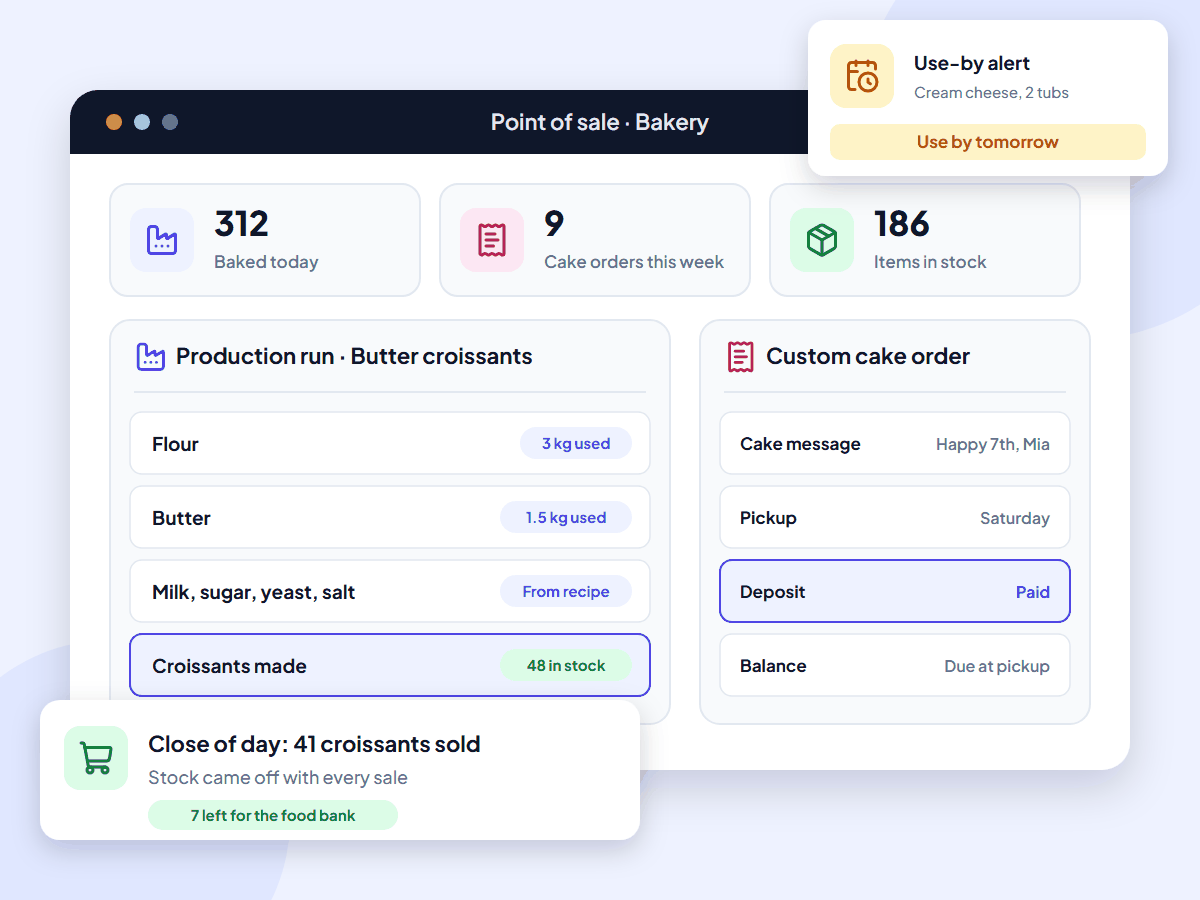
UltimatePOS bakery software: a croissant production run from a recipe, a custom cake order with a deposit, a use-by alert and the end-of-day stock count

What is bakery software?

Bakery software is a point-of-sale and inventory system for bakeries. It rings up counter sales, turns recipes into ingredient use and batch costs, tracks use-by dates, takes custom cake orders with deposits and bills wholesale customers. UltimatePOS does all of this for a one-time price.

It is also called bakery management software, a bakery management system, a bakery POS system or bakery point of sale software.

Monthly bakery software adds up

BakeSmart, a bakery platform, starts at $99 a month per location, plus a setup fee from $499. Its wholesale and point-of-sale tools are add-ons. Three years of the base plan with setup comes to $4,063.

UltimatePOS costs $79 once. Add the Manufacturing module for recipes and production runs, and the total is $148, also once. You install it on a computer or server you control and keep using it. There is no fee per register, user or shop.

With UltimatePOS you get:

  • A one-time price of $148 with recipes, updates included
  • No monthly plan or contract
  • As many registers, staff and shops as you need
  • Sales, recipes and customers on your own server

Features

Bakery POS and management software features

Counter sales, cake orders, wholesale, labels and use-by dates come with UltimatePOS. Recipes, production runs and batch costs come with the Manufacturing module ($69 once). Open a card to read its guide.

Get a low stock alert when flour or butter runs low and send a purchase order to your supplier. Run a second shop from the same system and move stock between them with stock transfers.

How a bakery runs on UltimatePOS, from recipe to register

  1. Save your recipesAdd each product's ingredients and how many it makes.
  2. BakeRecord the production run. Ingredients go out, baked goods come in.
  3. SellRing up the counter, take cake orders and invoice cafés.
  4. Watch the datesCheck what expires soon and order ingredients before you run out.
  5. Close the dayTake unsold items off stock and close the register.

Worked examples

Two bakery jobs, with real numbers

One batch from recipe to sale, and one custom cake from order to pickup.

A morning batch of croissants, costed and sold

Your croissant recipe uses 3 kg of flour, 1.5 kg of butter, plus milk, sugar, yeast and salt, and makes 48 croissants. You add $12.00 for labor and the oven as a fixed production cost.

Flour, 3 kg at $1.10 a kg$3.30
Butter, 1.5 kg at $9.00 a kg$13.50
Milk, sugar, yeast and salt$2.40
Labor and oven$12.00
Batch cost, 48 croissants$31.20
Cost of one croissant$0.65
  1. At 6 a.m. you record a production run for 48 croissants. UltimatePOS takes 3 kg of flour and 1.5 kg of butter out of stock and adds 48 croissants.
  2. You sell them at $3.50 each. By closing time you have sold 41, which is $143.50.
  3. The 7 left over go to a food bank. A stock adjustment with the reason takes them off stock, so tomorrow starts at zero.

The batch made $112.30 before rent and other overheads: $143.50 in sales less the $31.20 batch cost. See the Manufacturing module guide and our markup and margin guide.

A custom birthday cake with a deposit

On Monday a customer orders a $65.00 cake for Saturday, with the message “Happy 7th birthday, Mia.”

Custom birthday cake$65.00
Deposit paid on Monday$25.00
Balance due at pickup$40.00
  1. Your Custom cake product has Manage stock switched off, because you bake it to order.
  2. You ring up the cake and type the message and pickup date in your two sale fields: Cake message and Pickup date.
  3. The customer pays $25.00 now. The sale shows $40.00 still due.
  4. You print the ticket, and the decorator works from the message on it.
  5. On Saturday the customer collects the cake, and you add the $40.00 payment to the same sale.

Your sales list shows which cake orders still have a balance. See the invoice layout guide for the sale fields.

Inventory

Bakery inventory software: ingredients, batches and use-by dates

UltimatePOS keeps your bakery inventory and the till in one system.

Bakery jobHow UltimatePOS handles it
Ingredient deliveriesA purchase from the supplier, with the lot number and expiry date if you track them. Guide
Ingredients used by each batchA production run takes them out of stock, based on the recipe. Guide
Running low on flour or butterA low stock alert, then a purchase order to your supplier. Guide
Dairy and fillings that expireExpiry dates on stock, a list of what expires soon and an optional stop on sales. Guide
Unsold, damaged or donated itemsA stock adjustment with the quantity and the reason. Guide
Day-old bread at a lower priceA dated discount on a category, such as Day-old, with a start and end date. Guide
Cookies or bread by weightScale labels that carry the weight, and decimal quantities at the till. Guide
Custom cake ordersSale fields for the message and pickup date, and a deposit with the balance due. Guide
Cafés and shops you supplyA price list, a credit limit and pay terms for each account. Guide
A second shop or a central bakehouseEach one is a location with its own stock. Stock transfers move items between them. Guide
What sells and what makes moneySales and profit reports by product and category. Guide

For more on stock counts and reorders, read our inventory guide for small businesses.

Who it’s for

A bakery POS system for retail, café, cake and wholesale bakeries

UltimatePOS is bakery software for small business owners who want to buy their system once and stop paying every month. Use it as retail bakery software, wholesale bakery software or both.

Retail bakeries

Bread, pastries and cookies over the counter, with recipes, batch costs and use-by dates.

Bakery cafés

Tables, add-ons and a kitchen screen for coffee and food, on the same system as the bakery counter.

Cake shops

Custom cake orders with a message, a pickup date and a deposit, plus the cost of each cake.

Wholesale bakeries

Price lists, credit limits and weekly standing orders for the cafés and shops you supply.

More seating than counter? See our restaurant POS system. Making packaged food at volume? See our manufacturing inventory software.

Why bakeries use UltimatePOS

  • Pay once. A one-time license instead of a monthly plan, with updates included.
  • Your recipes stay yours. Recipes, sales and customer details live on your own computer or server.
  • Keep your own card processor. Take cards on the terminal you already have and record each payment in UltimatePOS.
  • Know what each item costs. Recipe costs and profit reports show which breads and cakes earn the most. Our markup and margin guide helps you set prices.
  • Help when you need it. 6 months of support from our team and 270+ step-by-step guides.

10,000+

businesses use our software

10+

years of updates

2,000+

updates and features

How much does bakery software cost?

UltimatePOS costs $148 once with recipes and production runs. Updates are included, and so are 6 months of support, which you can extend. Most bakery platforms charge every month, per location or per user.

Prices checked on each company’s own website in November 2026, in US dollars, excluding tax, hardware and card fees. UltimatePOS: Regular License on CodeCanyon; Manufacturing module from our shop.
Software What you pay How it is charged
UltimatePOS $148 once with recipes and production runs ($79 UltimatePOS + $69 Manufacturing module), or $79 for the POS alone. Optional installation service: $25. One-time license. Runs in a web browser. No fee per register, user or shop.
BakeSmart From $99 a month per location, plus a setup fee from $499. Wholesale, cake pricing and point of sale are add-on modules. Monthly plan per location.
FlexiBake Base $295 a month, plus $145 per extra user. Point of sale is not listed. Monthly plan.
CakeBoss $149 for the first year, then $36 a year. Orders, recipe costing and invoices. Point of sale and inventory are not listed. Yearly subscription.
Bakery BOSS $99 once. Orders, invoices, inventory and a POS module. Recipe costing is not listed. One-time license.
Square for Restaurants Free plan for basic sales. Plus is $49 a month per location. Monthly plan, plus card fees.
Toast Starter Kit at $0 a month on pay-as-you-go card rates. Point of Sale plan from $69 a month. Monthly plan, plus card fees.

Software cost over three years, one bakery

$148UltimatePOS with recipes, paid once
$4,063BakeSmart, $99 a month for 36 months plus $499 setup
$10,620FlexiBake Base, $295 a month for 36 months

These figures cover software only. The monthly products include things UltimatePOS does not, such as cloud hosting, built-in card payments, an online ordering page and, on FlexiBake, nutrition labels. Installed on a computer in your bakery, UltimatePOS has no running cost. To use it from a second shop or your phone, put it on an online server. Our example server costs about $7.20 a month with backups (hosting options, full POS cost breakdown).

What UltimatePOS customers say

Reviews of UltimatePOS from buyers on CodeCanyon, across all types of business.

MMontashir

★★★★★

“This is the most complete application for pos. I am writing the review after using this for 2 years… Whatever you can think of under a pos for business, you will find a solution here.”

IiN4sser

★★★★★

“We’ve been using UltimatePOS for 2 years. UltimatePOS is a powerful tool that helps us to manage stock, sales, purchases & other business day-to-day activities.”

TTerranos74

★★★★★

“I’ve been using to manage my business for several years now. My support service already expired but I still can rely on the script due to the stability…”

How to start using UltimatePOS in your bakery

1. Try the demo

Open a sample shop with products, sales and reports. No sign-up needed.

2. Buy UltimatePOS

Get the $79 Regular License, and the $69 Manufacturing module for recipes. Updates are included.

3. Install it

Install it on a computer in your bakery or an online server, or let our team do it for $25.

4. Add your products

Import your products and ingredients from a spreadsheet, then save your first recipe.

Bakery software questions

The best bakery POS system for a small bakery rings up the counter quickly, knows what each recipe costs, tracks use-by dates and takes custom orders with a deposit. UltimatePOS does all four for $148 once with the Manufacturing module, or $79 for the POS alone. It does not print allergen labels, so check whether you need that.

Bakery management software runs the business side of a bakery: recipes and their cost, ingredient stock, production, orders, wholesale invoices and sales reports. UltimatePOS combines this with the till, so a sale and a production run both update the same stock.

It is another name for bakery management software: one system for sales, recipes, stock and orders. Some are cloud services billed monthly, others you install yourself. UltimatePOS is the second kind, at $148 once.

Small bakeries often use a POS for the counter, a spreadsheet for recipe costs and an app for cake orders. Larger bakeries use bakery platforms such as BakeSmart, Cybake or FlexiBake. UltimatePOS puts the counter, recipes, stock, cake orders and wholesale accounts in one system.

BakeSmart starts at $99 a month per location plus setup, and FlexiBake Base is $295 a month. CakeBoss is $149 for the first year, then $36 a year, for orders, invoices and recipe costs, with no POS listed. UltimatePOS costs $148 once with recipes, or $79 for the POS alone.

UltimatePOS has no monthly fee. You pay $79 once for the license, $69 once for recipes, and run it on your own computer or server. You keep your own card processor, so no POS company takes a cut of each sale.

Yes. You install UltimatePOS on a computer in your bakery or on an online server, so the system and your data stay yours. On a shop computer it runs on your own network; on an online server you can reach it from a second shop or your phone. Our team can install it for $25 if you prefer.

Square for Restaurants has a free plan and Toast a $0 Starter Kit. Both take a fee on every card payment. UltimatePOS is a paid license: $148 once, with recipes, use-by dates and cake orders, and no fee on your card sales. See our cheapest POS system guide.

For bakeries that supply cafés and shops, look for price lists per customer, credit limits, pay terms and repeat invoices. UltimatePOS has all four: price groups, pay terms, a customer ledger and recurring invoices.

Ring up the cake, type the message and pickup date in two sale fields and take a deposit as a part payment. The balance stays due until pickup, and the fields print on the ticket. You can also take the deposit as an advance payment on the customer’s account.

Yes, with the paid WooCommerce module. It sends your products and stock to a WooCommerce store and brings website orders into UltimatePOS. You need a WooCommerce website for this, because UltimatePOS has no ordering website of its own.

Add up the cost of the ingredients in the recipe, add labor and oven cost, and divide by how many the batch makes. The Manufacturing module works this out from your recipe and ingredient prices. In our croissant example, a $31.20 batch of 48 costs $0.65 each.

Record every ingredient delivery as a purchase, record each bake as a production run, and let each sale take finished items out of stock. Then count the shelves at closing and record what you throw out or give away with a stock adjustment.

Many sell day-old items at a lower price, give them to a food bank or a shelter, or use them in other products such as bread pudding or croutons. In UltimatePOS, a dated discount handles day-old prices and a stock adjustment records donations.

Yes. Weigh the item on a label scale and scan its barcode. UltimatePOS reads the product and the weight from the scale label and works out the price. See how our grocery POS system uses it.

Yes. Enter the expiry date when ingredients or packaged goods arrive. The dashboard lists what expires soon, and you can stop sales a set number of days before.

Yes, for small wholesale bakeries. Give each café or shop its own price list, credit limit and pay terms, and set weekly orders as recurring invoices, which need one cron job on your server. It does not plan delivery routes. See our wholesale inventory software page.

Yes. The restaurant features add tables, add-ons and a kitchen screen to the same system as your bakery counter.

It suits a home bakery that wants recipe costs, stock and sales in one place. If you only need an order form and an online shop page, a home bakery app may be simpler. UltimatePOS runs on a laptop or an online server for $148 once.

No. It prints labels with the name, price and barcode, but it does not work out allergens or nutrition facts. Keep using your label maker for those.

No. It does not build a bake list for you. Your sales reports show what sold by product and day, which you can use to set tomorrow’s quantities.

It records card, cash and other payment methods, but it does not connect to a card terminal. Take the payment on your own terminal and record it as Card.

You need a computer or tablet with a web browser and a barcode scanner. Add a receipt printer and a cash drawer, a label printer for packaged goods, and a label scale if you sell by weight. See our hardware guides.

No. The sale screen is a product grid and payment buttons. Give counter staff the Cashier role, which only opens the sale screen, and try everything first in the live demo.

Yes. Add each shop or bakehouse as a business location, move stock between them with stock transfers, and choose which shops each user can see.

Yes. You pay $79 once, plus $69 once for the Manufacturing module if you want recipes. The license includes future updates and 6 months of support that you can extend. Hosting is extra. On a computer in your bakery there is nothing more to pay, and our example online server costs about $7.20 a month.

About this page

Written by the Ultimate Fosters team, who have built and supported UltimatePOS for 10+ years. Every feature is checked against our UltimatePOS documentation and release notes, and we recheck competitor prices on their own websites every quarter. See all industries we support.

Try UltimatePOS in the live demo

Ring up a sale, look at stock and purchases, and open the manufacturing demo to see a recipe. No installation or sign-up.