
Repair shop software

Phone & Computer Repair Shop Software, Pay Once

UltimatePOS with the Repair module is computer repair shop software for phone, laptop and electronics repairs. Check each device in with its IMEI or serial number. Text the customer when the status changes, then turn the job into an invoice with the parts and labor. It costs $115 once and runs on your own computer or server. No monthly fee.

Opens a sample shop. No sign-up. Choose “Advance Repair Module” to open job sheets.

Used by 10,000+ businesses  ·  4.3+/5 from 500+ ratings on CodeCanyon  ·  10+ years of updates
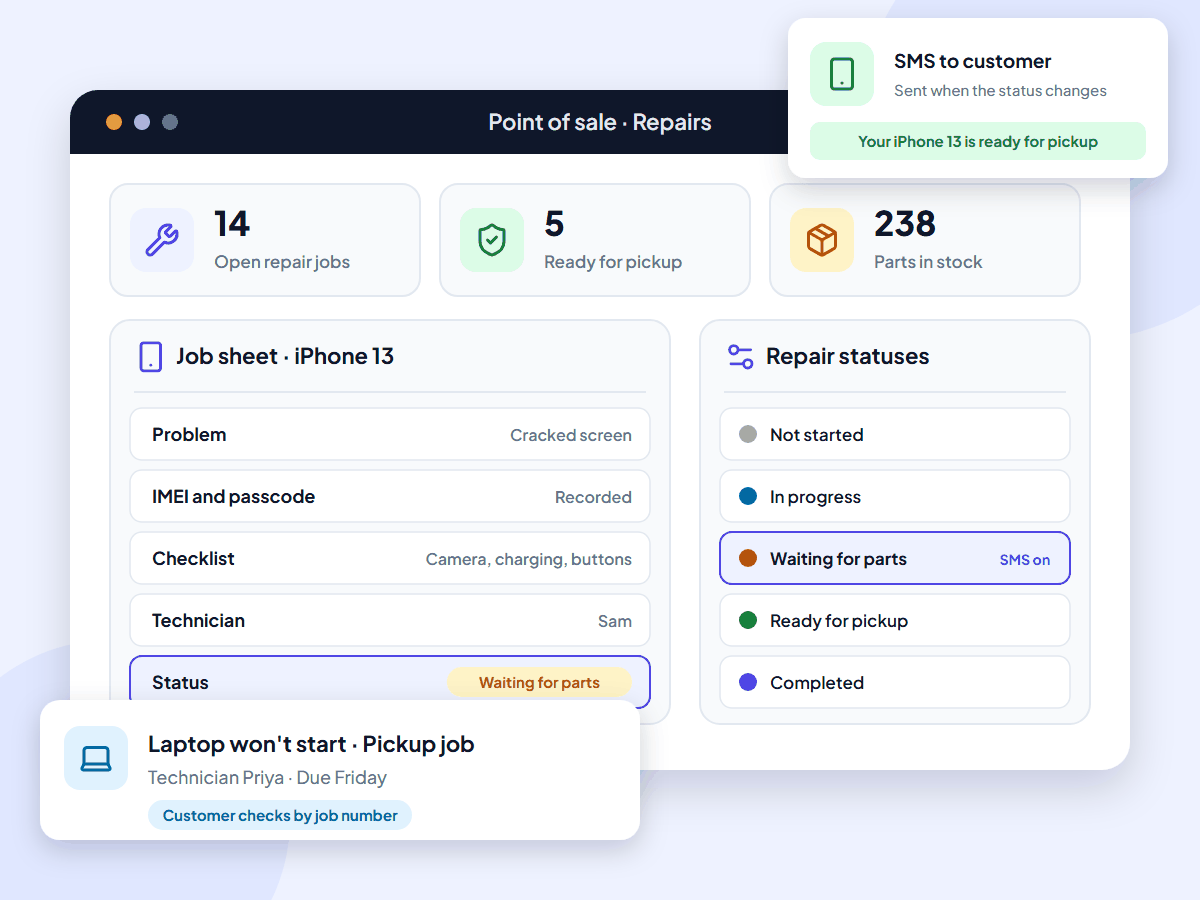
UltimatePOS repair shop software: an iPhone job sheet with IMEI, checklist and technician, color-coded repair statuses, an SMS update to the customer and a laptop pickup job

What is computer repair shop software?

Computer repair shop software tracks each device from check-in to pickup. It records the customer, the device and its IMEI or serial number, the fault and the technician. It sends status updates, takes parts out of stock and turns the finished job into an invoice. UltimatePOS with the Repair module does this for a one-time price.

Phone shops call it cell phone repair shop software or a repair POS. Others call it repair tracking or repair ticketing software.

Monthly repair software adds up

RepairDesk starts at $99 a month per store, billed every quarter. RepairShopr’s Repair Shop plan is $139.99 a month. Over three years, that is $3,564 or $5,040 for one shop, and the bill never stops.

UltimatePOS costs $79 once. Add the Repair module for job sheets and the total is $115, also once. You install it on a computer or server you control and keep using it. There is no fee per technician, ticket or store.

With UltimatePOS you get:

  • A one-time price of $115 with repairs, updates included
  • No monthly plan or contract
  • No limit on tickets, technicians or stores
  • Customer details and passcodes on your own server

Features

Cell phone repair shop software features

Job sheets, statuses and repair invoices come with the Repair module ($36 once), which turns UltimatePOS into computer repair shop software. The counter, stock, purchases and reports come with UltimatePOS ($79 once). Open a card to read its guide.

Get a low stock alert when screens or batteries run low and send a purchase order to your supplier. Run a second store from the same system and move parts between them with stock transfers.

How a repair runs in UltimatePOS, from check-in to pickup

  1. Check inOpen a job sheet with the device, IMEI, passcode, problem and checklist.
  2. AssignPick the technician and the due date. Print a label for the device.
  3. RepairAdd parts and labor. Change the status as the work moves on.
  4. UpdateEach status change can text or email the customer.
  5. Pick upTurn the job into an invoice, take payment and hand the device back.

Worked examples

Two repair jobs, with real numbers

One phone repair at the counter and one laptop picked up from a customer.

A cracked iPhone screen, from check-in to pickup

A customer brings in an iPhone 13 with a cracked screen. You replace the screen and charge for the part and the labor.

iPhone 13 screen$89.00
Screen replacement labor$40.00
Invoice total, before tax$129.00
  1. You open a carry-in job sheet, pick Apple, Phone and iPhone 13, and type the IMEI and the passcode.
  2. The checklist for the model comes up. You tick camera, charging port and buttons as working, and note the scratch on the back.
  3. You assign the job to Sam, due tomorrow. The status is Waiting for parts, and the customer gets your text for that status.
  4. The screen arrives. Sam fits it, adds the part and the labor to the job, and sets the status to Ready for pickup. A second text goes out.
  5. The customer pays at pickup. The job becomes an invoice, and the screen comes out of stock.

The screen cost you $38.00, so the job made $91.00 before rent and wages. See the Repair module guide and our markup and margin guide.

A laptop that won't start, picked up from the customer

A customer calls about a laptop that won't start. You collect it, replace the failed drive and copy the files across.

500 GB SSD$69.00
Install and set up$60.00
Copy files from the old drive$30.00
Invoice total, before tax$159.00
  1. You open a pickup job sheet with the customer's address, the model and the problem.
  2. Priya collects the laptop, runs the checklist and finds a failed drive. The status moves to In progress.
  3. You make a quotation for the drive, the labor and the file copy, and the customer says yes.
  4. Priya fits the drive and copies the files. When the status changes to Ready for pickup, the customer gets your email.
  5. Before calling, the customer types the job number on your status page and sees the laptop is ready.

Quotations are part of the POS screen, and you can turn one into a sale when the customer agrees.

Parts and stock

Repair shop inventory: parts, phones and accessories

Your repair jobs and your counter use the same stock, so one count covers the parts you fit and the items you sell.

Repair shop jobHow UltimatePOS handles it
Screens, batteries and ports by modelProducts with stock, linked to each device model so the right parts show on the job. Guide
Parts used on a repairAdd them to the job sheet. They leave stock with the repair invoice, like any sale. Guide
Labor and diagnostic feesService items with Manage stock switched off, added to the job like a part. Guide
Running low on partsA low stock alert, then a purchase order to your supplier. Guide
Used and refurbished phones for saleA serial number on each sale, such as the IMEI, and a warranty if you give one. Guide
Cases, chargers and screen protectorsBarcodes and labels, scanned at the counter. Guide
Parts at a second storeEach store is a location with its own stock. Stock transfers move parts between them. Guide
What repairs and sales make moneyProfit reports by product, category and date. Guide

New to barcodes? Read our barcode inventory guide.

Who it’s for

A repair shop POS for phone, computer and electronics repair

UltimatePOS suits independent repair shops, from one technician to a few stores, that want to buy their software once. Use it as phone repair shop software, computer repair shop software or both.

Cell phone repair shops

Screens, batteries and charging ports, with the IMEI and passcode on every job.

Computer and laptop repair

Diagnostics, drive swaps and data transfers, with pickup and on-site jobs.

Electronics repair

Tablets, TVs, printers and other devices, each with its own models and checklists.

Phone and accessory stores

Sell phones and accessories at the counter and take repairs on the same system.

Repair watches and jewelry? See our jewelry POS. Mostly selling, with few repairs? See our retail POS system.

Why repair shops use UltimatePOS

  • Pay once. A one-time license instead of a monthly plan, with updates included.
  • Customer data stays with you. Names, phone numbers and device passcodes sit on your own computer or server, not on a vendor’s cloud.
  • Add every technician. No ticket limits and no fee per user. Give each person a role that shows only what they need.
  • Keep your own card processor. Take cards on the terminal you already have and record each payment in UltimatePOS.
  • Help when you need it. 6 months of support from our team and 270+ step-by-step guides.

10,000+

businesses use our software

10+

years of updates

2,000+

updates and features

How much does computer repair shop software cost?

UltimatePOS costs $115 once with job sheets. Updates are included, and so are 6 months of support, which you can extend. Most computer repair shop software charges every month, per store or by the number of users or tickets.

Prices checked on each company’s own website in November 2026, in US dollars, excluding tax, hardware and card fees. UltimatePOS: Regular License on CodeCanyon; Repair module from our shop.
Software What you pay How it is charged
UltimatePOS $115 once with job sheets (UltimatePOS $79 + Repair module $36). Optional installation service: $25. One-time license. Runs in a web browser. No fee per technician, ticket or store.
RepairDesk Essential from $99 a month per store, billed quarterly, or $79 a month billed yearly, with 5 users. Growth from $149 ($119 yearly). Monthly plan per store.
RepairShopr Starter $69.99 a month for 75 tickets and 1 user. Repair Shop $139.99 a month for unlimited tickets and 10 users. Annual plans cost less. Monthly plan per location.
Orderry Hobby $39 a month for 2 employees and 100 jobs or sales a month. Other plans from $69 a month. Monthly plan.
CellStore $39 a month. Monthly plan.
Computer Repair BOSS $99 once. Customers, jobs, invoices and staff records. Point of sale is not listed. One-time license.

Software cost over three years, one store

$115UltimatePOS with the Repair module, paid once
$3,564RepairDesk Essential, $99 a month for 36 months
$5,040RepairShopr Repair Shop, $139.99 a month for 36 months

These figures cover software only. The monthly products include things UltimatePOS does not, such as cloud hosting, built-in card payments, appointment scheduling and digital signatures. Installed on a computer in your shop, UltimatePOS has no running cost. To let customers check their repair online, or to use it from a second store or your phone, put it on an online server. Our example server costs about $7.20 a month with backups (hosting options, full POS cost breakdown).

What UltimatePOS customers say

Reviews from buyers on CodeCanyon. The Repair module alone has 680+ sales and a 4.2+/5 rating from 25+ reviews.

MMontashir

★★★★★

“This is the most complete application for pos. I am writing the review after using this for 2 years… Whatever you can think of under a pos for business, you will find a solution here.”

IiN4sser

★★★★★

“We’ve been using UltimatePOS for 2 years. UltimatePOS is a powerful tool that helps us to manage stock, sales, purchases & other business day-to-day activities.”

Kkamesh84ca

★★★★★

“I recently integrated the Advance Repair module for Ultimate POS into my repair shop, and it has been a game-changer. This module system has streamlined our operations, making transactions faster and more efficient…”

How to start using UltimatePOS in your repair shop

1. Try the demo

Open a sample shop and choose Advance Repair Module to see job sheets. No sign-up needed.

2. Buy UltimatePOS

Get the $79 Regular License and the $36 Repair module. Updates are included.

3. Install it

Install it on a computer in your shop or an online server, or let our team do it for $25.

4. Set up your devices

Add the devices, models, checklists and statuses you use, then import your parts.

Computer repair shop software questions

The best software for a phone repair shop records the IMEI and passcode at check-in, tracks each job by status, texts the customer when the status changes, uses parts from stock and sells accessories at the counter. UltimatePOS with the Repair module does all of this for $115 once. It has no online booking, so check whether you need that.

Look for job sheets with the IMEI or serial number, a checklist at check-in, statuses that text or email the customer, parts stock that drops when you use a part, a counter for accessory sales, and reports. UltimatePOS with the Repair module has all of these. It has no online booking, e-signatures or trade-in tool, so check whether your shop needs them.

It runs each repair from check-in to payment: the customer and device, the fault, the technician, the parts used and the invoice. Most repair software also sells accessories at a counter and sends status updates. UltimatePOS keeps repairs and sales in one system, on the same stock.

RepairDesk starts at $99 a month per store, billed quarterly, and RepairShopr’s Repair Shop plan is $139.99 a month. Orderry and CellStore start at $39 a month. UltimatePOS costs $115 once with the Repair module.

Some free and open-source repair tools exist. Before you switch, check that they include a point of sale, parts stock and support. UltimatePOS is a paid license, $115 once, with repairs, stock and the counter in one system. See our cheapest POS system guide.

Yes, a few projects exist. UltimatePOS is not open source, but you get the full source code with your license and run it on your own server. Read our open source POS comparison.

If you want to stop paying every month, UltimatePOS with the Repair module covers job sheets, statuses, SMS and email updates, parts and invoices for $115 once. Both include card payments, and RepairDesk adds appointment scheduling and digital signatures. UltimatePOS has none of these, so compare the features you use.

Yes. Each job sheet has a field for the serial number or IMEI, plus the password or pattern lock. When you sell a used phone, you can type its IMEI as the serial number on the sale.

Yes. Your login page has a Repair Status button. The customer types the job sheet number and sees the current status, without signing in. This needs UltimatePOS on an online server, so customers can reach it from home. You can switch the button off if you don’t want it.

Yes. Write a text and an email for each repair status. When you change a job’s status, the customer gets that message. Texts go out through your own SMS provider, such as Twilio, set up in SMS settings. Emails go out through your email settings.

Yes. Print the job sheet with the customer’s details and your repair terms at the bottom, so the customer can sign the paper copy. You can also print a label for each device. See the Repair module guide.

Yes. Choose carry-in, pickup or on-site on each job sheet. For pickup and on-site jobs, you add the address. It does not plan routes.

Yes. Parts are products with stock. Link them to device models, add them to the job, and they leave stock with the repair invoice. A low stock alert tells you when to reorder with a purchase order.

Yes. Make a quotation on the POS screen with the parts and labor, print it, and turn it into a sale when the customer agrees. It does not send estimates for online approval.

No. UltimatePOS has no online booking or appointment calendar. Customers call or walk in, and you open the job sheet then.

It records card, cash and other payment methods, but it does not connect to a card terminal. Take the payment on your own terminal and record it as Card.

Yes. UltimatePOS is a full point of sale. Sell cases, chargers and phones at the counter with barcodes, and add a warranty to a phone you sell.

It can be, if you price each repair above the cost of the part and your time. In our iPhone example, a $129.00 screen job with a $38.00 part leaves $91.00 before rent and wages. UltimatePOS profit reports show what each product and category earns.

A computer or tablet with a web browser, a receipt printer, a label printer and a barcode scanner. Add a cash drawer if you take cash. See our hardware guides.

Add each technician as a user with a role that has the Service staff permission. You can then assign jobs to them, and the role controls which screens they can open.

Yes. Add each store as a business location, move parts between them with stock transfers, and choose which stores each user can see.

Yes. The Repair module lists watches among the devices it supports. See our jewelry POS page for a watch repair example.

Yes. You pay $79 once, plus $36 once for the Repair module. The license includes future updates and 6 months of support that you can extend. Hosting is extra. On a computer in your shop there is nothing more to pay, and our example online server costs about $7.20 a month.

About this page

Written by the Ultimate Fosters team, who have built and supported UltimatePOS for 10+ years and its Repair module since 2020. Every feature is checked against our UltimatePOS documentation and release notes, and we recheck competitor prices on their own websites every quarter. See all industries we support.

Try UltimatePOS in the live demo

Choose Advance Repair Module, open a job sheet and change its status. No installation or sign-up.