
Thrift store POS software
Thrift Store POS System, Pay Once
UltimatePOS is a thrift store POS system for second-hand and resale shops. Add donated items to stock at no cost, print price tags for each drop-off, run color-tag sales and change the price of a one-off item at the till. It costs $79 once and runs on your own computer or server. No monthly fee, and your sales data stays with you.
Opens a sample shop. No sign-up. Ring up a sale and look at stock, purchases and labels.
Used by 10,000+ businesses · 4.3+/5 from 500+ ratings on CodeCanyon · 10+ years of updates
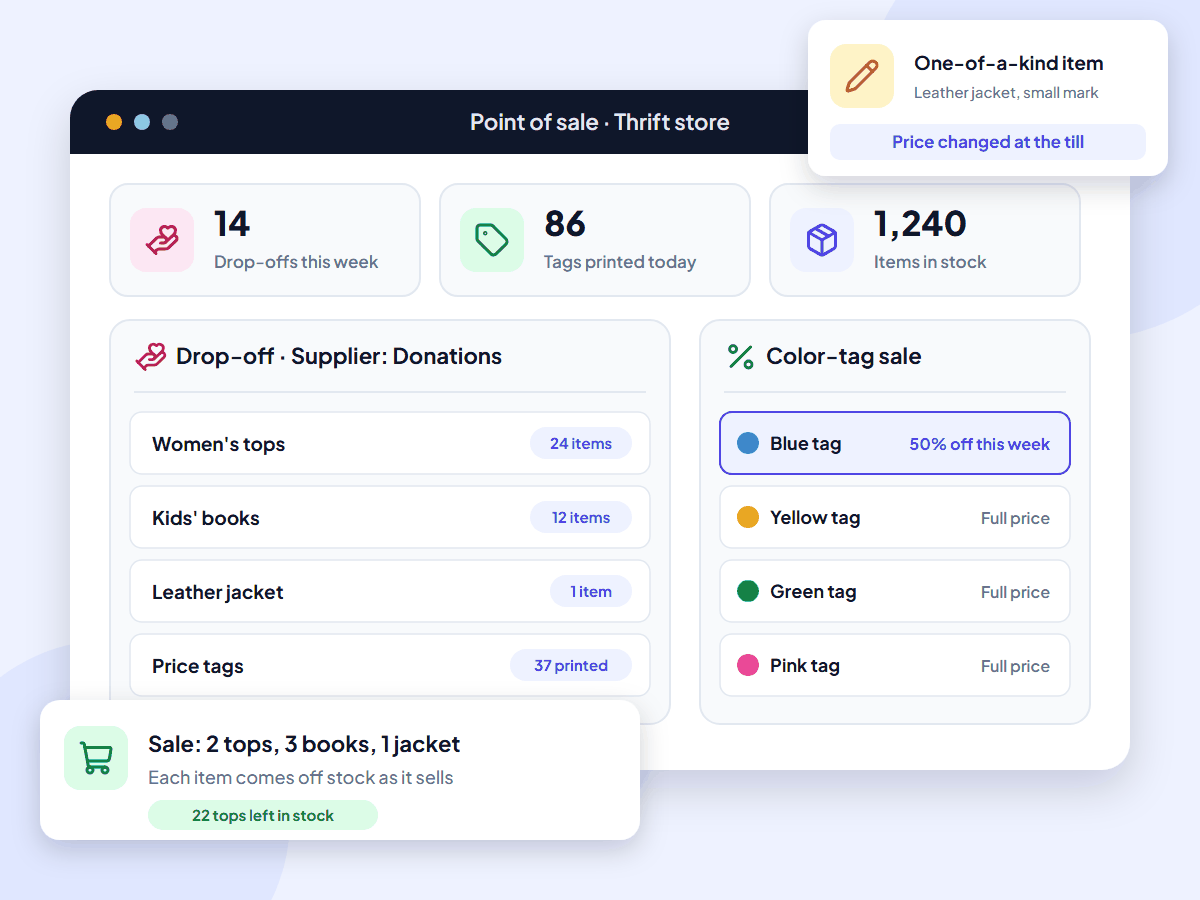
What is a thrift store POS system?
A thrift store POS system is point-of-sale and inventory software for shops that sell second-hand goods. It adds donated or bought-in items to stock, prints price tags, runs color-tag markdowns, lets cashiers price one-off items and shows what sells. UltimatePOS does all of this for a one-time price.
It is also called a thrift store point of sale, thrift shop POS, resale shop POS, second-hand store software or a charity shop till.
Monthly thrift store software adds up
ThriftCart, a POS made for thrift stores, starts at $99 a month. Its color-based discounts and barcode labels sit in the Core plan, which shows its price only after you fill in a form. Three years of Startup comes to $3,564.
UltimatePOS costs $79 once, with price tags and color-tag sales included. You install it on a computer or server you control and keep using it. There is no fee per register, user or shop.
Features
Thrift store POS features
Everything below is part of the UltimatePOS thrift store POS software. There is no module to buy. Open a card to read its guide.
Run a second shop or a sorting warehouse and move stock between them with stock transfers. Give volunteers and part-time staff the Cashier role, which only opens the sale screen.
How a donation goes from drop-off to sale in UltimatePOS
- Log the drop-offRecord donated items as a purchase from your Donations supplier, at $0.
- Tag itPrint price tags for the whole drop-off from the purchase list.
- Sell itScan the tag. Change the price of a one-off item at the till if you need to.
- Mark it downPut a dated discount on the oldest tag color.
- Clear and cash upWrite off what did not sell and close the register.
Worked examples
Two thrift store jobs, with real numbers
One donation from drop-off to sale, and one color-tag markdown, step by step.
A Saturday drop-off, tagged and sold
A donor drops off 24 women's tops, 12 kids' books and a leather jacket. You sell tops at $6.00 and books at $1.00, and you price the jacket at $45.00 on its own.
| Women's tops, 2 at $6.00 | $12.00 |
| Kids' books, 3 at $1.00 | $3.00 |
| Leather jacket, price changed at the till | $35.00 |
| Sale total before tax | $50.00 |
- You record the drop-off as a purchase from your Donations supplier with a purchase price of $0, and all 37 items go into stock.
- From the purchase list you print 37 price tags in one go and tag the items before they go out.
- Tops and books are price lines you set up once. The jacket is its own product, made by duplicating a similar one.
- A customer buys 2 tops, 3 books and the jacket. The jacket has a small mark, so the cashier clicks it and changes $45.00 to $35.00.
- Stock updates as the sale goes through: 22 tops, 9 books and no jacket left.
The items came in at $0, so the profit report counts the full $50.00 as gross profit, before rent and wages. See the free items guide and the label guide.
A four-color tag rotation
You tag each week's drop-offs in one color: blue, yellow, green, then pink. When a color is four weeks old, it goes 50% off for seven days.
| Blue-tag dress, 50% off this week | $5.00 |
| Green-tag lamp, full price | $12.00 |
| Sale total before tax | $17.00 |
| Blue-tag items left at the end of the week | 8 |
- You set up each price line once per color, such as Dress (blue) and Dress (yellow), with the color in the Brand field. Duplicating a product makes this quick.
- On Monday you add a discount called Blue tag: brand Blue, 50% off, with that Monday as the start date and Sunday as the end date.
- A customer brings a blue-tag dress tagged at $10.00 and a green-tag lamp. The dress rings up at $5.00 by itself, and the lamp stays at $12.00.
- On Sunday night the discount ends. Next week you add the same discount for yellow.
- The 8 blue items that did not sell go to a recycler. A stock adjustment with the reason takes them out of stock.
The profit report by brand then shows how much each tag color sold. See the discounts guide and the stock adjustment guide.
Inventory
Thrift store inventory software: donations, tags and markdowns
UltimatePOS handles thrift store inventory management and the till in one system.
For more on tags and scanning, read our barcode inventory guide.
Who it’s for
POS system for thrift, resale and charity shops
UltimatePOS is thrift store software for owners who want to buy their system once and stop paying every month.
Selling new and used furniture? See our furniture store POS. Shops selling mostly new goods can use our retail POS system.
Why thrift stores use UltimatePOS
10,000+
businesses use our software
10+
years of updates
2,000+
updates and features
How much does a thrift store POS system cost?
UltimatePOS costs $79 once. Updates are included, and so are 6 months of support, which you can extend. ThriftCart charges every month, and the one-time Windows programs are licensed per computer.
Software cost over three years, one shop
These figures cover software only. The monthly products include things UltimatePOS does not, such as cloud hosting, built-in card payments and, on ThriftCart’s higher plans, donation scheduling and round-up donations. Installed on a computer in your shop, UltimatePOS has no running cost. To use it from a second shop or your phone, put it on an online server. Our example server costs about $7.20 a month with backups (hosting options, full POS cost breakdown).
What UltimatePOS customers say
Reviews of UltimatePOS from buyers on CodeCanyon, across all types of business.
How to start using UltimatePOS in your thrift store
Thrift store POS questions
About this page
Written by the Ultimate Fosters team, who have built and supported UltimatePOS for 10+ years. Every feature is checked against our UltimatePOS documentation and release notes, and we recheck competitor prices on their own websites every quarter. See all industries we support.