
Furniture store POS software
Furniture Store POS System, Pay Once
UltimatePOS is a furniture store POS system that takes deposits on special orders, keeps track of every delivery and shows what is in your showroom and your warehouse. It costs $79 once and runs on your own computer or server. No monthly fee, and your customer list stays with you.
Opens a sample shop. No sign-up. Ring up a sale and look at stock, purchases and customer balances.
Used by 10,000+ businesses · 4.3+/5 from 500+ ratings on CodeCanyon · 10+ years of updates
What is a furniture store POS system?
A furniture store POS system is point-of-sale and inventory software built for how furniture sells. It takes deposits on special orders, keeps fabric, color and size options on one item, tracks deliveries and shows stock in the showroom and the warehouse. UltimatePOS does all of this for a one-time price.
It is also called furniture store software, furniture POS or furniture point of sale software.
Monthly POS fees add up
Most furniture store POS software is rented by the month. Lightspeed Retail starts at $89 a month billed yearly. Celerant’s furniture POS starts at $125 a month, or $350 with its online store. Even $89 a month comes to $1,068 a year for one store.
UltimatePOS costs $79 once. You install it on a computer or server you control and keep using it. There is no fee per register, user or store.
Features
Furniture store POS features
Everything below is part of UltimatePOS. There is no module to buy. Open a card to read its guide.
Record a fabric code, dimensions or a supplier reference in custom fields, print price tags for the showroom floor, and record damaged pieces with a stock adjustment.
How a furniture sale works in UltimatePOS
- QuoteGive the customer a printed quote with the fabric and size they chose.
- OrderRecord a sales order for the piece and take a deposit.
- Supplier orderSend a purchase order to the supplier and receive the piece when it arrives.
- DeliverAdd the delivery details, pick a delivery person and print the note.
- CloseTurn the order into a sale and take the balance.
Worked examples
Two furniture sales, with real numbers
One special order with a deposit and delivery, and one floor-model sale with commission, step by step.
A special-order sofa with a deposit and delivery
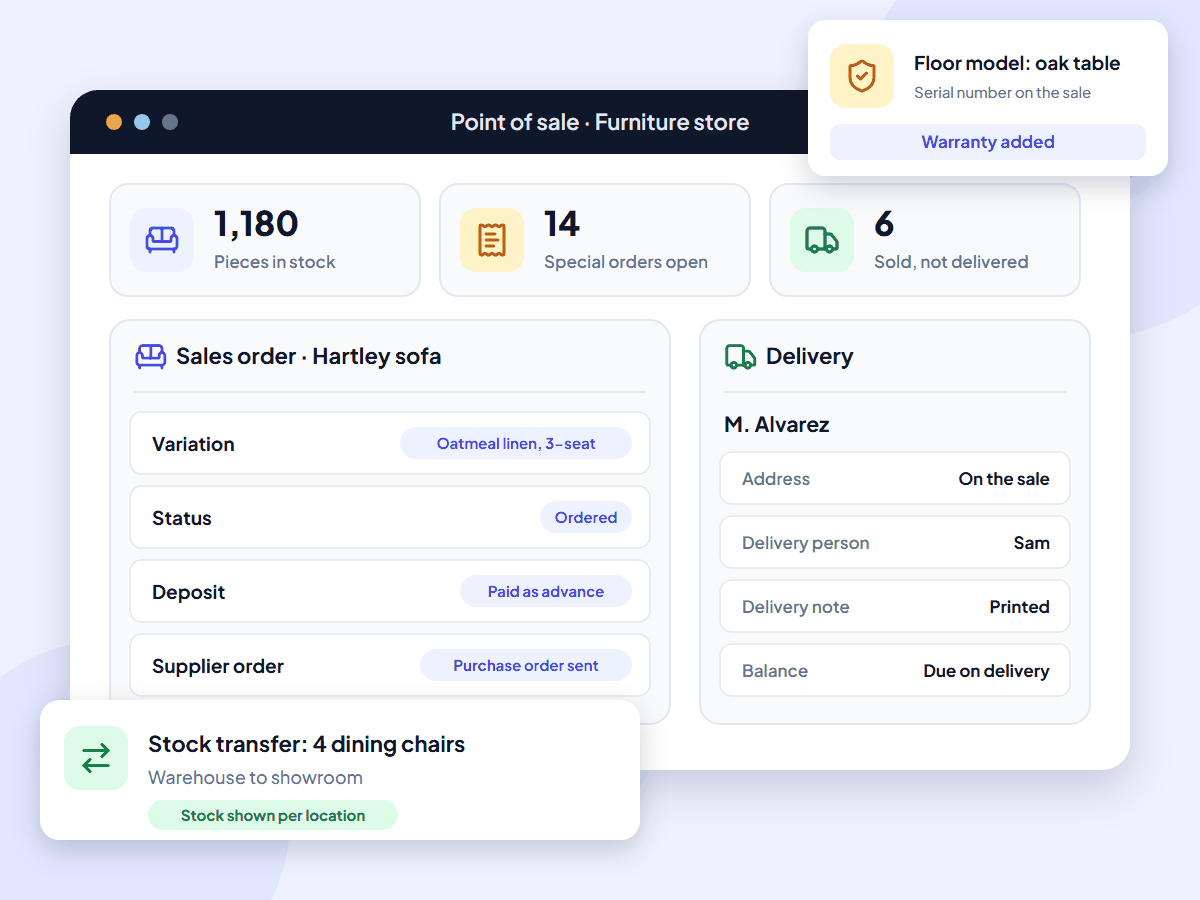
A customer orders the Hartley sofa in oatmeal linen, 3-seat size, for $2,150.00. Your delivery charge is $99.00. They pay a $500.00 deposit today.
| Hartley sofa, oatmeal linen, 3-seat | $2,150.00 |
| Delivery | $99.00 |
| Deposit paid as an advance | −$500.00 |
| Due on delivery, before tax | $1,749.00 |
- You set up the Hartley sofa once, with each fabric and size option as a variation. Oatmeal linen, 3-seat has its own SKU and price.
- You record the order as a sales order. UltimatePOS does not take a sofa out of stock yet.
- You take the $500.00 deposit with the Payment button on the POS screen. The customer owes nothing yet, so UltimatePOS saves it as an advance.
- You send a purchase order to the supplier and receive the sofa when it arrives.
- On delivery day you turn the order into a sale, add the $99.00 delivery charge, the address and the delivery person, and print the delivery note.
- At the door the customer pays $1,749.00. The sale uses the $500.00 advance and records the rest by card or cash.
See the sales order guide and the advance payment guide.
A floor-model table and four warehouse chairs
Your showroom has a floor-model oak dining table tagged $1,200.00. You sell it at 15% off with four matching chairs at $180.00 each. The chairs are in your warehouse. Your salesperson earns 5% commission.
| Oak dining table, floor model, 15% off | $1,020.00 |
| Oak dining chairs, 4 at $180.00 | $720.00 |
| Sale total before tax | $1,740.00 |
| Commission at 5% | $87.00 |
- You move 4 chairs from the warehouse location to the showroom with a stock transfer. Each location shows its own stock.
- You add the table to the sale and give a 15% line discount because it is the floor model.
- You type the table's serial number on the sale and add its warranty.
- You pick the salesperson as the commission agent. UltimatePOS works out $87.00 on the $1,740.00 sale.
- At month end, the sales representative report shows each salesperson's sales and commission.
See the stock transfer guide and the commission agent guide.
Inventory
Furniture inventory software for showroom and warehouse stock
UltimatePOS is your POS and furniture inventory software in one system. Here is how it handles each job.
For more on stock control, read our inventory guide for small businesses.
Who it’s for
Furniture store software for showrooms and mattress stores
UltimatePOS is furniture store software for owners who want to buy their system once and stop paying every month.
Build your own furniture? See our manufacturing inventory software. Sell mostly to other stores? See our wholesale inventory software. Run a different kind of shop? See our retail POS system.
Why furniture stores use UltimatePOS
10,000+
businesses use our software
10+
years of updates
2,000+
updates and features
How much does a furniture store POS system cost?
UltimatePOS costs $79 once. Updates are included, and so are 6 months of support, which you can extend. Most furniture store POS software charges every month.
Software cost over three years, one store
These figures cover software only. The monthly products include things UltimatePOS does not, such as cloud hosting, card processing and, on some plans, an online store and financing links. Installed on a computer in your store, UltimatePOS has no running cost. To use it from your warehouse or a second showroom, put it on an online server. Our example server costs about $7.20 a month with backups (hosting options, full POS cost breakdown).
What UltimatePOS customers say
Reviews of UltimatePOS from buyers on CodeCanyon, across all types of business.
How to start using UltimatePOS in your furniture store
Furniture store POS questions
About this page
Written by the Ultimate Fosters team, who have built and supported UltimatePOS for 10+ years. Every feature is checked against our UltimatePOS documentation and release notes, and we recheck competitor prices on their own websites every quarter. See all industries we support.