
Grocery store POS system
Grocery Store POS System, Pay Once
This grocery store POS system scans barcodes, sells fruit and deli items by weight, and tracks expiry dates and stock in every store. UltimatePOS costs $79 once and runs on your own computer or server, so there is no monthly fee and your data stays with you.
Opens a sample shop. No sign-up. The scale, expiry and lot settings are under Business Settings.
Used by 10,000+ businesses · 4.2+/5 from 700+ ratings · 10+ years of updates
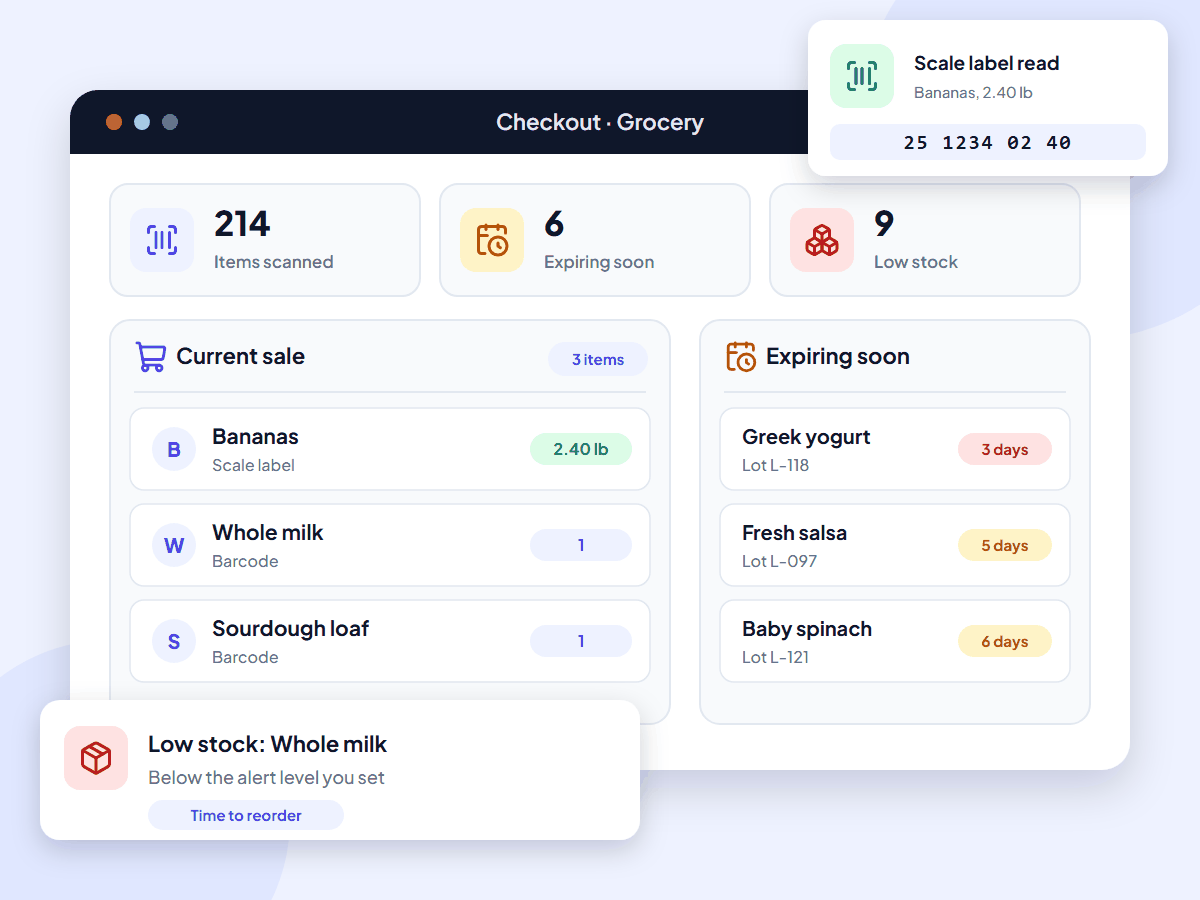
What is a grocery store POS system?
A grocery store POS system is the checkout and stock software a grocery store or supermarket runs on. It scans barcodes, sells loose items by weight, takes payment and updates stock with every sale, including expiry dates on fresh and packaged food. UltimatePOS does all of this for a one-time price.
It is also called a supermarket POS system, a grocery point of sale or grocery store software.
Monthly POS fees add up for small grocers
Most grocery POS software is rented by the month. For example, KORONA POS charges $79 a month for each till on the plan that adds stock counts and supplier ordering, which is $2,844 per till over three years. IT Retail starts at $49 a month for up to 5 employees, and NRS asks for a contract.
Instead, with UltimatePOS you buy the software once, install it on a computer or server you control, and keep using it. Updates are included, and every till is a web browser logged in to your system, so there is no fee per till.
Features
Grocery store POS system features
Everything below is part of UltimatePOS. No add-on module is needed. Open a card to read its guide.
Import your products from a spreadsheet, with barcodes, opening stock, lot numbers and expiry dates. Role permissions decide what each cashier can see and change.
How stock moves through your store
- OrderSend a purchase order to your supplier for the cases you need.
- ReceiveRecord the delivery with lot numbers and expiry dates. Stock goes up.
- LabelPrint shelf and barcode labels for new items and price changes.
- SellScan packed items and scale labels at the till. Stock goes down with each sale.
- ReorderCheck the low stock list on the dashboard, then order again.
Worked examples
How weighed items and expiry dates work
Two jobs every grocery store does each day, step by step.
Selling bananas by weight
Your label scale weighs the bananas and prints a barcode like this:
25 1234 02 40
- 25 tells UltimatePOS this is a scale label (the prefix you set).
- 1234 is the product code (SKU) for bananas.
- 02 40 is the weight: 2.40 lb.
So at $0.69 a pound, the bill line shows 2.40 lb and $1.66. The cashier only scans the label.
You choose the prefix and how many digits the code and weight use in the POS settings. See the weighing scale guide.
Keeping yogurt off the shelf after its date
- First, a delivery of yogurt arrives. You record it as a purchase with lot number L-118 and its expiry date.
- Then the dashboard expiry alert lists the yogurt once it falls within the number of days you choose, such as 30.
- Next, with “Stop selling 2 days before” turned on, the till stops selling it 2 days before the date.
- Finally, the stock expiry report shows how many pots of lot L-118 are left, so you can mark them down or return them.
See the expiry date guide and the lot number guide.
Who it’s for
POS system for small grocery stores and supermarkets
UltimatePOS suits independent grocers and small supermarkets that want to own their system and keep their card processor.
Sell medicines too? See our pharmacy POS page. Run a café with tables? See our restaurant POS system. Other shops: retail POS system.
Why independent grocers choose UltimatePOS
10,000+
businesses use our software
10+
years of updates
2,000+
updates and features
How much does a grocery store POS system cost?
UltimatePOS costs $79 once. Updates are included, and so are 6 months of support, which you can extend. Most grocery POS systems, however, charge every month, often for each till.
Software cost over three years, one till
These figures cover software only. Hardware is extra with every system: a barcode scanner, receipt printer, cash drawer and, for loose goods, a label scale. Installed on a computer in your store, UltimatePOS has no running cost. To use it from anywhere, put it on an online server. Our example server costs about $7.20 a month with backups (hosting options, full POS cost breakdown).
What UltimatePOS customers say
Reviews of UltimatePOS from buyers on CodeCanyon, across all types of business.
How to start using UltimatePOS in your store
Grocery store POS system questions
About this page
Written by the Ultimate Fosters team, who have built and supported UltimatePOS for 10+ years. Every feature is checked against our UltimatePOS documentation and the live demo, and we recheck competitor prices on their own websites every quarter. See all industries we support.