
Pharmacy POS & billing software

Pharmacy Billing and POS Software for Pharmacies and Chemists

Bill medicines by batch, see expiry dates before stock goes to waste, and print tax bills with your licence number. You pay once and keep the software and your data.

Used by 10,000+ businesses  ·  4.2+/5 from 700+ ratings  ·  10+ years of updates
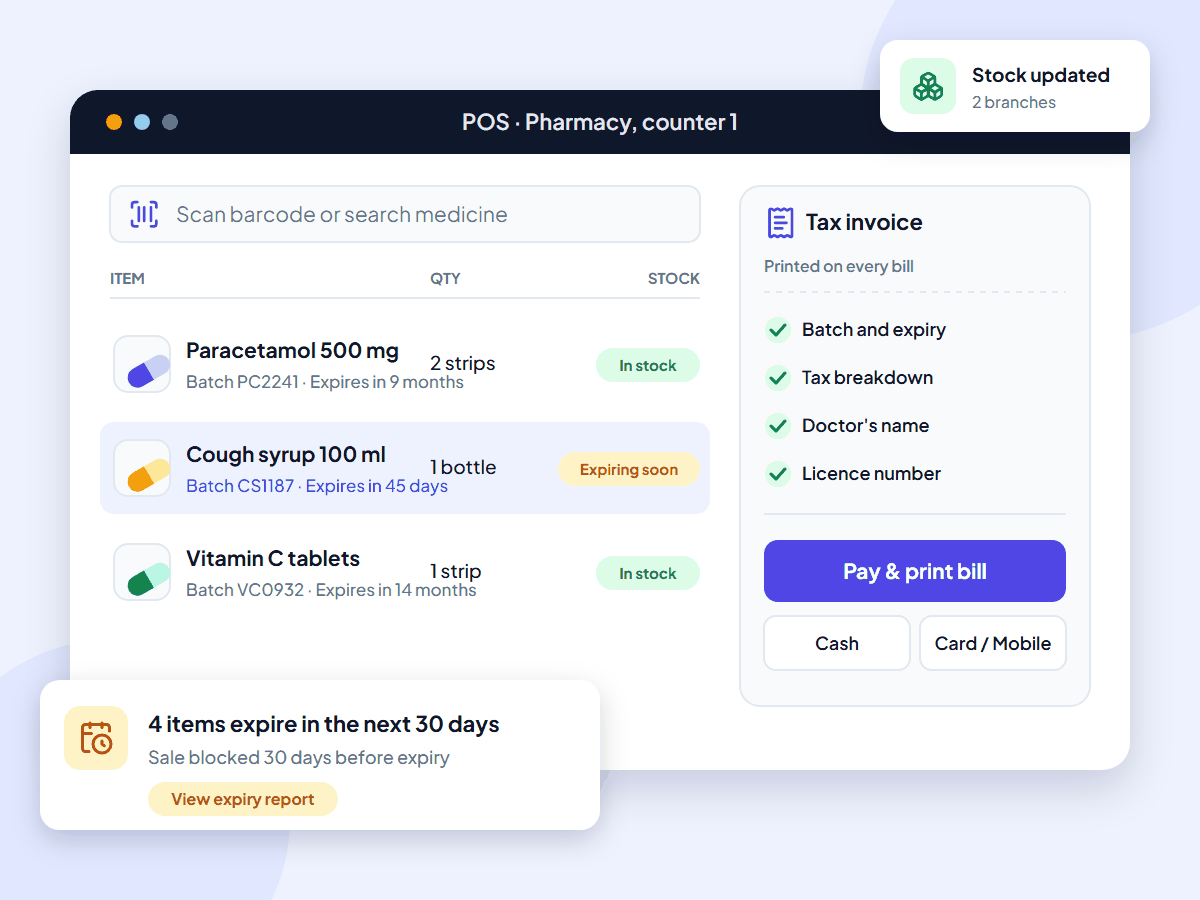
UltimatePOS pharmacy POS billing screen showing the batch and expiry of each medicine, what prints on the bill, and an expiry alert

What is pharmacy billing software?

Pharmacy billing software, also called a pharmacy POS system or chemist billing software, is what a pharmacy uses at the counter to bill medicines, record each batch, track expiry dates and print tax invoices. It also handles supplier purchases, stock and credit customers. UltimatePOS does all of this on your own computer or server.

Stop losing money to expired stock

A box expires at the back of the shelf because nobody saw the date. A customer brings back a syrup and you can’t tell which batch it came from. The billing app knows the price but not the batch, so the batch register stays on paper.

UltimatePOS records the batch and expiry date when stock comes in, shows them at the counter, and warns you before stock expires.

When stock arrives, UltimatePOS records:

  • The lot (batch) number
  • The expiry date, or the manufacturing date and shelf life
  • The supplier and purchase price
  • The unit, for example a box of 10 strips

Features

Pharmacy billing software features

We checked each feature against our documentation. Open a card to read its step-by-step guide. (Lot numbers are not in UltimatePOS LITE.)

Why pharmacies choose UltimatePOS

  • Pay once. A one-time licence instead of a yearly plan, with updates included.
  • Your data stays with you. Sales, stock and customer records live on your own computer or server.
  • Grow without switching. Add a second store, a warehouse or more staff in the same system.
  • Help when you need it. 6 months of support from our team and 270+ step-by-step guides.

10,000+

businesses use our software

10+

years of updates

2,000+

updates and features

How much does pharmacy billing software cost?

UltimatePOS costs $79 once. Updates are included, and so are 6 months of support, which you can extend. Most pharmacy and retail POS software charges every month or every year instead.

Prices checked on each company’s own website in November 2026. Prices in US dollars or Indian rupees, as each company lists them. UltimatePOS: Regular License on CodeCanyon, excluding tax and handling fees.
Software What you pay How it is charged
UltimatePOS $79 once. Optional installation service: $25. One-time licence. No yearly fee to keep using it.
Square for Retail (US) $0, $49 or $149 a month per location, plus card fees Monthly plan per location
Lightspeed Retail (US) From $89 a month, billed yearly Monthly plan; 1 register included
MargBooks pharmacy (India) ₹5,400 to ₹29,700 a year, plus GST Yearly plan, priced by users and invoices
Vyapar (India) ₹4,399 (Silver) or ₹4,799 (Gold) a year Yearly plan

Installed on a computer in your shop, UltimatePOS has no running cost. To use it from anywhere, put it on an online server; our example server costs about $7.20 a month with backups (hosting options, full cost breakdown).

Who it’s for

Built for these pharmacy businesses

Independent pharmacy

Quick counter billing for a pharmacy, chemist or medical store, with the batch and expiry on every line.

Pharmacy chain

Several stores and a warehouse in one system, with stock transfers between them.

Wholesaler or distributor

Wholesale price lists, supplier ledgers and credit limits for your buyers.

Medical supply store

Medicines, medical devices and wellness products together on one bill.

Also run a general store? See our retail POS system page.

What UltimatePOS customers say

Reviews of UltimatePOS from buyers on CodeCanyon, across all types of business.

MMontashir

★★★★★

“This is the most complete application for pos. I am writing the review after using this for 2 years… Whatever you can think of under a pos for business, you will find a solution here.”

IiN4sser

★★★★★

“We’ve been using UltimatePOS for 2 years. UltimatePOS is a powerful tool that helps us to manage stock, sales, purchases & other business day-to-day activities.”

TTerranos74

★★★★★

“I’ve been using to manage my business for several years now. My support service already expired but I still can rely on the script due to the stability…”

How to start using UltimatePOS in your pharmacy

1. Try the demo

Open the live demo and choose the Pharmacy shop. No sign-up needed.

2. Buy once

Get the $79 Regular License. Future updates are included.

3. Install

Install it on a shop computer or a server, or let our team do it for $25.

4. Add medicines

Import items from Excel, then add stock with lot numbers and expiry dates.

Pharmacy billing software questions

No. It costs $79 once. You can try the full software for free in the live demo, which has a sample pharmacy, before you buy.

You can install it on a Windows computer in your shop or on an online server. Internet features, such as WhatsApp messages or using it from home, need a connection.

Yes. You record the lot number and expiry date on each purchase, pick them when you sell and print them on the bill. Lot numbers are not in UltimatePOS LITE.

You can set the stock accounting method to FIFO, so the oldest purchase is used first. At the counter you can also choose which expiry date you are selling.

Add it to the invoice header or to a letterhead image in the invoice layout. It then prints on every bill.

Yes. You add your own tax rates and tax groups, such as VAT at 5% or a state sales tax, and the tax breakdown prints on the bill. In India it supports CGST, SGST and IGST with HSN codes and GST reports (GST setup guide). In Saudi Arabia, the ZATCA module adds e-invoicing.

Yes. You choose your business currency in settings, so prices and bills show your local currency.

You can record cash and any payment method you add, such as card, UPI or a mobile wallet, and split one bill across methods with Multiple Pay. UltimatePOS records the payment; it does not process card payments itself.

Both. Besides billing, it manages stock, purchases, suppliers, customers, staff accounts and reports, so it works as pharmacy software for the whole shop, not only the counter.

Yes. Add each store and warehouse as a location, transfer stock between them, and limit each user to their own store.

Add each medicine once, or import your full list from Excel, then add opening stock with lot numbers and expiry dates. After that you bill by scanning the barcode or typing the name.

The licence includes 6 months of support from our team, which you can extend, plus 270+ step-by-step guides in our documentation. The software keeps working after support ends.

About this page

Written by the Ultimate Fosters team, who have built and supported UltimatePOS for 10+ years. Every feature is checked against our documentation and the demo pharmacy, and we recheck competitor prices on their own websites every quarter. See all industries we support.

Check the expiry report in the demo pharmacy

Open the demo, choose the Pharmacy shop and look at real batch and expiry data. No installation or sign-up.